How to Recover a Domain Google Thinks Is Still Parked
 Bret Siers
You did the right thing. You took down the parking page. You published real content. Three articles, a landing page, proper schema markup. You checked Google this morning, expecting to see your work reflected back at you.
The old parking page preview is still there. Or worse, the domain doesn't show up at all.
I get it. You did everything right and the system hasn't noticed yet. That gap between your intention and Google's response is one of the most frustrating moments in building something online.
Here's what's happening. Google has what engineers informally call a "parking hangover." When a domain has served parking content for a while, Google's systems don't immediately recalibrate when that changes. The domain carries a classification score based on its crawl history, and that score updates slowly. John Mueller, Google's developer relations lead, has acknowledged this directly: recently un-parked domains typically take one to three weeks for Google to stop treating them as parking pages. Sometimes longer if the parking history runs deep.
That's the frustrating part. The useful part is that there are specific steps that speed the process up.
Step 1: Confirm the Parking Content Is Actually Gone
This sounds obvious. It isn't. I've seen domain owners spend two weeks troubleshooting a Google indexing problem when the actual issue was a DNS record still pointing at the old parking provider.
Check these three things before anything else:
DNS resolution. Use MXToolbox or the command line dig to confirm your domain is pointing to your own hosting, not a parking service IP. Some registrars have caching layers that make DNS changes appear live before they've fully propagated. What looks correct in your registrar dashboard might not be what the rest of the internet sees yet.
Robots.txt. Visit yourdomain.com/robots.txt directly. If you see rules from your old parking platform, they're still serving the old robots.txt. Replace it with a clean file that explicitly allows all crawlers: User-agent: * Allow: /
Cache check. Open your domain in an incognito window. If the parking page loads, the old content may be cached at the CDN level. Clear the cache through your hosting provider.
Only move forward once your own content is actually serving at the root URL. Everything after this step assumes that's true.
Step 2: Google Search Console URL Inspection
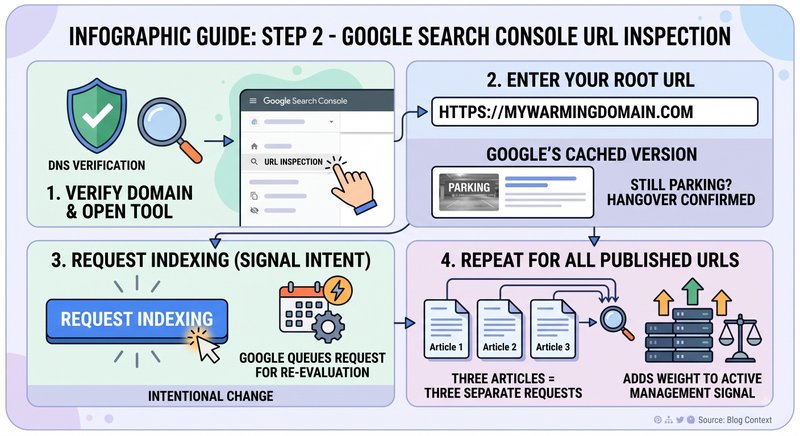
Now you're talking directly to Google. This is the most direct signal you can send that your domain has changed.
Open Google Search Console. If you haven't verified your domain property yet, do that first. DNS verification is the most reliable method for domains with a parking history, because it proves ownership at the infrastructure level.
Once your property is verified:
- Click "URL Inspection" in the left sidebar
- Enter your domain's root URL
- Review what Google's cached version shows. If it still shows parking content, that's your confirmation. The hangover is real.
- Click "Request Indexing"
This doesn't guarantee an immediate recrawl. Google processes these requests in a queue. But it tells Google you're actively requesting re-evaluation, and that distinction matters. Intentional change looks different from accidental content shifting.
Do this for every URL on your domain. Three articles published means three separate inspection requests. Each one adds weight to the signal that this domain is under active, intentional management.
Step 3: Replace Parking Signals with Opposite Signals
Here's the part most recovery guides miss. Removing parking content is only half the work. The other half is actively replacing parking signals with their opposites. Google isn't just looking for "not parking." It's looking for evidence of something real.
A parking page has specific characteristics Google's systems recognize: third-party ad content, generic link structures, no schema markup, thin or no original content, a redirect chain rather than direct serving. Your domain needs to look like the opposite of all of those.
Add Organization schema markup. If you haven't done this, do it today. A JSON-LD block with @type: Organization, a name, description, URL, and contact point tells every crawler: this is a defined entity with an owner. This is the single highest-contrast signal against parking content. It takes 20 minutes. It changes everything about how your domain is classified.
Publish original content with Article schema. Write a 400-600 word piece about the topic your domain covers. Mark it up with Article schema: headline, description, author, datePublished. Now you have an authored, dated piece of content. Parking pages don't have authors. They don't have publication dates. You do.
Create a clean sitemap. List every URL on your domain. Submit it through Google Search Console (Settings > Sitemaps > Add Sitemap). The sitemap defines the scope of your content and tells Google exactly where to look.
Step 4: Build Fresh Crawl Signals Over Time
This is the patience step. And honestly, it's the hardest one. Not because it's complicated. Because it requires you to keep doing the right thing while the results stay invisible.
The parking history score doesn't erase in a day. It needs a counter-history. Repeated crawls that show the same non-parking signals each time. The first crawl says "something changed." The third says "this is consistent." The fifth says "this domain has a new identity."
You're building that counter-history one crawl at a time. Here's how:
Update your content at least twice in the first 30 days. Add a paragraph to an existing article. Publish a second piece. Update your landing page copy. Each content update generates a new crawl request and adds a data point to your domain's activity log.
Add one external signal. A mention of your domain from outside the domain itself. A LinkedIn company page with a link, a relevant directory listing, or a mention in your own professional bio. External references confirm to Google that the domain exists in a real-world context. It's not just talking to itself.
Monitor Search Console for crawl activity. Under "Settings > Crawl Stats," you can see how often Googlebot is visiting. In the first few weeks after un-parking, crawl frequency may be low. It should increase as fresh signals accumulate. Watching this number climb is the first tangible sign that the recovery is working.
What the Timeline Actually Looks Like
Everyone wants a number. Here's what the data shows, based on John Mueller's public statements and patterns observed across multiple domain recoveries.
Week 1-2: You've submitted the recrawl request and added schema markup. Google may still be serving the old parking page preview in search results. This is normal. Resist the urge to change anything. The signals are in the queue.
Week 2-4: The first recrawls under your new setup occur. Search Console shows indexing activity. The search preview may begin updating. This is when most people start breathing again.
Week 4-8: For domains with a shorter parking history (under two years), the preview should be showing your current content. Coverage reports in Search Console show your URLs as indexed. The counter-history is establishing.
Week 8 and beyond: Domains with multi-year parking histories may need this long. A deeper parking record requires more data points to override. The math is straightforward: the longer you parked, the longer the recovery.
If you're at week 10 and still seeing parking content in search previews, don't panic. Check whether the problem is at the hosting layer. Use the URL Inspection live test in Search Console, which shows you exactly what Googlebot fetched. Sometimes the content is rendering correctly for humans but not for crawlers. Fix that gap and the recovery will follow. The systems are slower than your intention. That's frustrating. But it does resolve.
The SiteWarming perspectiveActive warming accelerates this recovery. Not by gaming the process, but by doing exactly what Google is waiting to see: consistent, original content appearing at regular intervals, machine-readable structure on every page, and a domain that behaves like an actively maintained property. SiteWarming's warming process produces this pattern automatically. The content generation, schema markup, sitemap maintenance, and crawl signal establishment are exactly the counter-signals that clear a parking history. What is SiteWarming?
Before starting recovery, a domain health baseline helps. Domain Health Check: Beyond Renewal is the diagnostic step before the recovery steps in this article. For the full options menu once your domain is un-parked and recoverable, What to Do With a Parked Domain in 2026 (7 Options Ranked) gives the next decision framework. And the Complete Guide to Domain Parking in 2026 has the context for why this recovery process is necessary in the first place.
Image Credits
- Hero: Photo by Jakob Braun on Unsplash
Share this article
Ready to Transform Your Domain Portfolio?
Start building real value with your domain investments today.