What Structured Data Should Every Domain Have Before Launch?
 Bret Siers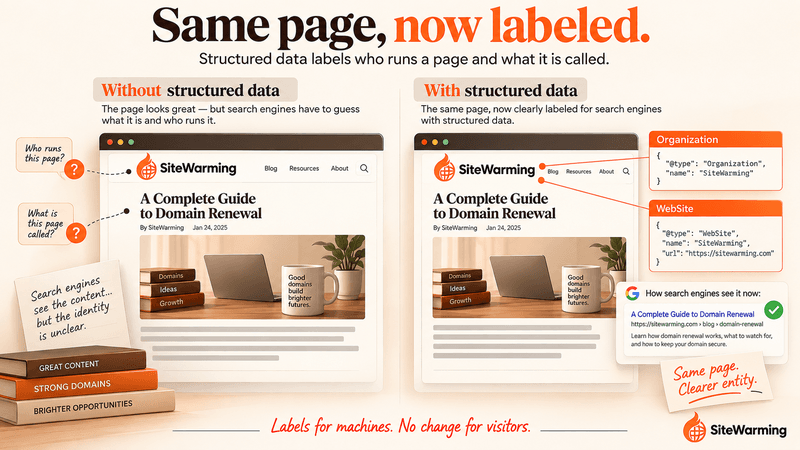
Before launch, add Organization and WebSite structured data to your home page: Organization tells Google who runs the domain, and WebSite supplies the site name. Add LocalBusiness only if you have a physical location, and BreadcrumbList only once the site has two levels. Structured data helps Google understand your site. It does not earn AI citations by itself.
Imagine a founder who launched her site on a Thursday. Six months of preparation. The design was clean. The writing was careful. She'd thought about the audience, the message, the purpose. She'd even asked three people to read through it before going live. Everything looked right.
On Friday, she asked AI search engines how they described the site. Nothing. Not a partial answer. Not a wrong answer. The domain simply didn't exist in any response.
She'd built a house and forgotten to put the address on it.
The structured data layer, the machine-readable metadata that sits alongside content and tells systems what kind of entity a site represents, was missing entirely. Every guide she'd read treated it as a post-launch optimization. A nice-to-have. Step forty-seven on a fifty-item checklist.
It shouldn't be. It's cheap, it takes the least time to add, and it's the layer that tells search engines what your site is. But be exact about what it does. It would not have put her site into AI answers on Friday. A new domain is usually missing from those answers because it hasn't been indexed or cited yet. What structured data does is label the entity, so that when Google does crawl the site, it knows who runs it and what it is called.
What is structured data, and why add it before launch?
Here's the thing most people get backwards. They write all their content, design their pages, polish their copy, and then, maybe, add structured data as an afterthought. It feels like the right order. Build the house, then add the address.
But machines don't experience your site the way you do. A crawler reads your content, and content leaves the entity implicit. What type of thing is this? Who runs it? What is it about? Where else does this entity exist? Those aren't questions your homepage copy answers reliably. They're questions structured data answers explicitly.
Structured data is JSON-LD code embedded in your page's HTML. It communicates entity information in a format machines read natively. It doesn't affect how your page looks. It creates a layer of context running parallel to your visible content.
The vocabulary comes from Schema.org, which was founded by Google, Microsoft, Yahoo and Yandex and runs as a community project. That is an industry-wide collaboration, not a Google product. It is also common practice: JSON-LD is used by 55.8% of all websites, according to W3Techs in October 2026.
I want to be clear about the stakes. Structured data buys eligibility, not a guarantee. Google says it does not guarantee that your structured data will show up in search results, even if the page is marked up correctly. The rules also cut one way: Google's policies say not to mark up content that isn't visible to readers, and a structured data manual action removes a page's eligibility for rich results without affecting how it ranks. So the absence of markup doesn't break anything visible. It just leaves Google to infer who you are.
Does structured data get a new domain cited by AI systems?
Not by itself. Google's guidance on its AI features is direct: "There's also no special schema.org structured data that you need to add." A page has to be indexed and eligible to be shown with a snippet. And when Ahrefs studied 1,885 pages that added JSON-LD between August 2025 and March 2026 against 4,000 control pages, it found no major uplift in AI citations on any platform: -4.6% in Google AI Overviews, +2.4% in AI Mode and +2.2% in ChatGPT, the last two statistically indistinguishable from zero. It reads the 53% of AI-cited pages that use schema as correlation: those sites invest in technical SEO and content.
So add structured data for the right reason, which is clarity about who you are, and put the effort that earns citations into content and crawlability. We cover that side in why AI can't read a parked domain.
Which five structured data types does a new domain need?
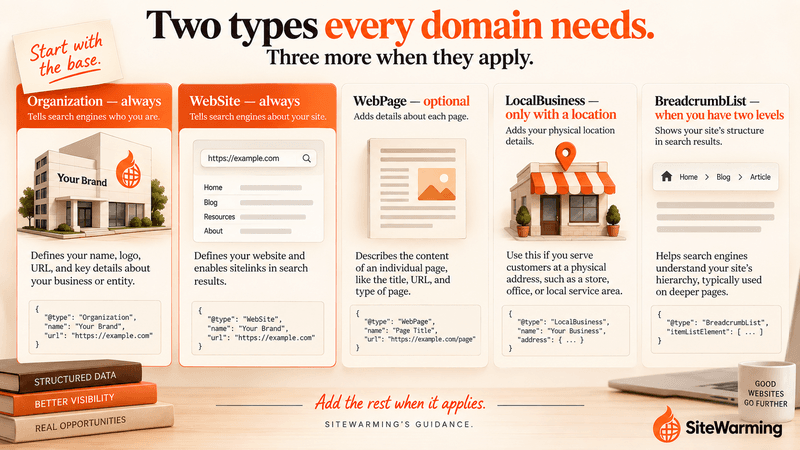
These aren't the only structured data types that exist. Schema.org has hundreds. But these five are the foundation for a new domain. Two of them every domain needs. The other three depend on your situation.
| Type | What it tells machines | Add it when | What Google says |
|---|---|---|---|
| Organization | A real entity operates this domain | Always, on the home page | Helps Google understand and disambiguate your organization; can influence the logo shown |
| WebSite | What this domain is called | Always, on the home page | Required for site names: the site name and home-page URL |
| WebPage | Names a page and ties it to the site | Optional | A valid Schema.org type that connects a page to its site |
| LocalBusiness | A business at a physical location | Only if you have a location or service area | Business details in the knowledge panel |
| BreadcrumbList | Where a page sits in the site | Once the site has a second level | Needs at least two list items |
What is Organization schema, and what goes in it?
This is the most important one. It tells every machine that reads your site: a real entity operates this domain.
Organization schema includes your organization's name, your website URL, your logo URL, contact information and, critically, your sameAs array. The sameAs field is where you list every other place your organization exists on the web: your LinkedIn page, your Crunchbase profile, your social accounts. Google says Organization markup on your home page can help it "better understand your organization's administrative details and disambiguate your organization in search results," and that some properties, such as logo, can influence what appears in results and your knowledge panel. The same page is clear that Google does not guarantee features that use structured data will appear.
{
  "@context": "https://schema.org",
  "@type": "Organization",
  "name": "Your Organization Name",
  "url": "https://yourdomain.com",
  "logo": "https://yourdomain.com/logo.png",
  "contactPoint": {
    "@type": "ContactPoint",
    "contactType": "customer service",
    "email": "hello@yourdomain.com"
  },
  "sameAs": [
    "https://www.linkedin.com/company/your-org",
    "https://x.com/yourorg"
  ]
}
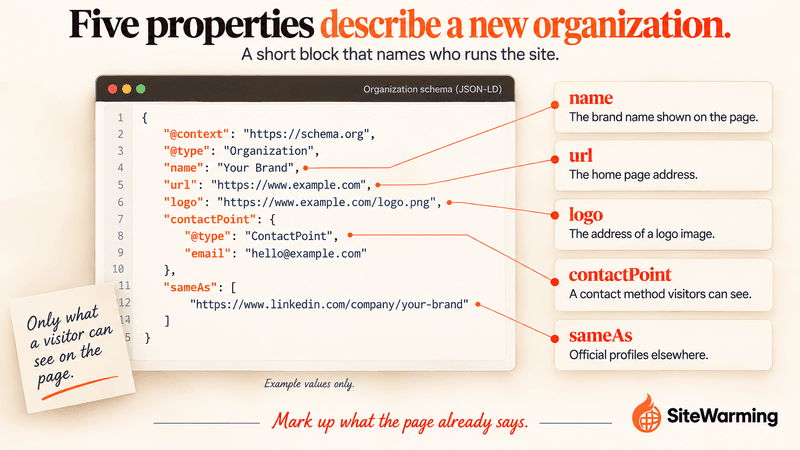
Even before you have a logo, add this with what you have. Leave out what you don't have, and don't mark up anything a visitor can't see: Google's policies say not to mark up content that isn't visible to readers. That means your launch page needs a visible name and a way to reach you. You can update the markup later. The entity declaration matters now.
Most people skip this one because it feels premature. "I don't have a real organization yet." You do. If you have a domain and an idea, you have an entity. Tell the machines.
What does WebSite schema do?
Organization tells machines who you are. WebSite tells machines what this specific domain is called. They're separate concepts, and machines need both.
WebSite schema registers the domain itself as a distinct entity: its name and URL. Google uses a variation of it to choose the site name shown in results. It requires the name of the site and the home-page URL, and the markup must be on the home page. You can add an alternateName. Google also says it can't guarantee your preferred name will be used if its system is less confident in it.
WebSite markup used to be associated with the sitelinks search box. Google retired that feature on November 21, 2024, and it said that site names, which use a variation of WebSite markup, continue to be supported. So the reason to add WebSite now is the site name, not a search box.
{
  "@context": "https://schema.org",
  "@type": "WebSite",
  "name": "Your Site Name",
  "alternateName": "Your Site Name Short",
  "url": "https://yourdomain.com"
}
What does WebPage schema add?
WebPage schema is optional but cheap. It names the page, gives it a description and connects it to the WebSite it belongs to. For a new domain it is the minimum identity declaration for the single page that will serve as your initial presence. It is a valid Schema.org type that helps a machine see how the pieces relate, though we aren't aware of a Google search feature that depends on it.
{
  "@context": "https://schema.org",
  "@type": "WebPage",
  "name": "Your Site Name - Home",
  "description": "What visitors find here.",
  "url": "https://yourdomain.com",
  "isPartOf": {
    "@type": "WebSite",
    "url": "https://yourdomain.com"
  }
}
When do you need LocalBusiness schema?
If your domain represents a business with a physical location or a specific geographic service area, LocalBusiness schema is the one to add. Google lists it as the markup for business details in the knowledge panel, such as opening hours and directions. LocalBusiness extends Organization with address, phone number, opening hours and geographic coordinates. If you have a location, add this instead of, or in addition to, the base Organization type.
{
  "@context": "https://schema.org",
  "@type": "LocalBusiness",
  "name": "Your Business Name",
  "address": {
    "@type": "PostalAddress",
    "streetAddress": "123 Main St",
    "addressLocality": "City",
    "addressRegion": "State",
    "postalCode": "00000",
    "addressCountry": "US"
  },
  "telephone": "+1-555-000-0000",
  "url": "https://yourdomain.com"
}
If your business has no physical location, skip this one. Don't add a fake address to fill the schema.
When does BreadcrumbList schema make sense?
This one surprises people. "Breadcrumbs? I only have one page." Fair. Here is the catch: Google's documentation requires a BreadcrumbList to contain at least two list items, so a one-item list with only Home doesn't qualify. If you have a single page, skip it for now.
Add it the day the site has a second level, such as a Home page and an About page or a blog. That is when it starts describing a structure. The item URL on the last entry is optional, because Google uses the URL of the containing page.
{
  "@context": "https://schema.org",
  "@type": "BreadcrumbList",
  "itemListElement": [
    {
      "@type": "ListItem",
      "position": 1,
      "name": "Home",
      "item": "https://yourdomain.com"
    },
    {
      "@type": "ListItem",
      "position": 2,
      "name": "About"
    }
  ]
}
How do you add structured data before you launch?
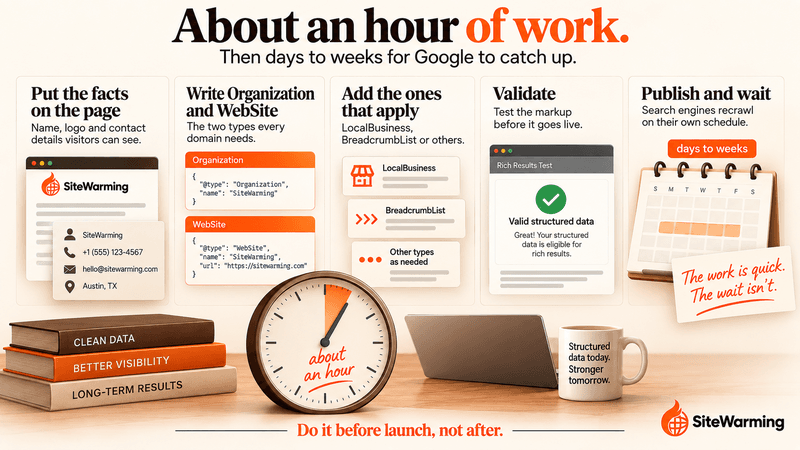
Here's the good news. These blocks go in a <script type="application/ld+json"> tag in your page's <head>. You don't need a developer or a CMS plugin. You need a text editor and about an hour. Separate blocks for each type are easier to maintain than a single combined array.
- Put the facts on the page. A visible site name, a one-sentence description and a way to reach you. The markup should describe what visitors can see.
- Write the Organization and WebSite blocks. These two are the minimum for any domain.
- Add the others that apply. WebPage if you want it, LocalBusiness if you have a location, BreadcrumbList once there is a second level.
- Validate. Run the page through Google's Rich Results Test and fix any errors it reports.
- Publish and wait. Google says it can take anywhere from a few days to a few weeks to find and crawl a page. Check back after that.
Two audiences see every domain: human visitors and machine readers. Your design, your copy and your brand speak to the humans. Structured data is the first language you speak to the machines, a plain statement of who you are. It won't make anyone find you on its own, and it will make you easier to understand when they do.
What should you add as the site grows?
So you've added the foundation. Your domain is now easier for a machine to read. What happens when the site starts to fill in?
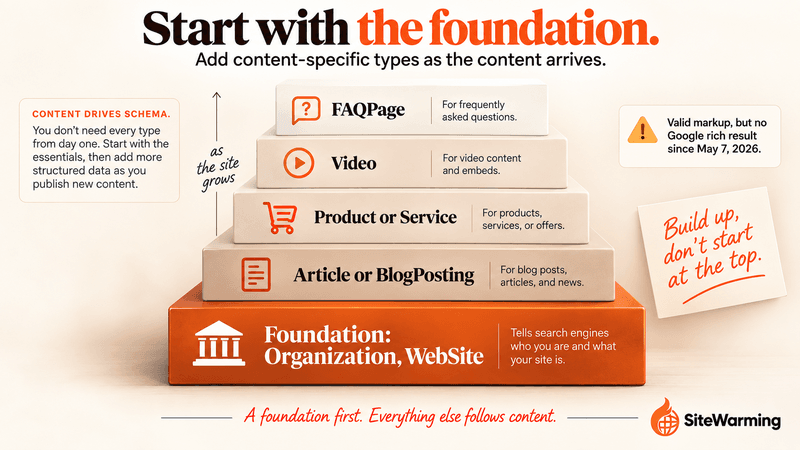
This is where structured data starts compounding. As you add content, additional types become relevant: Article or BlogPosting for writing, Product or Service for offerings, Video for video content, and FAQPage for question-and-answer content. One note on that last one: Google's own documentation says FAQ rich results stopped appearing in Google Search on May 7, 2026. FAQPage is still valid Schema.org markup, and it still mirrors a visible Q&A, but don't add it expecting a rich result.
A domain that has been communicating clear structured data for a year has a richer machine-readable identity than one that implemented it at launch. But implementing it at launch still beats treating it as step forty-seven.
Here's the contrast that makes this real. A parked domain typically has no entity markup and no content: nothing to interpret. That's the subject of why AI can't read a parked domain. Structured data plus real content at launch is the step away from that state.
[IMAGE 6 / replace in StoryChief: structured-data-tiers-grow-with-site]
How does structured data fit with SiteWarming?
Structured data is part of the first layer of warming your domain. Before a full design and before a long list of pages, machines need to know who you are. That is what Organization and WebSite markup establish: an identity, a name and a purpose.
Parked domain vs. 404 vs. coming soon, the pair article to this one, explains why a coming-soon page with real content is a different state from a parking page. Markup is one part of that difference. Content and a contact path are the rest.
SiteWarming's Launch & Warm works the same way. You tell the domain's story, choose an intent template, launch the warm site and add structured context such as FAQs, so a domain you aren't ready to build is still findable. The Free plan includes one warmed domain. If you want the concept first, what is SiteWarming? explains it.
What is the short version?
Two types for every domain: Organization and WebSite. Add LocalBusiness if you have a location. Add BreadcrumbList once you have two levels. WebPage is optional.
They don't affect how your site looks. They make your domain easier to read for the machines that will encounter it: search crawlers and knowledge graph builders. They are not a shortcut to AI citations, and you should be wary of any guide that says they are.
The founder in the opening spent six months building something beautiful. Structured data would not have put it in an AI answer overnight, but it would have told Google who she was, and it would have taken an hour.
Start with Organization schema. Add WebSite. Validate. Ship. Then go build the thing you're excited about.
Related reading
- Parked Domain vs 404 vs Coming Soon: what domain states signal to machines
- Why AI Can't Read Your Parked Domain: what machine readers need to interpret a domain
- Two Audiences of Every Domain: understanding the human and machine split
- What Is Site Warming? Not email warming
- Domain Health Check: beyond the renewal date, the full audit framework
Frequently asked questions
What structured data should a new website have?
Start with Organization and WebSite markup on the home page, which tell Google who runs the domain and what the site is called. Add LocalBusiness only if you have a physical location or service area, and BreadcrumbList once the site has a second level. WebPage is optional. Mark up only what visitors can see on the page.
Do I need schema markup before I launch?
You don't need it to launch, and Google does not guarantee that any feature will appear. But it takes under an hour, helps Google disambiguate your organization and choose your site name, and is easiest to add while the site is small. Add it before launch, so it never becomes a backlog item.
Does structured data help AI search citations?
Not on its own. Google says no special schema.org markup is needed for AI Overviews or AI Mode, and an Ahrefs study of 1,885 pages that added JSON-LD found no major citation uplift. Structured data clarifies your entity. Being indexed and publishing useful content is what earns citations.
What is Organization schema?
Organization schema is JSON-LD that tells search engines a real entity operates your domain. It includes the name, URL, logo, contact details and a sameAs list of your other profiles. Google says it helps Google understand your organization's details and disambiguate it in results, and it can influence which logo appears.
What is WebSite schema used for?
WebSite schema registers the domain itself with a name and a URL. Google uses a variation of it to choose the site name shown in results, and requires it on the home page. It no longer powers the sitelinks search box, which Google retired on November 21, 2024.
Can I add BreadcrumbList to a one-page site?
You can, but Google's documentation requires at least two list items, so a single Home entry does not qualify. Wait until the site has a second level, such as Home then About or Blog, and add the markup then. The last item's URL is optional, because Google uses the page's own.
Should I add LocalBusiness schema?
Only if your domain represents a business with a physical location or a defined service area. Google uses it for business details in the knowledge panel, such as opening hours and directions. If you operate online only, skip it, and never invent an address just to fill the markup.
How long does it take Google to pick up structured data?
Google says it can take anywhere from a few days to a few weeks for it to find and crawl a page, and it does not guarantee that features using structured data will appear. Publish the markup with the page, check it with Google's Rich Results Test, and then give it time.
How can I make an undeveloped domain visible?
Put real, current content and a way to reach you on it. SiteWarming's Launch & Warm walks you through four steps: tell the domain's story, choose an intent template, launch the warm site and add structured context such as FAQs. It handles DNS, HTTPS certificates and hosting, and the Free plan includes one warmed domain.
Share this article
Ready to Transform Your Domain Portfolio?
Start building real value with your domain investments today.