Parked Domain vs 404 Page vs Coming Soon Page: What Search Engines Actually See
 Bret Siers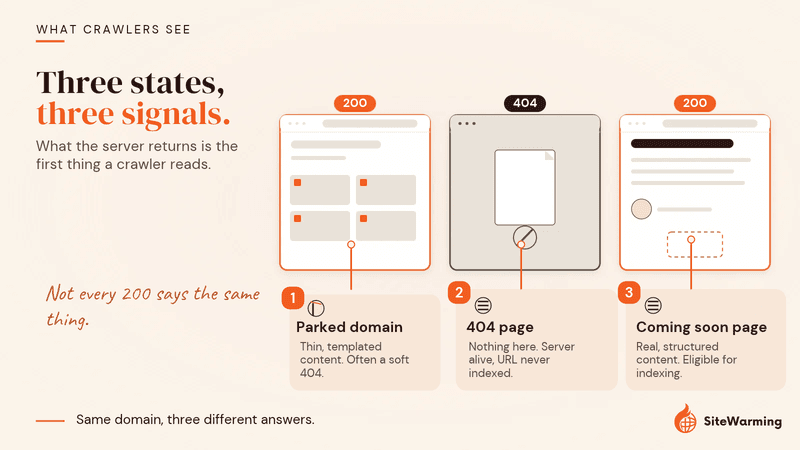
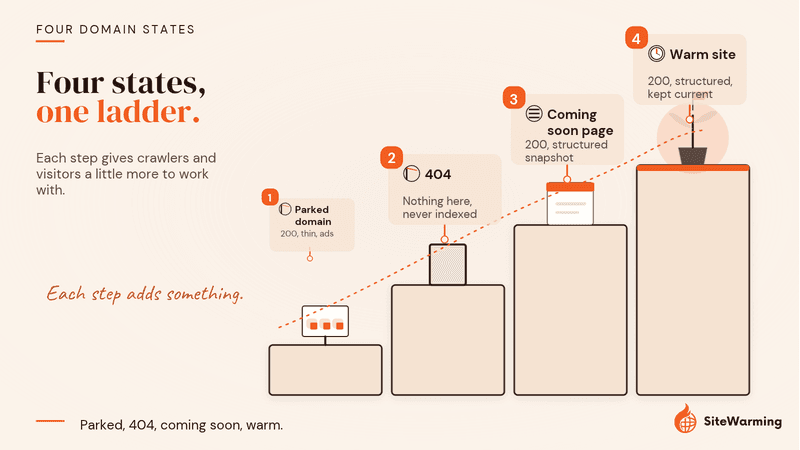
A parked domain returns a 200 with thin, templated content that Google can treat as a soft 404. A 404 tells crawlers nothing is here, so the URL is never indexed. A coming soon page returns a 200 with real, structured content that can be indexed. Each sends a different signal, whether you chose it or not.
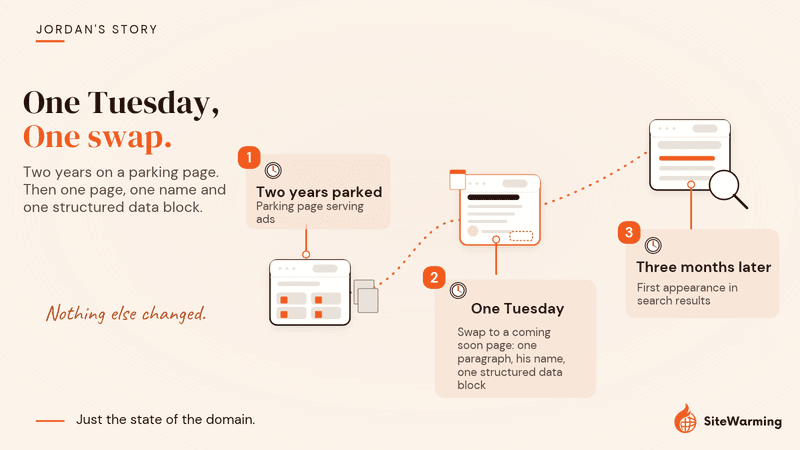
Jordan had owned the domain for two years. A fintech idea he'd sketched on a napkin at a conference, bought the name that night, and never touched again. Every quarter he'd see it in his registrar dashboard, parked, serving ads for credit cards he'd never endorse.
On a Tuesday, he swapped the parking page for a simple coming soon page. One paragraph about what the project would be. His name. A single structured data block.
He expected nothing to change. It was still a placeholder. Just a different kind.
Three months later, the domain appeared in search results for the first time. Crawlers had visited. Something about the swap had registered with systems he'd never thought about.
Nothing else changed. Just the state of the domain.
That's the thing most domain owners miss. The state of a domain, what a server returns when it's accessed, is itself a signal. Not neutral. Not blank. A specific signal that search engines and AI systems read, store, and act on.
One domain is an anecdote, not a controlled test, and we can't tell you which part of Jordan's swap did the work. What we can do is show you the mechanism, using Google's own documentation, so you can decide what each of your domains should be sending.
Here's what each of the three most common states actually communicates, how to check which one you're in, and how to keep track of it across a whole portfolio.
What do search engines read first when they visit a domain?
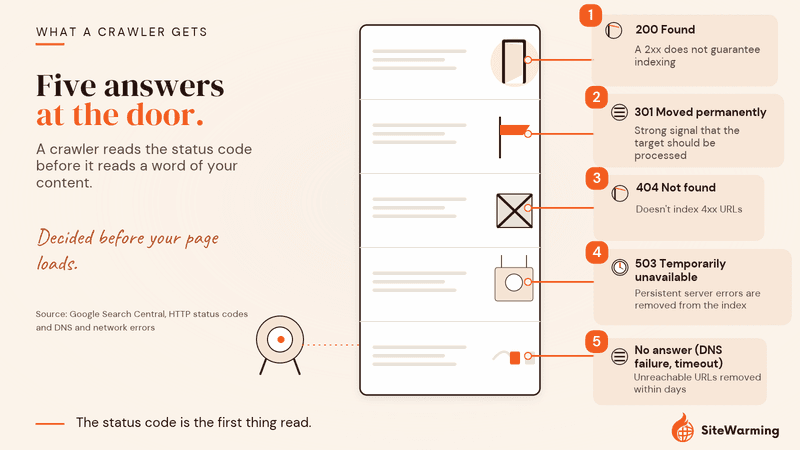
When Googlebot or a similar crawler visits a URL, the first thing it reads isn't your content. It's the HTTP status code. A three-digit number the server returns before any page content is delivered. Think of it as the domain answering the door before the visitor steps inside.
The codes that matter for dormant domains:
- 200. "Found. Here's the content."
- 301. "This moved permanently. Go here instead."
- 404. "Not found. Nothing here."
- 503. "Temporarily unavailable. Try again later."
Each tells a different story to the crawler. And the story your domain tells determines how every system downstream treats it. Here is what Google says it does with each one, plus one case that isn't on that list: a domain that doesn't answer at all.
| Response | What the server is saying | What Google does with it |
|---|---|---|
| 200 | "Found. Here's the content." | Passes the content on for processing. A 2xx does not guarantee indexing, and if the content suggests an error, such as an empty page or an error message, Search Console reports a soft 404 (Google Search Central: HTTP status codes). |
| 301 | "This moved permanently. Go here instead." | Follows the redirect, ignores the content on the redirecting URL and treats the redirect as a strong signal that the target should be processed (same source). |
| 404 | "Not found. Nothing here." | Doesn't index URLs that return a 4xx status, removes already-indexed ones, and gradually decreases crawling (same source). |
| 503 | "Temporarily unavailable. Try again later." | Slows crawling. Already-indexed URLs are kept for a while but eventually dropped, and URLs that persistently return a server error are removed from the index (same source). |
| No answer (DNS failure, timeout) | Nothing. | Treated like a 5xx error. Crawling slows, and already-indexed URLs that are unreachable are removed within days (Google Search Central: DNS and network errors). |
What does a parked domain tell search engines?
This is the state most domain owners end up in without choosing it. You buy a domain, you don't build anything yet, and your registrar fills the empty space with a parking page. It feels harmless. It's not.
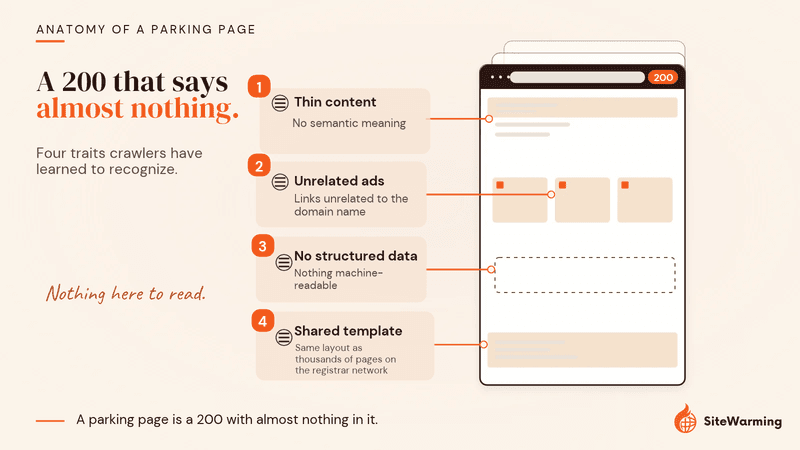
Most parked domains return a 200 status code. That seems fine. 200 means "found." But what's on the page matters enormously, and registrar parking pages are the worst possible version of a 200. A typical parking page has characteristics crawlers have learned to recognize: thin content with no semantic meaning, advertising links unrelated to the domain name, no structured data, and a templated layout identical to thousands of other parking pages on the same registrar network.
Here's the thing. A parking page doesn't tell search engines "nothing here yet." It tells them something more specific: this domain is serving a templated ad page. That's not abandoned, and it's not absent. A 404 says "nothing here." A parking page says "something is here, and it's deliberately thin."
We want to be precise about what Google has and hasn't said. Google's spam policies don't list parked domains as a violation, so this is not a penalty in the manual-action sense. The evidence is about behavior. Google flags empty or error-like 200 pages as soft 404s, and a domain that has been seen as parked for a long time can keep being treated as parked after you build on it. John Mueller described the second effect, as reported by Search Engine Journal in February 2021: "I've seen it happen for maybe a week or two, maybe up to three weeks, where it's just our systems assume that this is still a parked site and essentially treat the new content that is there as being parked as well."
For AI systems, a parked domain provides no usable context. AI systems can't read what isn't there, and parking pages, despite returning a 200, give them nothing interpretable. We cover that in why ChatGPT and AI tools can't see parked domains, and the search side in does domain parking hurt SEO.
How common are parked domains?
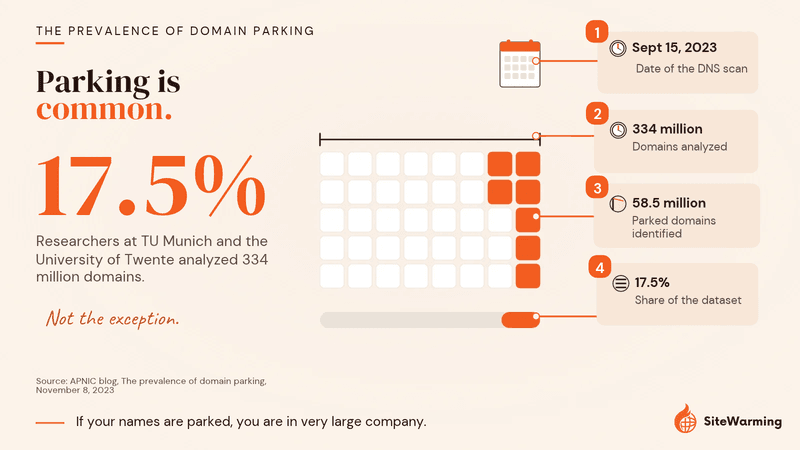
Parking is common, not rare. An APNIC analysis published in November 2023 of a September 15, 2023 DNS scan, by researchers at TU Munich and the University of Twente, identified 58.5 million parked domains out of 334 million analyzed, or 17.5% of the dataset. If your registrar parked your unbuilt names for you, you are in very large company.
Is a parked domain always a soft 404?
No. Google's Search Console Help defines a soft 404 as a page that "returns a user-friendly 'not found' message but not a 404 HTTP response code." Whether a given parking page is flagged depends on what is on it, so some are and some aren't. You can see which of your URLs Google classifies this way in the Page indexing report in Search Console.
The soft 404 label matters because of how Google treats it compared with a real 404. In its crawl budget guidance, Google says soft 404 pages "will continue to be crawled, and waste your budget," while "a 404 status code is a strong signal not to crawl that URL again" (Google Search Central: crawl budget). That guidance is written for large sites, and a single dormant domain won't run out of budget. The direction of the signal is still the point. We go deeper on the crawl side in parking pages vs 404 vs empty sites.
What does a 404 page tell search engines?
A 404 is often treated as the worst possible outcome. You see that "Page Not Found" message and your stomach drops. Something must be broken.
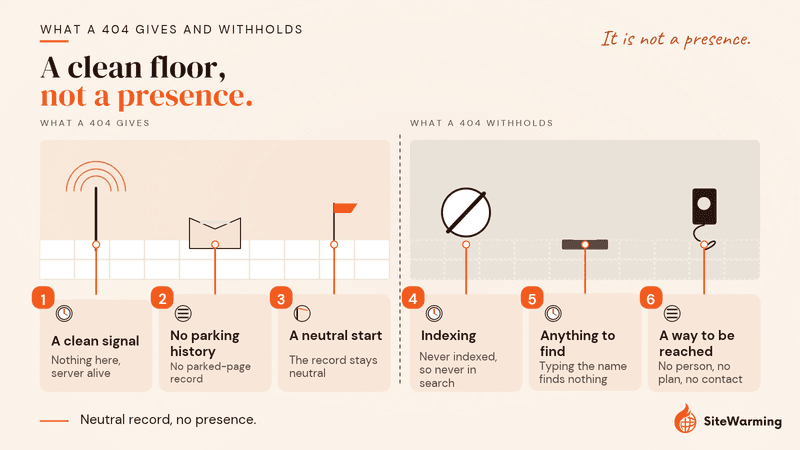
But for a dormant domain, a 404 is actually a clean signal. What it tells a crawler: the server is alive, but there's nothing at this URL. Google doesn't index URLs that return a 4xx status code, and it gradually crawls them less often (Google Search Central). When content appears later, it gets discovered fresh.
Google's own guidance is that a proper 404 isn't a problem. Search Console Help says: "In general, 404 errors won't impact your site's search performance, and you can safely ignore them if you're certain that the URLs should not exist on your site." What creates problems is a soft 404: a page that returns a 200 status while communicating nothing useful. Parking pages often function this way. They say "found" to the crawler while offering little interpretable content.
I get it. A 404 feels wrong. It feels like a failure state, like something you should be embarrassed about. But for a domain you're not ready to build yet, a 404 is cleaner than you'd think. It doesn't build anything positive, but it doesn't build the wrong history either. And when you're ready to build, you're starting from neutral instead of starting from a deficit.
The trade-off is the mirror image of the benefit. Because a 4xx URL is never indexed, a domain that returns a 404 can't appear in search, and anyone who types the name into a browser finds nothing: no person, no plan, no way to reach you. A 404 is a clean floor. It is not a presence.
What about a domain that doesn't answer at all?
A domain with DNS that doesn't resolve is not the same as a 404. Google says it treats network timeouts, connection resets and DNS errors similarly to 5xx server errors, and that a network error is "a sign that the server may not be able to handle the serving load" (Google Search Central). A domain that was never indexed has nothing to lose, but the crawler still reads silence as a server in trouble, not as an honest "nothing here." If you want the 404 state, point the domain at something that answers with a 404.
What does a coming soon page tell search engines?
So a parking page sends the wrong signal and a 404 sends no signal at all. Is there something in between?
A coming soon page, when done correctly, is a fundamentally different state from either of the above.
It returns a 200, like the parking page. But what it contains is entirely different.
A well-constructed coming soon page signals:
- A real entity is behind this domain
- Something is being built with intention
- The domain has context, purpose, and identity
- The entity behind it exists in a way that systems can interpret
The difference between a parking page and a coming soon page isn't just cosmetic. A coming soon page with proper structured data, an Organization schema telling crawlers who you are, a WebSite schema defining the domain, a description that connects the name to an idea, gives crawlers something real to work with.
The important caveat: not all coming soon pages are equal. A coming soon page with no structured data, no description, no entity definition, just a countdown timer and a logo, is only slightly better than a parking page. The signal improvement comes from the content and structure, not just from the fact of having a page.
Why did Jordan's swap work?
Our reading: the domain went from a parking page (200, low-quality, ad-serving) to a coming soon page (200, intentional, structured). The signal changed completely. Crawlers came back. The domain started to exist, in the systems that matter. Google is explicit that a 2xx alone doesn't guarantee indexing, so a page that only says "coming soon" isn't enough. Jordan's page had a paragraph, a name and structured data, which is the part we would copy.
What should a coming soon page contain?
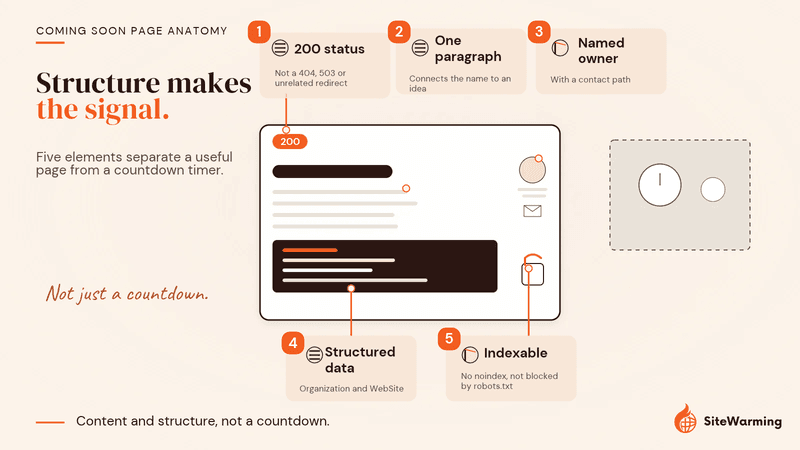
- A 200 status. Not a 404, not a 503, and not a redirect to an unrelated site.
- One paragraph that connects the name to an idea. What the project is and who it is for, in plain sentences a person and a machine can both read.
- A named owner and a way to reach you. A real entity, with a contact path.
- Organization and WebSite structured data. Google says Organization markup lets you tell it administrative details such as address, contact information and business identifiers. Google also notes that structured data helps it understand a page, and its structured data policies state that it does not guarantee your markup will show up in search results. Our guide to structured data every domain should have before launch lists the five types.
- Nothing that blocks indexing. If you want to be found, don't add a noindex tag. Google's noindex documentation also says a page blocked by robots.txt never has its noindex read, so the two settings need to agree with what you want.
Should a coming soon page return 200 or 503?
Return a 200. A 503 means the server is not ready to handle the request, and MDN says it should be used for temporary conditions, with a Retry-After header estimating when service returns. Google's documentation says URLs that persistently return a server error are removed from the index. A 503 is the right answer for a maintenance window on a live site. It's the wrong answer for an idea that will sit on a shelf for six months.
How do a parked domain, a 404 and a coming soon page compare?
Here's the full picture in one table. Notice the last column. That's the one most people never think about, and it's the one that determines how every system downstream treats your domain. "Our reading" is SiteWarming's interpretation of the evidence above, not a Google classification.
| State | HTTP status | What crawlers see | Can it appear in search? | What AI systems see | Our reading |
|---|---|---|---|---|---|
| Parked domain | 200 (often a soft 404) | Low-quality, ad-serving content | Google decides. Thin or empty 200s can be flagged as soft 404s | Nothing interpretable | Active negative |
| 404 page | 404 | No content, server alive | No. Google doesn't index 4xx URLs | Nothing | Neutral absence |
| Coming soon page | 200 | Intentional presence | Eligible. A 2xx doesn't guarantee indexing | Entity context, if structured data exists | Active positive |
| Warm site (Launch & Warm) | 200 | A live, structured page kept current | Eligible, same rule | A structured page built for people, search and AI | Active positive, kept fresh |
Which state should your domain be in?
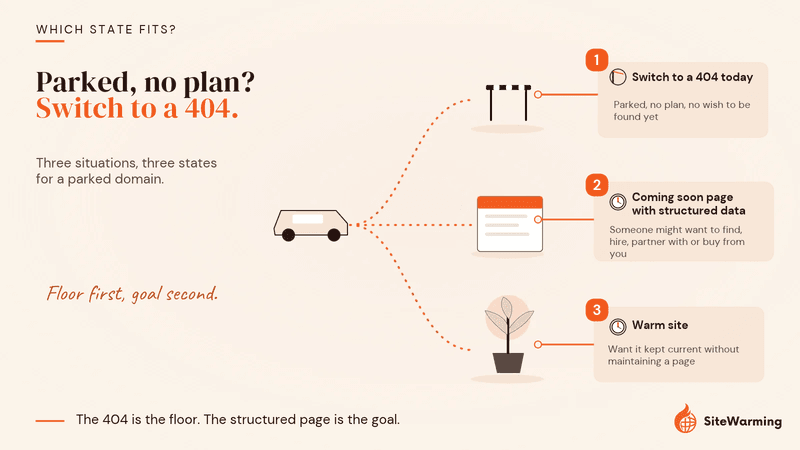
If you're not ready to build and you're currently parked: switch to a 404 today. We think every day your domain serves a parking page is a day it's accumulating a signal that works against you. A 404 stops that immediately.
If you want to do more than nothing, and you should, a coming soon page with proper structured data is the right floor. It communicates intention. It gives crawlers something real to read. It starts building the kind of history that helps when you're finally ready to launch.
| Your situation | State to choose | Why |
|---|---|---|
| Parked, no plan and no wish to be found yet | 404 | Stops the parking signal today and keeps the record neutral |
| Someone might reasonably want to find, hire, partner with or buy from you | Coming soon page with structured data | The only state that gives a visitor or a crawler something to read |
| You want it kept current without maintaining a page yourself | Warm site | The fourth state, described below: a coming soon page that stays fresh |
Should you 301-redirect a dormant domain to another site?
It's common, and it's not a state we'd choose for a name you may want to use. Google treats a 301 as a strong signal that the redirect target should be processed and ignores the content on the redirecting URL (Google Search Central). Two things follow. The dormant domain stops existing as an entity of its own, and anything in its history now sits next to the target.
How much risk that carries is less settled than a blanket warning suggests. John Mueller addressed redirecting a penalized site to a clean one in a June 2014 hangout and said he had personally never seen it cause an issue for a good site. Our advice is narrower. Check what the name was used for before you redirect it, redirect only to a page you'd be glad to be associated with, and don't use a redirect as a way to avoid choosing a state.
How do you check which state a domain is in right now?
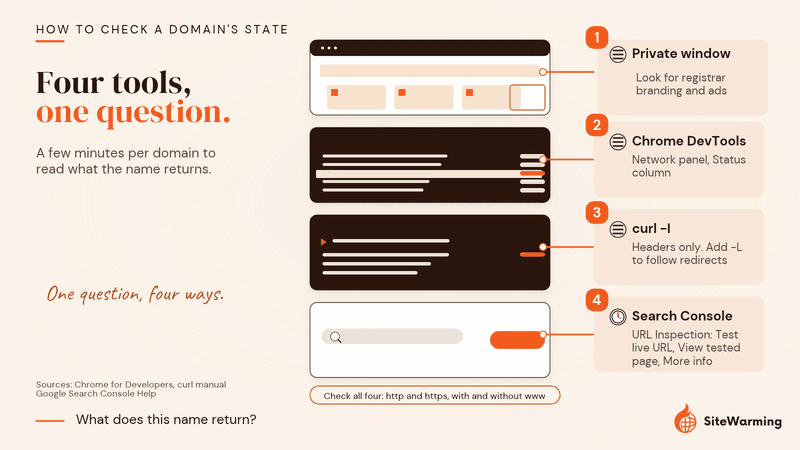
Most owners guess. You can know in a few minutes per domain.
- Look at it in a private window. Registrar branding, ad blocks or a "this domain may be for sale" banner mean it's parked. A plain "not found" message is ambiguous, because a friendly error page can still return a 200, which is exactly what a soft 404 is.
- Read the status in your browser. In Chrome DevTools, open the Network panel and reload. The Status column shows the HTTP code, for example 200 or 404, and the Headers tab lists the response headers (Chrome DevTools: Network reference).
- Read it from a terminal.
curl -Ifetches the headers only, and the first line is the status (curl manual). curl doesn't follow redirects by default, so add-Lto see where a 301 lands (everything curl). - Ask Google. In Search Console, the URL Inspection tool shows Google's indexed version of a URL, and "Test live URL" checks whether it might be indexable now. Under "View tested page" then "More info" you can read the HTTP response. The first results are the last indexed version, not the live page. The Page indexing report lists any URLs Google has classed as a soft 404. You need a verified property for the domain.
- Check all four addresses. http and https, with and without www, are separate URLs. Make sure they all land in the same state.
curl -I https://yourdomain.com
curl -sIL https://yourdomain.com
| What you get back | State | Next move |
|---|---|---|
| 200 with registrar ads or a "for sale" template | Parked | Replace it: 404 today, or a structured coming soon page |
| 200 with a "not found" message | Soft 404 | Return a real 404, or put real content on the page |
| 404 | Clean absence | Fine as a floor. Add a coming soon page if you want to be found |
| 200 with your paragraph, name and structured data | Coming soon page | Keep it current |
| 301 to another domain | Redirected | Confirm you want that domain tied to the target |
| 5xx, timeout or DNS error | Broken | Fix it. Google reads this as a server in trouble, not as an empty domain |
How do you keep track of the state of every domain you own?
With three domains you can run that check by hand. With thirty, spread across four registrars, nobody does, and that's how a name sits parked for two years while the renewal keeps coming. We're not going to pretend a curl command scales.
How does the SiteWarming Domain Management tool help?
It gives you one view of every domain you own across every registrar. Add domains one at a time, bulk import a CSV, or connect your registrar, and the dashboard shows what's live, what leads nowhere and what's approaching renewal. Viewing up to 1,000 tracked domains is free. It complements your registrar rather than replacing it: renewals, transfers and DNS changes stay where they are.
The status view tells you which names deserve a closer look. The steps above tell you exactly what a name returns. Our Domain Health Check guide turns the same question into a scored audit: one of its five parts asks whether a domain serves a real page rather than an error or a bare parking placeholder. And the free Domain Renewal Analysis helps you decide which names are worth keeping at all before you spend time fixing their state. For a wider triage, see what to do with unused domains.
How does Launch & Warm put the right state on a domain?
Launch & Warm is the fourth state: a warm site, a live, structured page that people, search engines and AI can all understand, which turns a dead domain into a doorway. You give us one sentence about the idea. We build a clean, structured page from it. You choose one of three templates (Future Build, Open, or Actively Selling), and DNS configuration, the HTTPS certificate and hosting are included. It's updated monthly, with your first two updates free, and builders and partners can reach you through a protected, anonymized inbox while you stay in control.
That's the difference from a hand-built coming soon page. A coming soon page is a snapshot. A warm site is kept current, which is why we call it warming, not parking. The Free plan includes one warmed domain. See how it works, or read what SiteWarming is and why it isn't email warming and the third option between building and parking.
The short version
Three states. Three signals. One decision you're either making or avoiding.
A parked domain tells machines: low-quality, intentional, ad-serving. A 404 tells machines: nothing here, server alive. A coming soon page with structure tells machines: someone real is building something real.
Jordan's domain sat parked for two years. Then he made one change. One afternoon of work. And his domain went from invisible to indexed.
Most domain owners never make this choice consciously. They let their registrar make it for them. Which means a lot of unbuilt domains end up parked. Which means a lot of them are accumulating a weak signal, right now, while their owners assume nothing is happening.
Something is always happening. The question is whether you're choosing what it is. If you have names sitting in the wrong state, start with the free plan and see every one of them in one place.
Frequently asked questions
Is a parked domain the same as a soft 404?
Not always. A soft 404 is a page that returns a 200 but reads like an error or an empty page, and Search Console reports it that way. Many parking pages fit that description, but Google decides page by page. Check the Page indexing report in Search Console to see whether your URLs are classified as soft 404s.
Does a 404 hurt a domain's SEO?
No. Google's Search Console Help says 404 errors generally won't impact your site's search performance when the URLs shouldn't exist. The cost of a 404 on a domain you haven't built is different: Google doesn't index 4xx URLs, so the domain can't appear in search at all.
Should a domain I haven't built return a 200 or a 404?
It depends on whether you want to be found. Return a 404 if you have no plan and no reason to be discovered yet. Return a 200 with a structured coming soon page if someone might reasonably want to find you, partner with you or buy the name. Avoid a parking template in both cases.
Will a coming soon page get my domain indexed?
It makes the domain eligible, and nothing more. Google states that a 2xx response doesn't guarantee indexing. A page with a clear paragraph, a named owner, contact details and Organization and WebSite structured data gives Google something to evaluate, and it should not carry a noindex tag if you want to be found.
Can I redirect an unused domain to another site?
You can, but it removes the domain as an entity of its own. Google treats a 301 as a strong signal that the target should be processed. Check the domain's history first, redirect only to a page you would be glad to be associated with, and don't use a redirect to avoid choosing a state.
How long does Google keep treating a domain as parked after I replace the parking page?
John Mueller described it as maybe a week or two, up to three weeks, in a comment reported by Search Engine Journal in February 2021. That was his description of cases he had seen, not a guarantee, and domains parked for longer may take longer. Search Console's URL Inspection tool lets you request a fresh crawl.
How do I check what HTTP status my domain returns?
Run curl -I https://yourdomain.com to see the headers, and add -L to follow redirects. In Chrome, open DevTools, go to the Network panel, reload and read the Status column. In Search Console, the URL Inspection tool shows the HTTP response for the crawled or live-tested page.
How does the SiteWarming Domain Management tool help with parked domains?
It shows every domain you own, across every registrar, in one view, with what's live, what leads nowhere and what's approaching renewal. You can add domains one at a time, bulk import a CSV or connect your registrar. Viewing up to 1,000 tracked domains is free, and registrar tasks such as DNS changes stay at your registrar.
What does Launch & Warm do that a coming soon page doesn't?
A coming soon page is a snapshot you write once and maintain yourself. Launch & Warm builds a structured warm site from one sentence about your idea, handles DNS configuration, HTTPS and hosting, refreshes it monthly and gives buyers and partners a protected, anonymized way to reach you. Your first two updates are free.
Related reading
- Does domain parking hurt SEO? What Google actually sees
- Domain parking vs 404 page vs empty site: the crawl budget view
- Why ChatGPT and AI tools can't see parked domains
- How to recover a domain Google thinks is still parked
- What structured data should every domain have before launch?
- What is site warming (and why it isn't email warming)
- Domain Health Check: a five-part portfolio audit
Share this article
Ready to Transform Your Domain Portfolio?
Start building real value with your domain investments today.