Is That Domain Renewal Email Real? How to Spot the Scam
 Bret Siers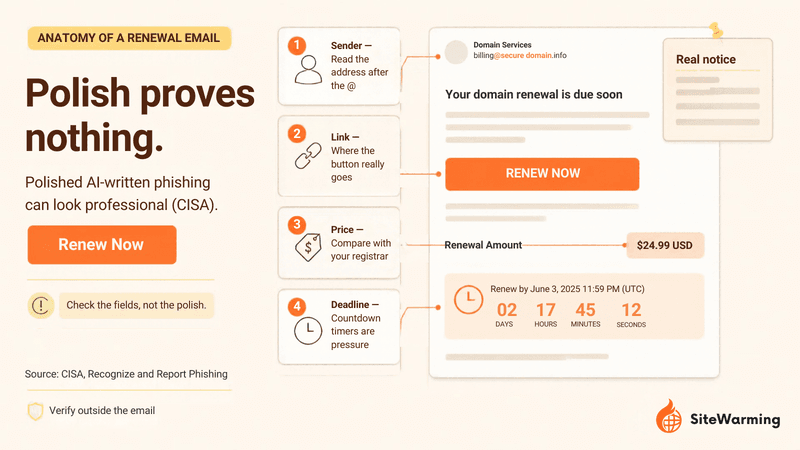
A domain renewal email is real only if your registrar of record sent it and the same notice appears when you log in at the registrar directly. Check the sender's domain, ignore every link, look up your registrar in ICANN Lookup, and compare the price and dates with your dashboard. If they do not match, treat it as a scam.
You're staring at an email. Something about a domain renewal. There's a dollar amount, an expiration date, and a button that says "Renew Now."
And you're not sure if it's real.
Not because you're careless. Because you've been here before. You've gotten renewal emails that felt like spam, and spam that felt like renewals, and at some point the whole thing started blurring together. You're sitting there trying to remember which registrar you even used three years ago when you bought the thing.
I get it. That hesitation is the right instinct. This guide turns it into a repeatable check: how these scams reach you, a six-step verification you can finish in about two minutes, a side-by-side of real notices and fakes, and what to do if you already paid or clicked.
How do domain renewal scams actually reach you?
Domain renewal scams arrive in three forms: a paper letter or invoice that looks like a renewal notice, an email that sends you to a fake payment or login page, and a lookalike sender that borrows a company's name. All three rely on one fact. Your domain's name and expiration date are easy to find, so a message that quotes them proves nothing.
What does a fake renewal notice look like on paper?
The oldest version is a letter. It carries a letterhead, your domain name, an expiration date and a price. The FTC's 2003 case against Domain Registry of America is the clearest record of how it works: the agency said the company's mail solicitations "appear to be renewal notices or invoices from the consumers' current registrars, advising them that their domain names are about to expire." A federal court order followed, and the FTC anticipated that approximately 50,000 of the company's customers would have the opportunity to transfer to another registrar.
That is a transfer solicitation: an offer to move your domain to a different registrar, dressed up as a bill from the one you already use. Nothing about it renews your domain where it lives today. The pattern outlasted the case. Domain Incite documented the same company's mailing again in 2011 under the headline "still slamming, still scamming." It was signed "Domain Renewal Group" and headed "Domain Name Renewal Service," with prices well above market. Paper versions have a long paper trail, and the price is usually where they give themselves away.
How do fake renewal emails work today?
The digital version is sharper. In a campaign Malwarebytes reported on June 25, 2026, emails claimed a domain was about to expire and sent recipients to a fake renewal page that displayed the recipient's domain name, registrar and expiry date, presented as a WHOIS lookup, added a countdown timer and a "special pricing" offer, then collected personal and payment information instead of renewing anything. The renew button never contacted a registrar.
Two lessons follow. First, a notice that quotes your exact domain and expiration date is not evidence of legitimacy, because that data is public. Second, polish is no longer a signal. CISA notes that while poor grammar was once common in phishing, AI-generated messages can now look polished. These aren't sophisticated, exactly. They're just well-dressed.
Can a lookalike domain fool a careful person?
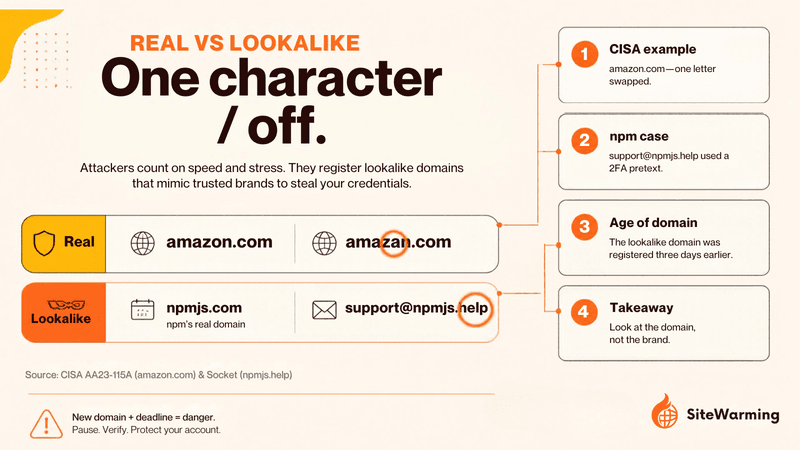
Yes, and it fooled experts. The tell is often a sender or link that is one character off. CISA's own example of an incorrect address is "amazan.com." Swapping the letter o for a zero works the same way, because your brain autocorrects what it expects to see.
The clearest recent case is not a renewal scam, but the mechanics are identical. On September 8, 2025, Socket reported that a maintainer of the npm package registry received a phishing email from support@npmjs.help that spoofed npm's branding and warned that outdated 2FA credentials would lock the account. The compromise let attackers publish malicious versions of 19 packages. A GitHub community discussion noted that the npmjs.help domain had been registered three days earlier. Ledger CTO Charles Guillemet warned publicly about the resulting supply-chain attack the same day.
The lesson for a domain owner: a brand-new lookalike domain plus a deadline and a button is the whole trick. The subject line can be a 2FA warning, a package alert or your domain's expiration. The structure does not change.
How do you check if a domain renewal email is real?
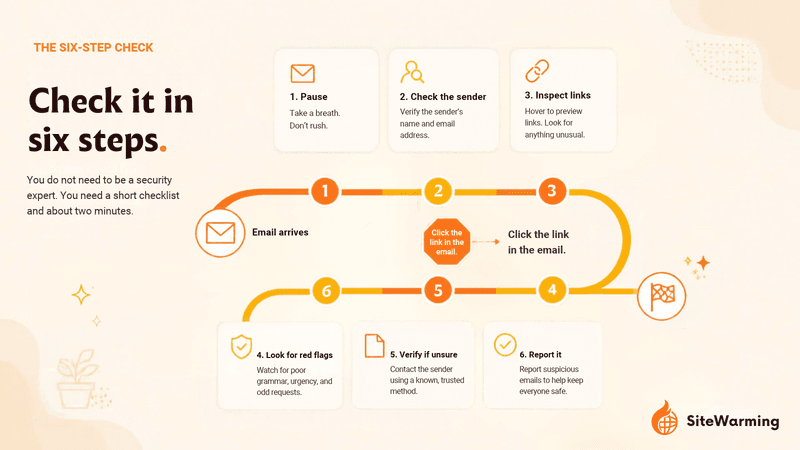
Check it in six steps, and do not use anything inside the email to do it: read the sender's address, go to your registrar yourself, confirm the registrar of record, compare the timing with what registrars must send, compare the price, and check who is really asking for the money. You do not need to be a security expert. You need a short checklist and about two minutes.
Step 1: Who actually sent it?
Check the sender's actual email domain, not the display name. Read the address after the @. If you registered through GoDaddy but the email comes from "renewals@godady-support.net" (an illustrative address), that's not them. Look for character swaps, extra words like "support" or "billing" bolted onto a brand name, and domains you don't recognize. If the sender's domain is one you do not recognize, look up when it was registered before you trust it. A domain that is days old, sending a message about a domain you have owned for years, is a strong signal.
Step 2: Can you verify it without clicking anything?
Don't click anything in the email. Open a new browser tab, type your registrar's address yourself or use a bookmark you made earlier, and log in. Check your renewal date there. If a renewal is really due, your account dashboard will show it. The same advice appears in the Malwarebytes guidance: never click renewal email links, and visit your registrar directly.
Step 3: Is that company really your registrar of record?
The registrar of record is the ICANN-accredited company that holds your domain's registration. Find it at ICANN Lookup, ICANN's registration data lookup tool. ICANN describes the tool as built on the Registration Data Access Protocol (RDAP), the successor to the WHOIS protocol, with an optional WHOIS lookup if RDAP fails.
Do not expect owner details. Registrant contact fields are usually redacted, but the registrar and expiration date generally stay public. When we ran a Verisign RDAP query for example.com, the domain reserved for documentation, on September 30, 2026, the response listed the registrar and an expiration date and included no registrant contact details. A live company domain such as wikipedia.com shows the same pattern: the registrar and expiration date appear, and the owner does not. That is enough for this check. If the email comes from a company that is not the registrar named in the lookup, it is either a scam or a transfer solicitation posing as a renewal. Our guide on WHOIS privacy and what stays visible explains what redaction does and does not hide.
Step 4: Does the timing match how registrars really behave?
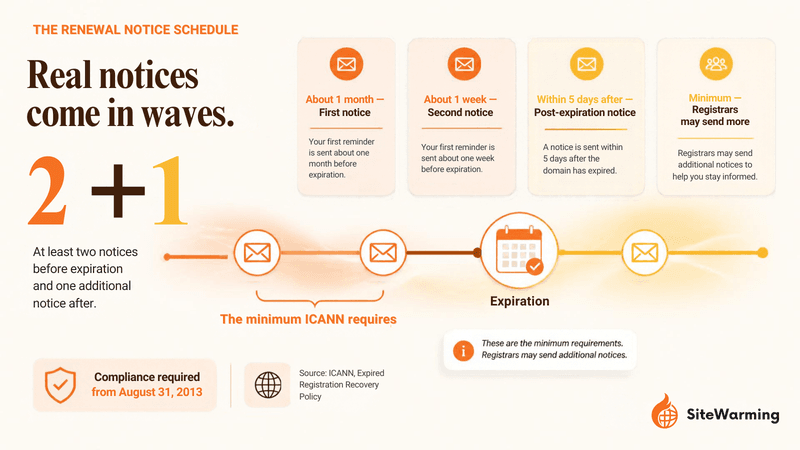
Real registrars are bound by a schedule. Under ICANN's Expired Registration Recovery Policy, a registrar must notify the registered name holder at least twice before a gTLD registration expires, one notice about a month out and one about a week out, and must send at least one more notice within five days after expiration. ICANN's registrant FAQ says the same. The policy took effect for all registrars on August 31, 2013.
So the question is not whether an email is urgent. Real notices get urgent near the end, and a reminder in the final week is normal. The question is whether the message fits the pattern: an established sender, a date that matches your dashboard and a reminder sequence spread over weeks. An unexpected first message that reads like a countdown timer, with consequences attached, deserves the other five checks. That pressure is by design.
Step 5: Does the price make sense?
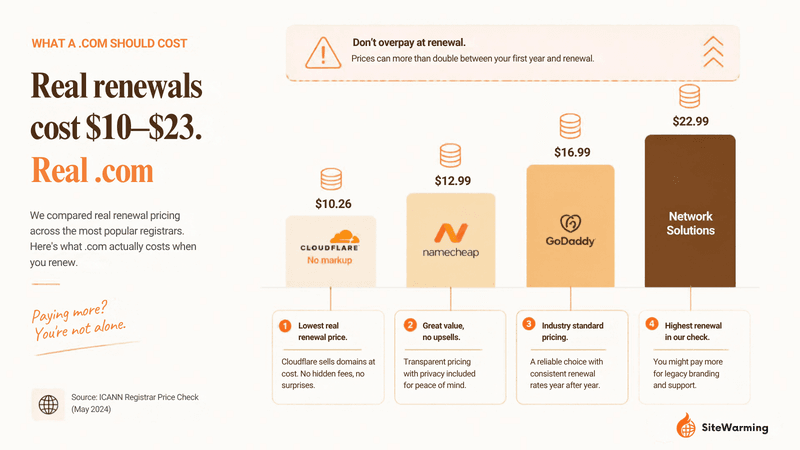
Compare the amount with what your registrar charges. Scam invoices tend to inflate the cost, and an amount of $89, $189 or $289 for a .com is far outside the normal range. We checked the registrar prices on September 29, 2026; the wholesale figure comes from Domain Name Wire's April 2026 report on Verisign's increase:
| Price point | .com per year | Source |
|---|---|---|
| Wholesale (Verisign) | $10.26 now; $10.97 from November 1, 2026 | Domain Name Wire |
| Cloudflare Registrar | Registry and ICANN price, no markup | Cloudflare |
| Namecheap renewal | $18.48 | Namecheap |
| GoDaddy renewal | $22.99 | GoDaddy |
Treat price as a clue, not a verdict. Other extensions and premium names can cost more, and registrar prices change, so compare against the number your own registrar lists for that specific domain. Our post on why domain renewals cost more every year explains the mechanics behind these numbers.
Step 6: Who is asking for the money, and can you reach them?
Look for a physical mailing address, a support number and a company name you can look up independently. Legitimate registrars include real contact information rather than a generic form link. If there is no way to call someone or confirm the company on its own website, that is a signal.
Then ask one more question: is this a renewal, or an offer? A transfer solicitation asks you to move your domain. That move cannot happen on a payment alone. ICANN's Transfer Policy says a transfer may only proceed if the gaining registrar receives confirmation from the registered name holder, and registrar-generated authorization codes must be unique per domain. Never send an authorization code to anyone who contacts you first.
Sometimes the email is real. Sometimes it's not. The point isn't to live in fear of your inbox. It's to have a process that takes two minutes instead of twenty minutes of anxious Googling.
If the email is real and you let it lapse, the consequences are concrete and compounding. Your domain enters a grace period, then redemption, then it's gone. We wrote about what actually happens when a domain expires because most people don't realize how fast that timeline moves.
What is the difference between a real renewal notice and a scam?
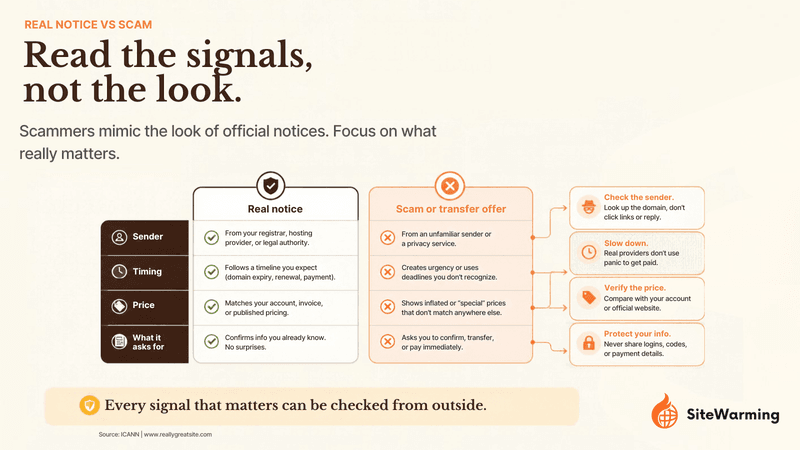
A real renewal notice comes from your registrar of record, matches what your dashboard shows and arrives on a schedule. A scam or transfer solicitation comes from someone else, pushes you toward a link, and asks for a payment or login that renews nothing. The table below puts the signals side by side.
| Signal | Real renewal notice | Scam or transfer solicitation |
|---|---|---|
| Sender | Your registrar's own domain, matching the registrar named in ICANN Lookup | A different company, a lookalike domain, or a free webmail address; Malwarebytes noted that a company claiming a London office and 24/7 support "isn't likely to send billing notices from Gmail" |
| Button or link | Optional: you can ignore it and find the same renewal in your dashboard | Leads to a page you did not reach yourself; in the 2026 campaign Malwarebytes described, the renew button never contacted a registrar |
| Timing | Reminders spread over weeks; ICANN policy sets a minimum of about one month and one week before expiration, plus one within five days after | A first message with a countdown timer or a deadline measured in hours |
| Price | Matches the renewal price your registrar lists for that domain | Far above it, or a "special pricing" offer |
| Details quoted | Your domain and expiration date (public data, so a weak signal on its own) | The same details, pulled from public records |
| What it asks for | Renewal of the registration you already have | A transfer to a new company, a login, or card details |
| Contact information | A physical address and support channel you can verify independently | A generic form link, or nothing you can check |
| After you act | The renewal appears in your registrar dashboard | Nothing renews; you may have lost money or credentials |
Which phrases signal a fake domain renewal email?
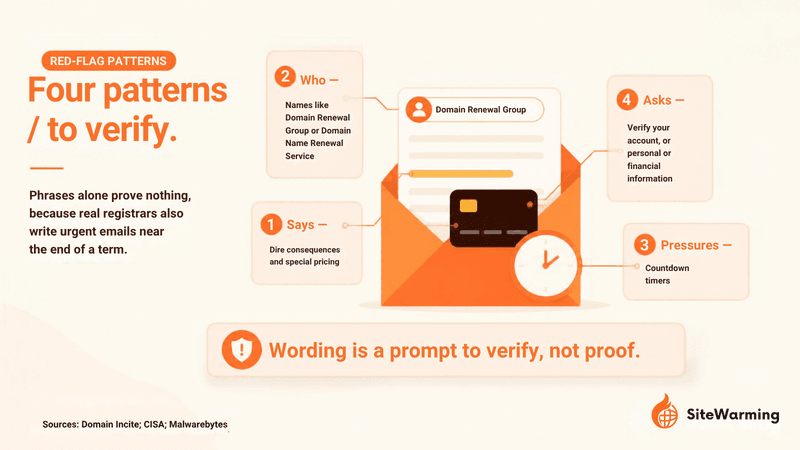
Phrases alone prove nothing, because real registrars also write urgent emails near the end of a term. Treat the patterns below as a prompt to run the six-step check, not as a verdict. They come from the FTC case, CISA's guidance and the campaigns documented above.
- Sender names that read like a service category. "Domain Renewal Group" and "Domain Name Renewal Service" were the names on the mailings Domain Incite described. A registrar you actually use will carry a name you recognize from your receipts.
- "Your domain is about to expire" from a company you never bought from. This is the FTC's description of the transfer-solicitation pattern: a notice that appears to come from your current registrar and does not.
- Urgent language with dire consequences. CISA lists "urgent or emotionally appealing language, especially messages that claim dire consequences" among the signs of phishing.
- Countdown timers and "special pricing." Both appeared in the 2026 campaign Malwarebytes reported.
- "Update your 2FA," "verify your account" or "confirm your domain ownership" with a button. The npm phishing email used this shape with a 2FA warning, and a renewal scam can borrow the same wording.
- A request to send personal or financial information. This is another item on CISA's list. Your registrar does not need your password or card number by email.
- A generic greeting. The FTC lists it as a sign of phishing, though a personalized greeting proves little when your name is in public records.
- A "reply to renew" instruction or a payment method you have never used with your registrar. Renewals happen inside your account.
What should you do if you already paid or clicked?
Act in this order: contain the money, confirm your domain's status at the registrar, lock down your accounts, then report. If you only clicked and entered nothing, the Malwarebytes guidance is to simply close the page. If you entered anything, work through these steps.
- Stop and keep the evidence. Do not reply or click again. Screenshot the email and save the sender address, amount, date and payment method.
- Call your bank or card issuer. If you paid or typed in card details, report it immediately, ask to dispute the charge and replace the card, and turn on transaction alerts. Malwarebytes gives the same advice: contact your bank at once if payment details were entered.
- Check your domain at the registrar. Type the registrar's address yourself and log in. Confirm the domain is still in your account, the expiration date is what you expect, and the contact details and nameservers are unchanged. If anything looks wrong, contact the registrar's support before doing anything else.
- Change your registrar and email passwords, then turn on 2FA. Use unique passwords, and change the password on the email account tied to your registrar first, because that inbox can reset everything else.
- Turn on the registrar lock. ICANN's Transfer Policy says a registrar may apply the lock only at registration or at the holder's request, and must remove it within five calendar days of the holder's request if it offers no self-service tool. The lock is under your control. Our post on how transfer locks work in practice covers the 60-day rule and the catches.
- Scan your device and protect your identity if you shared personal data. The FTC advises updating your security software and running a scan after a suspicious download, and points to IdentityTheft.gov for recovery steps when personal information was exposed, in its phishing guidance.
- Report it. Each of these has a separate job:
- ReportFraud.ftc.gov is the FTC's fraud reporting site, as named in its phishing guidance.
- Forward phishing emails to reportphishing@apwg.org, the address the FTC lists.
- File with the FBI's Internet Crime Complaint Center if you lost money. IC3 describes itself as the central hub for reporting cyber-enabled crime.
- Send the message to your registrar's abuse contact. ICANN requires registrars to publish an abuse email address on their home page.
- If a registrar itself behaved improperly, ICANN Contractual Compliance accepts complaints, including on transfer and renewal issues.
Why do real registrar emails feel just as untrustworthy as scams?
Because registrars have earned some of the suspicion. Here's where it gets interesting: the scams work because they look like real registrar emails, but the harder question is why real registrar emails feel so untrustworthy in the first place.
In our experience, the friction is built in. Take the gap between the first year and the second. GoDaddy's .com page, when we checked it on September 29, 2026, showed a first-year price of $0.01 with a three-year purchase required, and additional years at $22.99. The year-over-year price increases are real, but the way they're communicated is often designed to create confusion, not clarity. Add upsell screens during renewal that look like security warnings, such as "Your domain is unprotected!" with a big orange button when what they mean is "buy our privacy add-on." Add auto-renewal turned on by default. Add transfer processes that take several clicks, confirmation emails and a waiting period that feels deliberately confusing.
And then there's the cancellation flow itself. Try turning off auto-renewal at some registrars and you'll hit a series of confirmation screens that read like breakup negotiations. "Are you sure?" then "You'll lose protection" then "Last chance" before you finally reach the actual toggle. Some registrars bury the cancellation option three menus deep, behind settings labels that don't mention the word "cancel" at all. That is our read of retention design: built to exhaust you into keeping the default.
None of that is phishing. It's all legal. But it uses the same emotional playbook: urgency, confusion, and friction designed to get you to pay without thinking too hard about what you're paying for.
So when a real scam shows up in your inbox, your defenses are already worn down. You've been trained by years of legitimate but adversarial communication to just not trust any of it. The fake email and the real email feel the same because, in terms of emotional design, they kind of are the same.
That's the actual problem. It's not that scammers are getting smarter. It's that the baseline experience of being a domain owner has been so eroded that you can't tell the difference between someone trying to steal from you and someone trying to charge you for a service you actually need.
Trust isn't a feeling. It's a system. And when the systems around domain ownership keep breaking trust in small ways, the big breaks don't even register as unusual. A verification routine is what replaces the feeling.
Nobody tells you this when you buy a domain. They tell you to pick a name, enter your credit card, and figure the rest out later. The renewal email that lands in your inbox six months or twelve months from now is the first real test. Not of whether you can spot a scam. Of whether you know enough about what you own to tell the difference.
How can you make every renewal email a 10-second check?
The six-step check has one hard part: knowing which registrar holds each domain and when it expires. With three domains you can keep that in your head. With thirty spread across GoDaddy, Namecheap and a registrar you signed up for once, you cannot, and that is when a convincing fake gets through. The fix is a single record you trust more than any email.
What does a single view of your domains change?
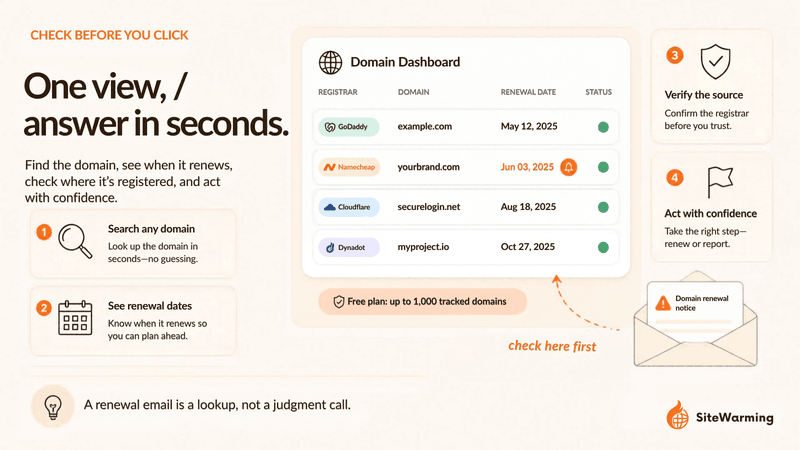
It turns verification into a lookup. SiteWarming's Domain Management shows every domain you own across every registrar in one view: what is live, what leads nowhere, and what is approaching renewal. When a renewal email arrives, you find the domain in that view, see where it lives and when it comes due, and then open that registrar yourself to renew. If the email names a different company or a different date, you have your answer in seconds.
You can add domains one at a time, by bulk CSV import or by connecting a registrar, and the Free plan lets you view up to 1,000 tracked domains, as listed on the pricing page. Renewals themselves stay at your registrar, so nothing here replaces the login step. If you are not ready for software, our free portfolio spreadsheet template has columns for the registrar and the expiration date, and our guide to domain renewal management covers a 90-60-30 day reminder system so no notice ever has to be a surprise. To see which names deserve another year at all, run the free Domain Renewal Analysis, which takes up to 150 domains.
What should you do with the domains you renew but have not built?
A real renewal notice raises a second question: is this name worth another year? If it is, and you have not built on it, Launch & Warm puts real content and a protected contact path on the domain, a warm site that people, search engines and AI can understand, so that the option to sell, partner or build can actually be exercised. The How It Works page walks through the launch flow, and the Free plan includes one warmed domain. If you are still deciding whether to renew at all, start with our post on whether to renew a domain you are not using.
And that's a skill worth building. Not because scams are everywhere, but because your domains represent ideas you cared about enough to name. Knowing what's real and what's not is just part of taking care of them.
Most people pass that test eventually. Usually after the first scare.
You're reading this, which means you're already ahead of that.
Frequently asked questions
Is my domain renewal email real?
It is real only if your registrar of record sent it and the same notice appears when you log in at the registrar directly. Check the sender's address, ignore every link in the message, and compare the expiration date and price with your registrar dashboard. If the dashboard shows nothing due, treat the email as a scam or a transfer offer.
Do registrars actually send renewal reminder emails?
Yes. ICANN's Expired Registration Recovery Policy requires registrars to notify the registrant at least twice before a gTLD registration expires, about one month and one week ahead, and to send at least one more notice within five days after expiration. The policy asks for delivery in a manner, such as email, that needs no action to receive it.
What is a domain transfer solicitation?
A transfer solicitation is a marketing offer from a company asking you to move your domain to it, often written to look like a renewal notice or invoice from your current registrar. The FTC described this pattern in a 2003 case involving Domain Registry of America. Paying one does not renew your domain at your registrar.
How do I find out which registrar holds my domain?
Search your domain in the ICANN registration data lookup and read the registrar field. Registrant contact details are often redacted, but the registrar name and expiration date usually remain visible. Then go to that registrar's website by typing the address yourself, not by following a link in an email.
How much should a .com renewal cost?
It depends on the registrar. Wholesale .com is $10.26 a year and rises to $10.97 on November 1, 2026. On September 29, 2026, GoDaddy listed a $22.99 renewal and Namecheap listed $18.48. A demand for $89, $189 or $289 is far outside that range and worth verifying before you pay.
Can someone steal my domain if I pay a fake renewal invoice?
Paying a fake invoice does not by itself move your domain, because a registrar transfer needs confirmation from the registered name holder and a unique authorization code, as ICANN's Transfer Policy describes. The larger risk is credential theft: a fake renewal page or login can hand over your registrar password, and a captured account can be used to start a transfer.
What should I do if I already paid a fake domain renewal invoice?
Contact your card issuer or bank right away to dispute the charge, log in to your registrar directly to confirm your domain's status, change your registrar and email passwords, turn on two-factor authentication and the registrar lock, and report the message to the FTC, the FBI's IC3 and your registrar's abuse contact. The full sequence is in the section above.
Where do I report a fake domain renewal email?
Report it to the FTC through ReportFraud.ftc.gov (the FTC's phishing guidance explains how), forward phishing emails to reportphishing@apwg.org, and file with the FBI's Internet Crime Complaint Center if you lost money. You can also send it to your registrar's published abuse contact, or file an ICANN Contractual Compliance complaint about a registrar.
How can a tool help me tell a real renewal notice from a fake one?
A single inventory of every domain, its registrar and its expiration date turns verification into a lookup. SiteWarming shows every domain you own across every registrar in one view, including what is approaching renewal, so you can confirm a notice against your own record before opening the registrar to renew. The Free plan covers up to 1,000 tracked domains.
What should I do with a domain I do not plan to build soon?
Decide before the renewal date whether the name is worth another year. If it is, Launch & Warm puts a structured page and a protected contact path on the domain, so it can be found and the option to sell, partner or build stays open. If it is not, let it expire on your terms rather than in a panic. The Domain Renewal Analysis can help you sort the keepers from the rest.
Share this article
Ready to Transform Your Domain Portfolio?
Start building real value with your domain investments today.