Can an Expired Domain Hurt Your Other Domains or Brand?
 Bret Siers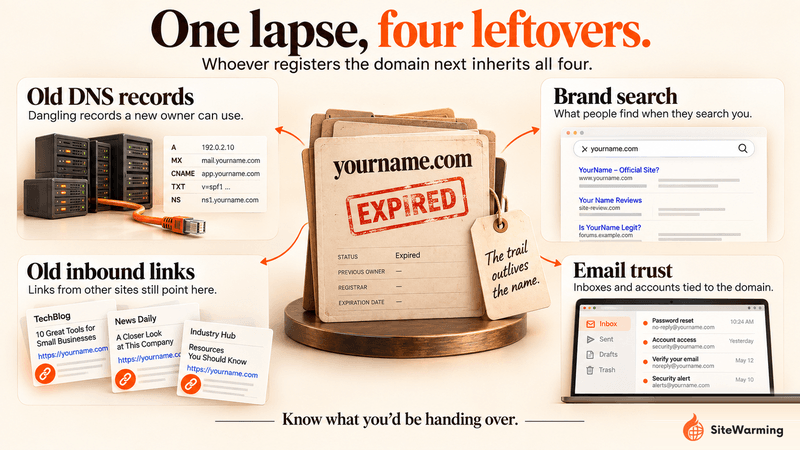
Yes, but usually not the way people fear. There is no documented way for a lapsed domain to lower your other sites' Google rankings. The real damage comes from whoever re-registers it: they can inherit its old links, email trust, brand searches and dangling DNS records, then use them against your brand or customers.
Diane let a domain expire in January. It was a side project she'd bought two years earlier, never launched, and finally stopped renewing. The $12 renewal notice came and she let it go.
In April, a customer emailed her. "Hey, I was trying to find your old product page and now that URL is redirecting to something that looks like a casino. Just thought you should know."
She checked. It was worse than a casino. The domain had been snapped up soon after it expired and was now serving pages of sketchy pharma ads. And when she searched for her business name, that old domain was still appearing in search results. Still associated with her. Still showing up when her customers looked her up.
She hadn't done anything wrong. She'd just let something go.
The damage was already live.
Her story is common, and it's easy to draw the wrong lesson from it. A lot of advice on this topic says an expired domain "contaminates" your other sites. What's documented is more specific, and in some ways worse. The harm comes from what the next owner can do with what you left behind. The rest of this post separates the risks that are documented from the ones that aren't, then gives you a check you can run today.
Why don't expired domains just disappear?
Here's what most people assume: when a domain expires, it goes back to neutral. Like returning a library book. You're done with it, someone else can check it out, and your name is no longer on the card.
That's not how it works. Not even close.
A domain is not just a name. It's a set of links pointing at it, search results that mention it, email addresses and account logins tied to it, and DNS records that point to other services. When the registration lapses, the name goes back into circulation. Everything attached to it stays where it was.
What happens next depends on who buys it. And you don't get to choose.
How long do you have to recover an expired domain?
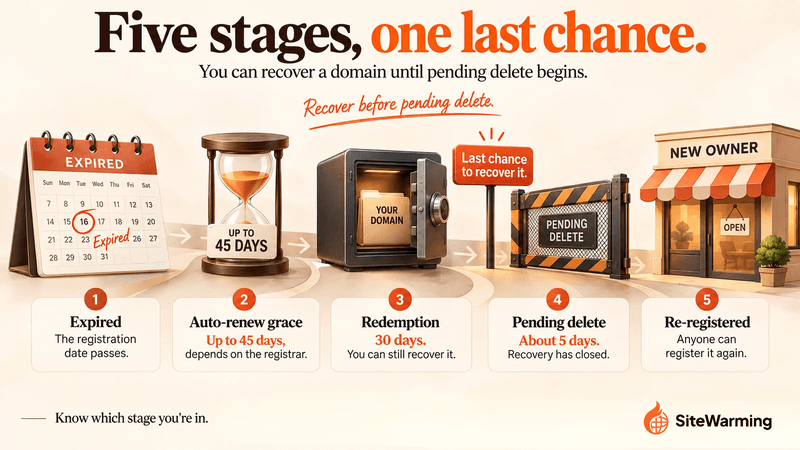
Less time than most people think, and the exact numbers depend on your registrar and registry. For a typical .com, the sequence looks like this.
| Stage | Typical length | Can you recover it? | Source |
|---|---|---|---|
| Expired, auto-renew grace | Up to 45 days; registrars may offer it but aren't required to | Yes. ICANN's Expired Registration Recovery Policy says the original registrant must be permitted to renew | ICANN registrant guide, ICANN ERRP |
| Redemption grace period | 30 days after deletion | Yes, through your previous registrar, usually for a restore fee on top of the renewal fee | ICANN ERRP, DNSimple |
| Pending delete | About 5 days; set by registry policy | No | DNSimple, RFC 3915 |
| Available | Open-ended | No. Anyone can register it | RFC 3915 |
ICANN's policy also says registrars may delete a registration at any time after it expires, so don't treat the full 45 days as guaranteed. For what each stage costs, see what happens when a domain expires. For the steps to take if you're already past the deadline, see what to do after a domain expires.
How fast do expired domains get re-registered?
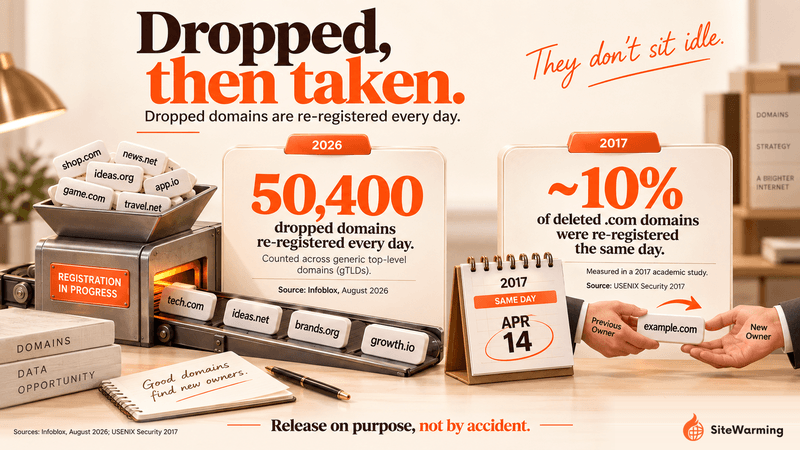
Faster than a registration reminder email. In a 2017 USENIX Security study of dropped .com domains, researchers found that about 10% were re-registered on the same day their old registration was deleted, and that more than half of those same-day re-registrations happened within 30 seconds. A separate WWW 2018 study put the share of dropped domains that get caught at about 10% overall, with the vast majority of that happening on release day.
The volume is larger now. Infoblox's August 2026 analysis, The Second Life of Expired Domains, counted about 50,400 dropped domains re-registered every day across generic top-level domains, and nearly 20% of daily gTLD registrations were previously registered names. The Hacker News reported that one threat actor spent nearly $7 million buying expired domains, and quoted Infoblox's warning that these domains "inherit reputation and sometimes connections from their previous life."
Two honest readings of those numbers. Most dropped domains are not grabbed in seconds, so a forgotten side project is not guaranteed to be hijacked. But the ones that get caught quickly are caught by buyers who want what the previous owner left behind: links, visibility, trust. If your domain had any of that, assume someone is looking at it.
What are the four ways an expired domain causes damage?
The damage doesn't happen in one way. It spreads through four distinct vectors, and most people only think about the first one. They can all be happening at the same time.
| Vector | What the new owner gets | Where it shows up | How you'd notice |
|---|---|---|---|
| 1. Dangling DNS records | Control of any subdomain on your live domain that still points at the lapsed name | Your own DNS zone | A subdomain serving content you didn't publish |
| 2. Brand search confusion | A domain that still appears for searches on your name | Google results for your brand | Unfamiliar results next to yours |
| 3. Old links and redirects | Every link, bookmark and email link that still points at the old name | Other people's sites, your old emails | Customers reporting strange pages |
| 4. Inherited trust | Email sent to the old addresses and password resets for accounts tied to them | Vendor, SaaS and social accounts | Missing emails, unexpected account activity |
1. Dangling DNS records
This is the most mechanical vector, and the one people miss. If any DNS record on a domain you still use points at the lapsed name, whoever registers that name controls what the record resolves to.
Microsoft describes the pattern in its subdomain takeover guidance: dangling DNS entries are records that should have been removed when the resource behind them was deleted, but weren't. CNAME records are especially exposed. OWASP's testing guide lists A, CNAME, MX, NS and TXT records as vulnerable, and describes the exact scenario here: a CNAME that references an expired domain hands the subdomain to any new registrant.
It's not rare. Palo Alto Networks' Unit 42 found 317,000 unsafe dangling domains in passive DNS data, and 63.1% of them came from expired domain registrations.
In practice, that looks like this. You used old-project.com for a landing page and pointed shop.yourbrand.com at it. The registration lapses. A stranger registers old-project.com and now decides what shop.yourbrand.com shows, on your brand's own domain.
Shared hosting is a separate, smaller issue. A buyer of your old name does not get your server or your IP address, so a lapsed domain can't push your other sites onto a blocklist that way. The email risk on shared hosting is real, but it comes from other customers on the same IP: Twilio SendGrid notes that when another sender on a shared IP breaks inbox providers' standards, your reputation changes too. It applies to email deliverability, not to Google rankings. Google's John Mueller has said he knows of no Google algorithm that takes the IP addresses of other sites on the same server into account when ranking a page. If you suspect a listing, Spamhaus's domain blocklist lists domains only, while its SBL lists IP addresses, so you need to check both. Our guide to checking whether your domain is blacklisted walks through it.
2. Brand search confusion
When someone searches for your business by name, search engines don't just show your current site. They show what they've indexed that's connected to that name.
If your expired domain was ever associated with your business, that old domain can keep appearing in branded searches after you let it go. There's no fixed timeline. Google's John Mueller said in 2025 that it "just takes a lot of time for the old state of a domain to be shaken off." He was talking about a domain's own rankings, not yours, but it shows how slowly Google's picture of a domain resets. During that window, someone who searches for your business might see the new owner's content alongside yours. If that content is spam, gambling, pharmaceuticals, or worse, it sits next to your real result.
That's not a visibility problem. That's a trust problem. A customer who sees your brand name next to a sketchy result doesn't investigate further. They just lose confidence.
And if that weren't enough, the old links you forgot about are still working. Just not for you anymore.
3. Old links and redirects
You almost certainly have links to your old domain somewhere. Social profiles, old press mentions, directories, forums where you posted years ago, the footer of an old email newsletter. Some of them are still live.
When someone else registers your expired domain, those links still work. They just resolve somewhere different now. Someone who bookmarked your old project page, or clicks a link from an old email, lands on whatever the new owner put there.
This is the scenario that generates the most anger when owners talk about expired domains. The original owner did nothing wrong. But their name and credibility are attached to links that now lead somewhere harmful. Customers don't know the difference. They just know the link came from you.
The fix is simple while you still control the domain: keep a redirect to your current site in place, and ask the sites that link to you to update their links. That's the same approach Google recommends in its site-move guidance. It stops working the day the registration lapses.
The first three vectors are visible. They have symptoms you can detect. The fourth one is quieter, and that's what makes it dangerous.
4. Inherited trust: email and account takeover
This is the one that keeps me up at night, and it's better documented than the usual advice suggests.
In a 2016 IEEE Symposium on Security and Privacy paper, "Domain-Z: 28 Registrations Later", the researchers found that anyone who re-registers an expired domain implicitly inherits the residual trust associated with the domain's prior use. Email is where that trust is easiest to spend. In 2018, security researcher Gabor Szathmari and colleagues re-registered six abandoned Australian law-firm domains and received more than 25,000 emails in three months. Per ESET's write-up, an attacker holding those domains could also have triggered password resets to take over Office 365 and G Suite accounts.
That's the quiet risk for a founder with a scattered portfolio. Think about every place you used an address on the lapsed domain: vendor accounts, SaaS logins, newsletter sign-ups, social profiles, the contact address on an old registration. Once the domain lapses, a password reset sent to that address goes to whoever owns the name next. And customers who still email the old address are writing to a stranger.
This is also the vector that hurts after the domain is gone, which is why it belongs in your checklist before you let a domain lapse, not after.
Does an expired domain hurt your other sites' Google rankings?
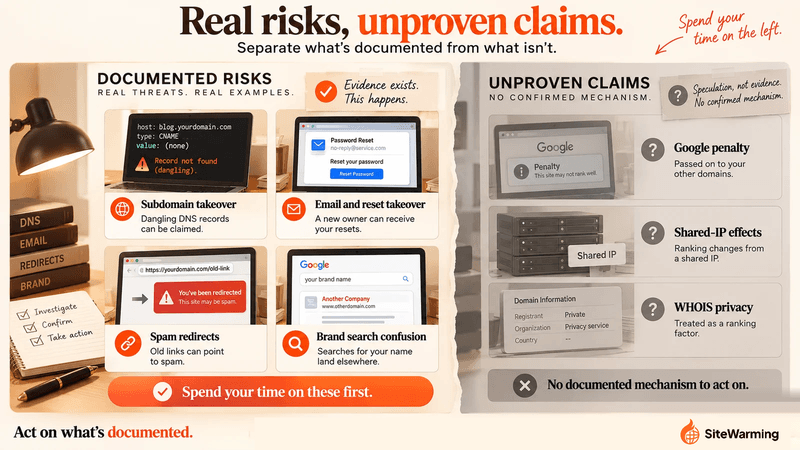
This is the claim most posts on the topic repeat, so it deserves a straight answer. We found no Google statement, policy or study showing that a lapsed domain lowers the rankings of your other domains. That is not the same as Google denying it. It means there is no documented mechanism, and you shouldn't spend money or worry on one.
One more source is worth handling carefully. Google's Search Quality Rater Guidelines (the September 2025 version) tell human raters to research a site's reputation using independent sources such as reviews, references and news articles. That's guidance for evaluators. It isn't evidence about how Google's ranking systems treat two domains you happen to own, and it's a weak basis for claims that one domain's reputation rubs off on another.
Google introduced the expired domain abuse policy in March 2024, saying that expired domains purchased and repurposed to boost low-quality content are now considered spam. If you're the previous owner, that policy is on your side, but it only acts against the buyer's rankings. It does nothing for your customers who land on the buyer's pages.
So where does the damage land? On the places this post has already covered: your customers, your brand's search results, your DNS, your email and your accounts. Those are real, and none of them depend on a ranking penalty.
How do you check if a lapsed domain is already causing damage?
Reading about the four vectors probably raised a question: is this happening to me right now? You can find out in five minutes. And five minutes of checking is worth more than five weeks of wondering.
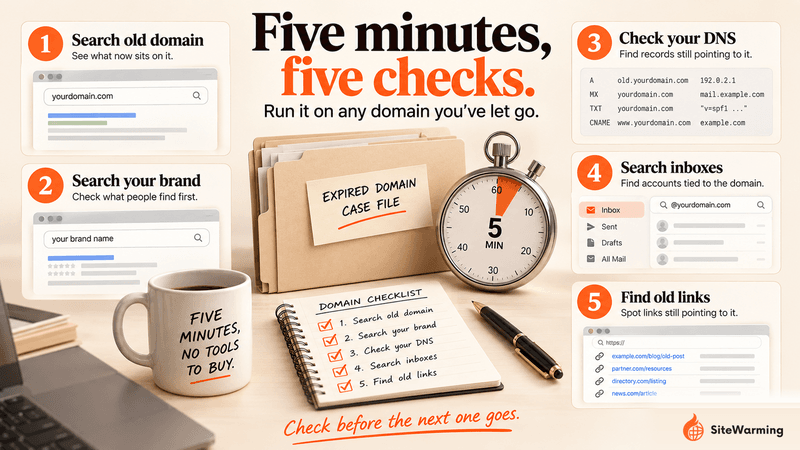
Step 1: Search for your expired domain. Type the old domain name directly into Google, then search for it with the site: operator. What comes up? If there's content there, click through. What is it? If it's redirecting to something harmful, you need to know.
Step 2: Search your business name. Search for your business name, not your main URL. Do you see unfamiliar results associated with it? Does your old domain appear anywhere in the results?
Step 3: Check your DNS for records that point at the lapsed name. Open the DNS zone for each domain you still use and look for any CNAME, MX, NS, TXT or A record whose value contains the lapsed domain. Any record you find is a dangling record. Delete it now. If the record is already serving content you didn't publish, that is a subdomain takeover in progress.
Step 4: Search your inbox and password manager for the old domain. Look for accounts, newsletters and vendor logins registered to an address on the lapsed domain, and for customers who still email it. Change the login email on every account you want to keep. A password reset sent to that address goes to whoever owns the name now.
Step 5: Look for old links to the domain. Use the free Ahrefs Backlink Checker or the free Semrush backlink checker to see which sites still link to your old domain. Both show only part of the picture in their free versions. If you still have a verified Search Console property for the old domain, its Links report also shows a sample, limited to 1,000 rows. Prioritize links that use your business name as the anchor text.
This check won't catch everything. But it will tell you whether you have an active problem that needs immediate attention.
What should you do if a lapsed domain is already being abused?
If the check turned something up, don't spiral. Every one of these situations is fixable. The question is speed, and which tool you reach for, because several of the tools people name for this don't do what they're assumed to do.
| What you found | First move | Where to do it |
|---|---|---|
| The new owner is serving spam, phishing or malware | Find the registrar with an ICANN lookup and send an abuse report. Registrars must keep an abuse contact. If they don't respond, file an ICANN complaint against the registrar | ICANN Lookup, ICANN registrar abuse page, RAA section 3.18.1 |
| Harmful pages show up in Google results | Report spam, phishing or malware through Google's reporting forms | Google report-quality-issues hub |
| Google still shows pages that no longer exist or have changed | Ask Google to refresh them. This tool works on pages you don't own | Refresh Outdated Content tool |
| A dangling DNS record points at the lapsed name | Delete the record at your DNS host, then check what the subdomain served | Your DNS provider's zone editor |
| Accounts are tied to an address on the lapsed domain | Change the login email, then review recent account activity | Each vendor's account settings |
| Old links redirect to spam | Contact the sites that link to you and ask them to update the links | Site owners, starting with links that use your name as anchor text |
| Your email deliverability dropped | Test your sending IP against blocklists, then ask your host about your IP. A dedicated IP runs roughly $4 to $6 a month at providers such as Bluehost and ChemiCloud (checked October 2026) | MXToolbox blacklist check |
Three notes on those tools, because they get misused.
The ICANN WHOIS inaccuracy complaint is for incorrect registration data. It is not a content-abuse form, so don't use it to report a spammy site. Use the registrar abuse route above.
The Search Console Removals tool only works for sites you own. Google says it lets you temporarily block pages from search results on sites that you own, so it can't help once you've lost the domain.
MXToolbox's blocklist check tests a mail server IP against more than 100 DNS-based blocklists. If you're checking a domain and not an IP, our guide to checking and fixing a blacklisted domain covers both.
The longer you wait, the harder this gets. None of these channels move fast, and reputation takes time to rebuild once it has been damaged.
What should you do before you let a domain lapse?
Diane's story didn't have to end the way it did. The cheapest protection is the work you do before the registration expires, while you still control the DNS, the email and the redirects.
A common assumption is that a domain with active content is a harder target after it expires. The evidence doesn't support that. Infoblox says re-registered domains are attractive because they inherit reputation and connections from their previous life, and an active domain has more of both. What an active domain gives you is something different: a record you can read. You know what points at it, what depends on it and what to unwind. A domain that went dark years ago is one you've probably forgotten the dependencies of.
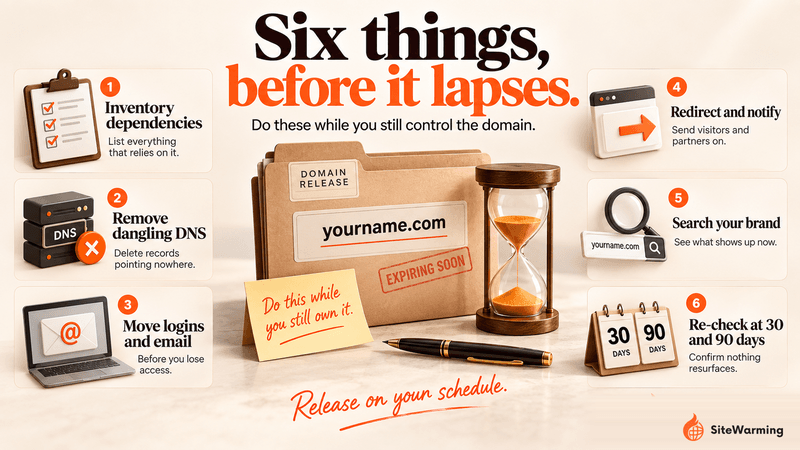
- Inventory what depends on the domain. List the DNS records, email addresses, vendor accounts, newsletter sign-ups and third-party services tied to it.
- Remove DNS records that point at it. Check every domain you keep for CNAME, MX, NS, TXT or A records that reference the one you're releasing. These are the dangling records attackers look for.
- Move logins and email off it. Change the login email on every account, and set up forwarding or an auto-reply for any address customers still use, for as long as you still hold the name.
- Redirect and notify. If the old URLs still get links or visits, redirect them to your current site and ask linking sites to update. Google's guidance is to keep redirects in place for as long as possible, generally at least one year, which means a redirect is itself a reason to renew. Weigh that against the cleanup you'd otherwise face.
- Search your brand and the domain. Record what appears today so you can compare after the drop.
- Put two dates in your calendar. Re-run the 5-minute check above 30 days and 90 days after the registration lapses.
Should you let it expire at all?
Sometimes yes. A side project you'll never build is not worth renewing forever. Our framework for deciding whether to renew an unused domain lays out the actual decision. The point of this post is narrower: if you do let a domain go, release it deliberately, with the checklist above, rather than letting it drift past a renewal date you stopped seeing.
Parking isn't the safe alternative people assume. A parked or dark domain isn't neutral: it still carries whatever links and records you attached to it, and it gives you and everyone else nothing to read. For the patterns that lead to expiration in the first place, see why most domains fail.
That's the pattern behind most of these stories. Founders with a scattered portfolio don't usually decide to let a domain lapse. They lose track of it. The Domain Management Tool puts every domain across every registrar in one view, so you can see what's live, what leads nowhere and what's approaching renewal before the date passes. For the domains worth keeping, Launch & Warm gives each one content and a contact path, so it can be found and its option can be exercised: sell it, partner on it or build on it. The domain health check is where it comes together as a full audit of every domain you own.
Warming a domain doesn't make it immune to abuse. It makes it legible: you know what it's connected to, so letting it go is a decision and not an accident. What is SiteWarming?
Related reading
- What happens when a domain expires: the full lifecycle and what each stage costs
- What to do after a domain expires: the recovery steps if you're already past the deadline
- Should you renew an unused domain: the decision framework for domains you're not developing
- How to check if your domain has been blacklisted: the exact tools and steps for checking email and web blocklists
- Domain parking is not neutral: why a parked domain isn't a safe holding state
- Why most domains fail: the patterns that lead to expiration and what they cost
FAQ
Can an expired domain hurt your other domains?
Not in Google rankings, as far as the record shows. Google documents no mechanism by which a lapsed domain lowers your other sites' rankings. The documented risks are different: a new owner can take over subdomains that still point at it, receive email sent to it, and show spam in searches for your brand.
Can an expired domain hurt your brand?
Yes. If someone re-registers it, old links, bookmarks and brand searches can send your customers to their content. A casino or pharmacy page appearing next to your brand name costs trust, even when the cause was a domain you stopped using. The five-minute check above shows whether it's happening to you.
How long do you have to renew an expired domain?
It depends on your registrar. ICANN says registrars may offer an auto-renew grace period of 1 to 45 days. For .com there is typically a further 30-day redemption period after deletion, when the domain can be restored for a fee. After a pending-delete period of about five days, anyone can register it.
Can someone else register your domain after it expires?
Yes. Once the expiry process finishes and the domain is released, anyone can register it. A 2017 USENIX study found about 10% of deleted .com domains were re-registered the same day, and Infoblox counted about 50,400 dropped domains re-registered every day across generic top-level domains in 2026.
What is a dangling DNS record?
A dangling DNS record is a record, usually a CNAME, that still points at a domain or service you no longer control. If that name lapses, the next registrant controls what the record resolves to, which can let them serve content on your live subdomain. Delete any record that references a lapsed domain.
Can someone read my email after my domain expires?
Yes, if someone registers the domain and sets up mail for it. Researchers who re-registered six abandoned law-firm domains received more than 25,000 emails in three months, and password resets for accounts tied to those addresses could have been triggered. Change login emails on every account before you let a domain lapse.
How do you report a spammy site on your old domain?
Find the registrar with an ICANN lookup and send an abuse report; registrars must keep an abuse contact. If they don't respond, file an ICANN registrar complaint. For Google results, use Google's spam, phishing and malware report forms. Don't use ICANN's WHOIS inaccuracy form, which covers incorrect registration data, not content.
Does letting a domain expire hurt your SEO?
You lose the expired domain's own rankings and links, because the name now belongs to someone else. Google documents no penalty passing to your other domains. If you're moving a site, keep redirects in place for as long as possible, generally at least a year, which means keeping the registration that long.
Share this article
Ready to Transform Your Domain Portfolio?
Start building real value with your domain investments today.