How to Check If Your Domain Is Blacklisted (and Fix It)
 Bret Siers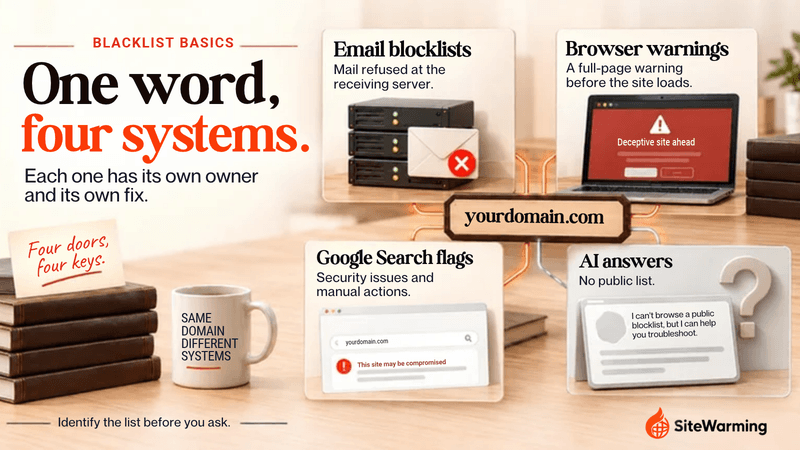
A blacklisted domain is one flagged on a reputation list that mail servers or browsers consult. Check email lists such as Spamhaus and Barracuda with their lookup tools, and browser warnings in Google's Safe Browsing site status and Search Console. The two are cleared differently, so identify the list before you ask to be removed.
Marcus runs a small architecture firm in Portland. He sends a weekly newsletter to 4,200 subscribers, past clients and referral partners he built up over two years. One Tuesday at noon, the replies stopped. Not fewer replies. None.
A contractor on his list finally wrote back: "Hey, I never get your emails anymore. I checked my spam folder. They're not even there."
They weren't in spam because they never got that far. The receiving servers were refusing them. Marcus's domain was listed on three separate databases. He had never heard of any of them, and he hadn't done anything wrong.
Nothing warned him first. The first sign was silence. The refusal itself isn't silent: RFC 5782 says the text of the blocklist record is "often used as the text of an SMTP error response." But that error goes back to whatever system sent the message, so you only see it if you read your bounces.
This guide covers what "blacklisted" means, how to check each kind, how to get off each list, and what to make of the idea that AI search engines keep a blacklist too.
What does "blacklisted" mean?
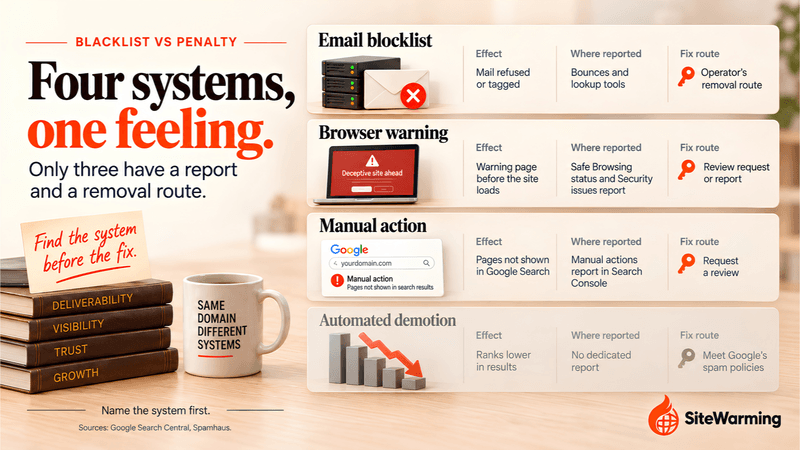
A domain can be flagged in four different places, and each is run by a different organization, checked with a different tool and cleared through a different process. Most guides treat them as one problem. They are not, and that is why people lose days submitting a request to the wrong place.
| What people call it | Who runs it | What you see | Where to check | How it clears |
|---|---|---|---|---|
| Email blocklist (DNSBL) | Spamhaus, Barracuda, SURBL and others | Mail refused with an SMTP error, or accepted and tagged for filtering | Spamhaus checker, Barracuda lookup, MXToolbox | The list operator; for the Spamhaus SBL, your ISP |
| Browser warning | Google Safe Browsing, Microsoft SmartScreen | A full-page warning before the site loads | Safe Browsing site status; open the site in Edge | Fix the site, then a review request (Google) or a report from the warning page (Microsoft) |
| Google Search flag | Google Search | A warning label in results, or pages not shown | Search Console: Security issues and Manual actions reports | Fix the site, then request a review in Search Console |
| AI answer visibility | No list documented | Your site is not cited | robots.txt, index status, Search Console | Allow the crawlers; clear any Search flag |
The next four sections take them in that order. My rule of thumb: identify the system first, because the same symptom ("people can't reach me") has four different fixes.
What is a DNSBL, and how does it block email?
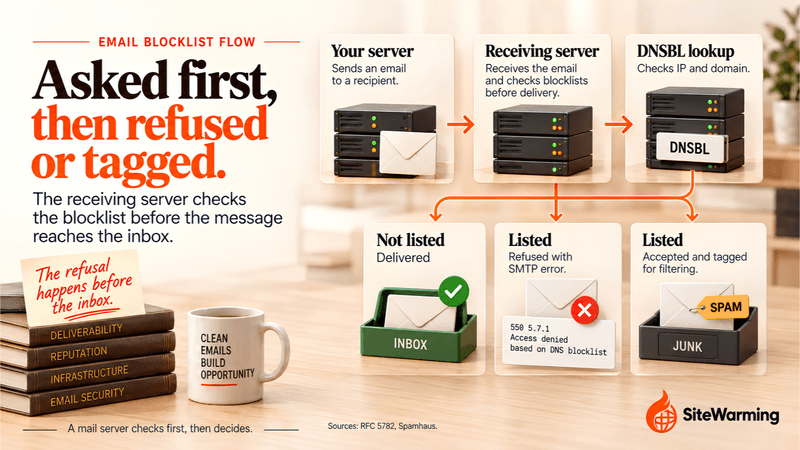
A DNSBL, short for DNS blocklist, is a list published through the Domain Name System that mail servers query as mail arrives. RFC 5782 says mail servers "typically check a list of DNSBLs on every incoming SMTP connection" and reject the connection on a match. Most lists hold IP addresses. The RFC adds that "a few DNSxLs list domain names rather than IP addresses," and those can be checked against the domains in a message's headers and in the URLs in its body.
The effect is not always a bounce. Spamhaus describes two options for whoever runs the receiving server: reject the email in real time, or accept the message and tag it for further filtering. A listing therefore does not mean every message fails. It means every receiver that uses the list gets to decide, and some will refuse you outright. That is why one recipient never hears from you while another does.
That also corrects a line you will see repeated: that a listing drops deliverability "to near zero." No source I found puts a number on it. What the sources support is narrower and still serious: refused or filtered mail at every server that consults the list.
Which email blocklists matter most?
| List | What it lists | What the operator says |
|---|---|---|
| Spamhaus SBL | IP addresses | "Identified as malicious," seen sending spam, hosting malicious content or hijacking IP space |
| Spamhaus XBL | IP addresses | Legitimate IPs "hijacked to use by third-party exploits" |
| Spamhaus DBL | Domains only | "Any domain indicating signs of spam or malicious activity," including hijacked domains |
| Spamhaus ZEN | IP addresses | One query that combines the PBL, SBL and XBL |
| Barracuda Reputation Block List | IP addresses | "A real-time database of IP addresses that have a 'poor' reputation for sending valid emails" |
| SURBL | Domains | "Domains of malicious or abused web sites," used to filter mail by the links in its body |
Two of these catch people out. The DBL lists domains only, so a clean IP does not protect a listed domain. The SBL, XBL and Barracuda lists key on the IP address, so a clean domain does not protect a listed IP.
How do you check if your domain is blacklisted?
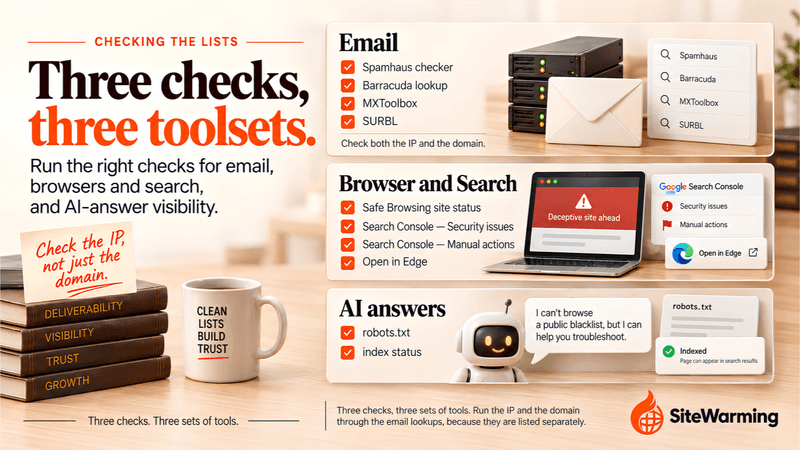
Check the domain and the IP address your mail leaves from. A clean domain on a listed IP still gets blocked, and the reverse is true for the DBL and SURBL.
Start with the bounce message. RFC 5782 says the list's own text is often used as the SMTP error, so the rejection often names the list that refused you. If you have no bounce, send yourself a message, open the full headers and read the Received lines from the bottom up to find the address your mail first appears from. If an email service sends for you, that address belongs to them, and their support team has to act on it.
Then run the lookups. Each tool covers a different set of lists, so one clean result is not an all-clear.
| Tool | What it checks | Input | Limit to know |
|---|---|---|---|
| Spamhaus IP and Domain Reputation Checker | Spamhaus lists, including the DBL and XBL | IP or domain | Spamhaus lists only. It is also where DBL and XBL removals are handled. |
| Barracuda lookup | Barracuda's reputation system | IP or domain | Removal requests accept IP addresses only |
| MXToolbox blacklist check | "Over 100 DNS based email blacklists" | Server IP or domain | Does not show your Gmail spam rate, which lives in Postmaster Tools |
| MultiRBL | "More than 200 blacklists and whitelists" | IP or domain | Mixes whitelists with blocklists, so read each list name |
| SURBL lookup | Domains of malicious or abused sites | Domain | Matters for mail that links to your domain, not only mail sent from it |
| Google Safe Browsing site status | Whether Google has flagged the site | Site address | Google's list only. It does not cover Microsoft SmartScreen. |
| Search Console, Security issues and Manual actions reports | Hacked content, malware or unwanted software, social engineering, and manual actions | A verified property | Shows only sites you have verified |
| Sucuri SiteCheck | Malware and blacklist status with "website security authorities such as Google, PhishTank, etc." | Site address | A remote scanner: it "will not detect anything on the server-side" |
| VirusTotal | A URL or domain against "over 70 antivirus scanners and URL/domain blocklisting services" | Site address | One vendor flagging you among dozens is a lead to follow up, not a verdict |
| Microsoft Edge | Open the site and see whether SmartScreen shows a warning page | The site itself | I found no public lookup page for SmartScreen |
If the browser-side checks flag you, Google sorts the cause into three groups: hacked content placed on your site without permission, malware or unwanted software, and social engineering, meaning content that tricks visitors into doing something dangerous. Knowing which group you are in tells you what to clean.
Could the listing be a false positive?
Before you panic, work out whose listing it is. A flagged address is not always yours to answer for, and the route out depends on the answer.
| Situation | What it looks like | What to do |
|---|---|---|
| You share an IP address | Your domain is clean on every domain lookup, but your sending or hosting IP is listed | Tell your host. IP-based lists key on the address, and Spamhaus says only the ISP in charge of an SBL-listed address can request removal. Ask for a clean address. |
| You bought or registered a used domain | A domain lookup shows a listing you did not cause | Look the domain up before you buy and again after. Spamhaus says most DBL listings expire automatically once the associated activity ceases, so an old listing may still be live or may have lapsed. |
| Your site was compromised | A listing you did not intend, on a domain you run | Treat it as genuine and clean up first. Spamhaus's "abused-legit" listings cover hostnames on legitimate domains that are being abused. |
Shared hosting is where this goes wrong in a way you cannot fix yourself. If your site sits on an IP address with hundreds of others and one of them sends spam, the address can be listed and the others inherit it. You woke up blacklisted on an address shared with a domain you have never heard of. The same logic applies to a used domain: the history came with the name. Your host is a different company from your registrar, and what each of them is responsible for matters when you need one of them to act.
Spamhaus itself allows for mistakes. Its DBL FAQ says: "While DBL is careful to not list innocent domains, it's possible that a domain may need to be removed from DBL before the listing expires."
The distinction matters because the request is different. For a genuine problem you fix the cause first. For a false positive you are asking the operator to remove a listing you did not earn, and you need to be able to show what happened.
How do you get delisted?
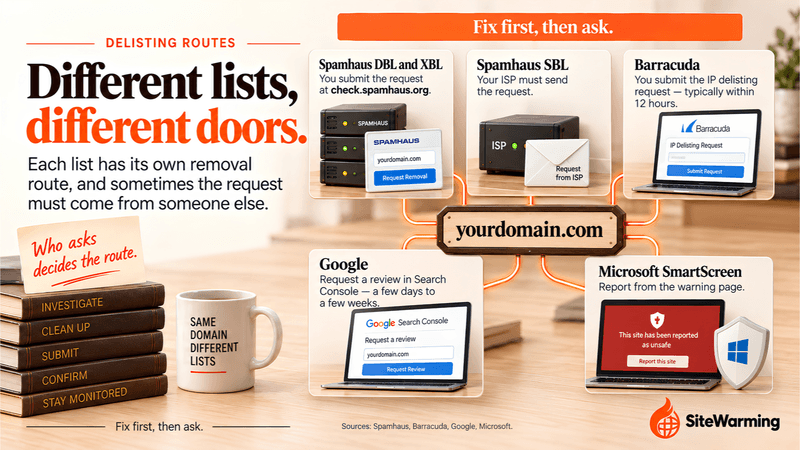
Fix the cause first, then ask. Spamhaus ties an SBL removal request to the problem being over: its SBL page says "once the abuse issue has been terminated, the ISP should request removal." Ask before you fix and the request has nothing to stand on, and if the activity continues you can be listed again.
What "fix the cause" means depends on the list:
- A hacked site or server (Spamhaus XBL or DBL, or Google's hacked content and malware categories). Spamhaus's DBL FAQ ties compromised legitimate sites to outdated software or weak security practices. Update the software, remove the injected files and pages, and change every credential that touched the server.
- Spam from your own systems (SBL, DBL, Barracuda). Find the account, form or script that is sending, stop it and confirm it has stopped before you ask for removal.
- A shared address (SBL, XBL, Barracuda). Ask your host to move you to a clean address or to handle the removal.
- Mail authentication gaps. These are not what puts a domain on a Spamhaus list, but they decide whether Gmail and Outlook.com accept your mail. Gmail's sender requirements call for SPF or DKIM from every sender and SPF, DKIM and DMARC from bulk senders, and ask you to keep your spam rate below 0.3 percent. Gmail's bulk sender FAQ defines a bulk sender as one sending close to 5,000 messages or more to personal Gmail accounts in 24 hours. For the wider picture, see why email deliverability starts before you hit send.
Then use the right route for the right list.
| List or system | Who asks | Where | What the source says about timing |
|---|---|---|---|
| Spamhaus DBL | You | check.spamhaus.org, "the only place where DBL removals are handled" | Most listings expire automatically once the activity stops. Once a removal is approved, it is "processed immediately." |
| Spamhaus XBL | You | check.spamhaus.org, "the only place where XBL removals are handled" | No time stated |
| Spamhaus SBL | The ISP in charge of the address | The SBL removal queue, after the abuse has ended | No time stated |
| Barracuda | You | Removal request form: server IP, email address, phone number | "Typically investigated and processed within 12 hours of submission if provided with a valid explanation." IPs only. |
| SURBL | You | Start from the SURBL lookup and its contact page | Not stated on the pages I read |
| Google Safe Browsing and Search flags | You | "Request a review" in the Search Console Security issues report | "A few days to a few weeks"; Google emails you when it receives the request and when the review is complete |
| Microsoft SmartScreen | Any user, including you | Report the site as safe from the warning page | No time stated |
No Spamhaus removal costs anything: its pages say there is "never any charge or fee associated with removing any Spamhaus listing." Be wary of anyone selling Spamhaus delisting.
What is the difference between being blacklisted and being penalized?
A blocklist or browser warning is a flag in a system outside Google. A Google penalty is Google's own decision about your pages, and it comes in two forms. Know which one you have before you submit anything, because a request to the wrong system gets you nowhere.
| System | Who decides | Effect | Where you see it | Fix |
|---|---|---|---|---|
| Email blocklist | The list operator | Mail refused or filtered by servers that use the list | Bounces and the lookup tools | The operator's removal route |
| Browser warning | Google Safe Browsing or Microsoft SmartScreen | A warning page before the site loads | Site status and the Security issues report | Clean the site, then request a review or report it |
| Manual action | A human reviewer at Google | Some or all of the site "will not be shown in Google search results" | The Manual actions report and the Search Console message center | Fix every affected page, then request a review |
| Automated demotion | Google's automated systems | Sites may rank lower in results or not appear in results at all | No dedicated report | Meet Google's spam policies |
The old shortcut, that blacklists block and penalties demote, does not hold. A manual action can remove a site from results entirely, and a blocklist can do no more than tag mail for filtering. Google's spam policies say violations are detected "both through automated systems and, as needed, human review that can result in a manual action."
Some domains have both. A domain can be flagged for email spam and carry a manual action for thin content, and those need separate fixes in separate systems. Do not spend three days submitting email blocklist removals if your problem is a Google manual action.
Can AI search engines blacklist your domain?
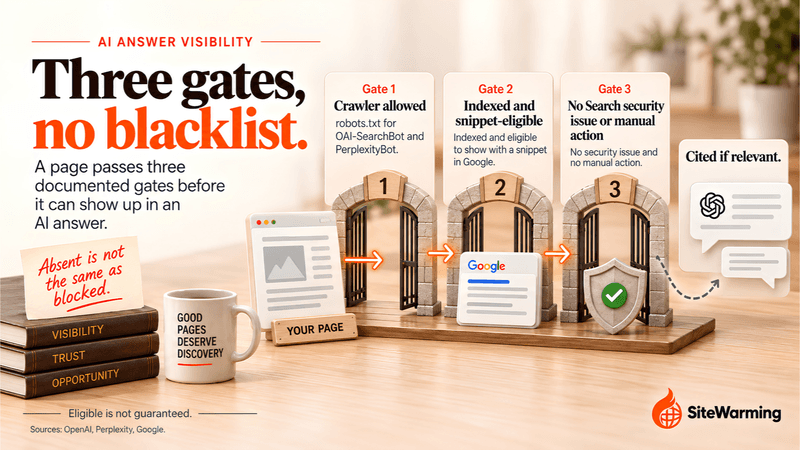
There is no public AI blacklist. I could not find one documented by Google, OpenAI or Perplexity, and I read their own pages. What is documented is smaller, duller and easier to fix.
Picture the version people worry about. Someone asks a question you can answer better than anyone. The AI system pulls from five sources, and yours is not one of them. Before you decide your domain failed a trust check, rule out the causes the vendors actually describe.
| Check | What the vendor says | Where to look |
|---|---|---|
| OpenAI's search crawler | "OAI-SearchBot is used to surface websites in search results in ChatGPT's search features." Sites opted out of it "will not be shown in ChatGPT search answers, though can still appear as navigational links." | Your robots.txt |
| Perplexity's crawler | "To ensure your site appears in search results, we recommend allowing PerplexityBot in your site's robots.txt file." | Your robots.txt |
| Google's AI Overviews and AI Mode | A page must be indexed and eligible to be shown in Google Search with a snippet, with no additional requirements | Search Console indexing reports |
| A Google Search flag | A manual action means some or all of the site is not shown in Google Search | Manual actions and Security issues reports |
The last row is the closest thing to a blocklist effect on AI answers, and it is my inference from Google's wording, not a statement Google makes: a page that Search will not show is not eligible to be a supporting link in AI Overviews or AI Mode. That is a reason to clear any Search flag, and it is the only route from a security problem to AI visibility that I could source.
What I would drop is the idea that Perplexity or ChatGPT exclude spam-associated or thin domains from citations "entirely." I found no vendor documentation for that, and no published list of trust criteria. Being absent from an AI answer is not evidence of a block, because these systems also just choose what is relevant. A spot check, asking an AI search tool a question your pages answer, tells you whether you are cited. It does not tell you why. For the reasons real sites get ignored, read how AI search engines decide which domains to trust and why a domain with no content doesn't show up in AI search.
How do you keep a domain off blocklists?
Here's what I wish someone had told Marcus before that Tuesday. Some of this you cannot control, such as a neighbor on a shared IP address. A lot of it you can.
The pattern I keep seeing is that the domains that end up flagged look like they belong to nobody. No live page, no one watching the inbox, mail records half set up, software that has not been touched in years. Spamhaus's reasoning about unknown domains is blunt. Its DBL FAQ says: "Experience has shown that an unknown reputation has a much higher risk of emitting spam than known-good domains, so unknown reputations begin as 'poor' by default." A name with no record gets no benefit of the doubt, and a name nobody looks after is easy for someone else to use.
| Habit | Why it matters | Source |
|---|---|---|
| Patch software and lock down accounts | Spamhaus lists legitimate sites that have been compromised, and ties many to outdated software or weak security practices | Spamhaus DBL FAQ |
| Authenticate your mail with SPF, DKIM and DMARC | Gmail requires SPF or DKIM from every sender and all three from bulk senders | Gmail sender requirements |
| Keep spam complaints low | Gmail asks you to keep your spam rate below 0.3 percent, and its bulk sender FAQ recommends staying under 0.1 percent | Gmail bulk sender FAQ |
| Know your sending IP and who shares it | The SBL, XBL and Barracuda lists key on the address, not the domain | Spamhaus blocklists |
| Check a domain's history before you buy it | DBL listings expire after the activity stops, so an old listing may still be live | Spamhaus DBL FAQ |
| Re-check on a schedule | My suggestion, not a sourced figure, is monthly: the Spamhaus checker, Safe Browsing site status, and the Security issues and Manual actions reports | |
| Keep your contact email monitored | Google notifies you of manual actions in the report and the message center | Manual actions report |
If you run several domains on one host, the collateral-damage scenario is worked through in Can an Expired Domain Hurt Your Other Domains or Brand? For how trust signals build up around a domain in the first place, see trust is a system.
How do you check blocklists across a whole portfolio?
With one domain, this is a short monthly check. With thirty, nobody does it, and the domains you have stopped thinking about are the ones nobody would notice going wrong.
SiteWarming's domain renewal tool puts every domain across every registrar in one view. Add domains singly, import a CSV, or connect a registrar or MCP, and it shows what is live, what leads nowhere and what is approaching renewal. The free plan tracks up to 1,000 domains. The domain health check treats blocklist status as part of a domain's technical configuration, and the guide to managing domains across multiple registrars explains how to keep that view without moving any domain.
Launch & Warm, covered in how it works, puts a live page behind the name and a contact path that lets people who want to build, partner or make an offer reach you. It does not remove a listing or prevent one. What it gives a dormant domain is a page someone can see and a way for people to reach you, which is more than a name that points at nothing. If you are new to the idea, start with what SiteWarming is.
Frequently asked questions
How do I check if my domain is blacklisted?
Look up both the domain and the IP address your mail is sent from. Use Spamhaus's IP and Domain Reputation Checker, Barracuda's lookup and MXToolbox for email lists. For browser warnings, use Google's Safe Browsing site status and the Security issues report in Search Console, then open the site in Edge to see any SmartScreen warning.
What is a DNSBL?
A DNSBL, or DNS blocklist, is a list published through the DNS that mail servers query when a message arrives. RFC 5782 describes it as a zone in the DNS. Most list IP addresses. A few, such as Spamhaus's DBL and SURBL, list domain names. A listed sender can be refused with an SMTP error.
How long does it take to get removed from a blacklist?
It depends on the list. Barracuda says removal requests are typically processed within 12 hours with a valid explanation. Spamhaus says approved DBL removals are processed immediately, and most DBL listings expire on their own once the activity stops. Google says a security review takes from a few days to a few weeks.
Why is my email blocked if my domain is not listed?
The block may sit on your sending IP rather than your domain, or it may not be a blocklist at all. Gmail requires SPF or DKIM from every sender, adds DMARC and one-click unsubscribe for senders of close to 5,000 messages a day, and expects spam rates below 0.3 percent.
Can a shared hosting IP get my email blocked?
Yes. IP-based lists such as the Spamhaus SBL, the XBL and Barracuda's list key on the address, so every site and mailbox on a shared address inherits a listing. Spamhaus says only the ISP in charge of an SBL-listed address can request removal, so contact your host and ask for a clean address.
How do I remove a Google Safe Browsing warning?
Fix the cause across the whole site first, whether that is hacked content, malware or phishing pages. Then open the Security issues report in Search Console and request a review, explaining what you cleaned. Google says a review can take from a few days to a few weeks, and it emails you when the review is complete.
What is the difference between a blacklist and a Google penalty?
A blocklist or browser warning is a flag in a separate system that refuses mail or warns visitors. A Google manual action is a human reviewer's finding that pages break its spam policies, and some or all of the site will not be shown in search results. Search Console lists manual actions. Email blocklists do not appear there.
Can my domain be blacklisted by AI search engines?
No public AI blocklist exists, and none of the sources I checked document one. What is documented is narrower: sites that opt out of OAI-SearchBot are not shown in ChatGPT search answers, Perplexity recommends allowing PerplexityBot, and Google's AI features only link to pages that are indexed and eligible to show in Search with a snippet.
Should I check a used domain's blocklist status before I buy it?
Yes. Look the domain up in Spamhaus's reputation checker before you pay, and again after you register it. Spamhaus says most DBL listings expire automatically after the associated activity stops, so an old listing may still be live or may have lapsed. Also check what the domain served before you bought it.
Related reading
- Can an Expired Domain Hurt Your Other Domains or Brand?: the collateral-damage scenario for people who run more than one domain.
- Email Deliverability Starts Before You Hit Send: why legitimacy now counts alongside authentication.
- How AI Search Engines Decide Which Domains to Trust: what AI systems reward when they choose sources.
- Can a Domain With No Content Show Up in AI Search?: why an empty domain is invisible to AI search rather than penalized.
- Trust Is a System, Not a Feeling: how trust is built from verifiable signals.
- What Actually Happens When Your Domain Expires: the expiry timeline, day by day.
Share this article
Ready to Transform Your Domain Portfolio?
Start building real value with your domain investments today.