Email Deliverability Starts Before You Hit Send: What a New Domain Needs First
 Bret Siers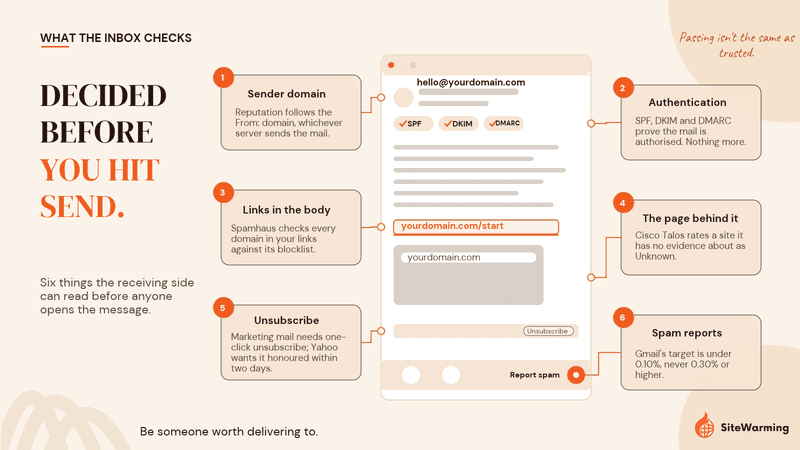
Email deliverability for a new domain is decided before the first send. SPF, DKIM and DMARC prove a message is authorized, but mailbox providers and security filters also weigh the domain itself: its age, its sending history, and whether its links lead to anything with a reputation. A domain with no history starts as unknown.
Why did my email go to spam when SPF, DKIM and DMARC all passed?
I sent an email last month from a domain I've owned for years. Clean content. Short subject line. SPF was configured. DKIM was signed. DMARC was published and enforced.
It went to spam.
Not the promotional tab. Spam. The folder nobody checks unless they're looking for a missing confirmation code.
I spent an hour reviewing the headers, checking authentication records, running the message through deliverability tools. Everything looked right. The domain resolved. The records matched. The content wasn't triggering any known filters.
The domain had no website. It had never sent mail at volume. From the outside, nothing about it said a real business lived there.
One send doesn't prove cause, and I won't pretend it does. But it matched a pattern I keep seeing with founders who register a name, leave it dark for years, and then point email at it the week they launch: the records are perfect and the mail still lands in spam.
Most domain owners assume email deliverability is about what's inside the email. The content, the subject line, the authentication records. You set up SPF, DKIM and DMARC, and you believe you've done your part.
That used to be closer to true. It isn't anymore. Authentication tells the receiving server the message is allowed to come from your domain. It says nothing about whether your domain deserves to be trusted.
What changed in Gmail, Yahoo and Outlook sender requirements?
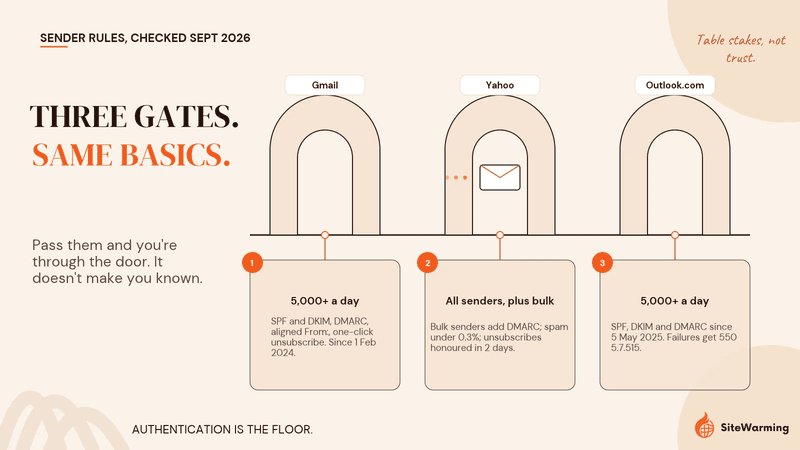
Since February 2024 the three largest consumer mailbox providers have turned authentication from best practice into a condition of delivery. Here is what each one actually requires, taken from their own documentation and checked again in September 2026.
| Provider | Who it applies to | What is required | In force since |
|---|---|---|---|
| Gmail | Senders of more than 5,000 messages a day to personal Gmail accounts | SPF and DKIM, a DMARC record, From: domain aligned with SPF or DKIM, valid forward and reverse DNS, TLS, one-click unsubscribe for marketing mail, spam rate kept below 0.10% and never at 0.30% or higher | 1 February 2024; stricter enforcement, including rejections, from November 2025 |
| Yahoo | All senders, with extra rules for bulk senders | All: SPF or DKIM, spam rate below 0.3%, valid forward and reverse DNS. Bulk: SPF and DKIM, DMARC of at least p=none that passes, From: alignment, one-click unsubscribe honored within 2 days | February 2024 |
| Outlook.com, Hotmail, Live | Senders of 5,000 or more messages a day to those consumer domains | SPF and DKIM that both pass, a DMARC record of at least p=none, and DMARC alignment with the From: domain. Mail that fails is rejected with error 550 5.7.515 | 5 May 2025 |
Sources: Google Email sender guidelines, Yahoo Sender Best Practices, Microsoft Defender for Office 365 blog, Microsoft Support
Google first announced the Gmail rules in October 2023, alongside Yahoo, as authentication, one-click unsubscribe and a spam rate threshold (Google Keyword blog). Then enforcement got harder, not softer. From November 2025, Google's own FAQ warned that "messages that fail to meet the email sender requirements will experience disruptions, including temporary and permanent rejections," as reported by deliverability specialist Al Iverson at Spam Resource. Mail that used to be filed in spam can now be refused at the door.
Microsoft took the same line. Outlook.com now refuses high-volume mail that misses its requirements with the error "550 5.7.515 Access denied, sending domain does not meet the required authentication level" (Microsoft Support). The published rules themselves haven't moved since 2024 at Gmail and Yahoo, or since May 2025 at Microsoft. What has changed is how hard they are enforced.
These weren't suggestions. They were gates. But the gates are table stakes. Every serious sender, and every serious spammer, can pass them.
Why did Google remove domain reputation from Postmaster Tools?
The more telling change came on 30 September 2025, when Google retired the old Postmaster Tools interface and the Domain Reputation and IP Reputation dashboards went with it (MessageGears). In their place, the new version offers a Compliance dashboard that shows whether you meet the sender guidelines (Google Postmaster Tools deprecation notice). Google's stated reason is that the old dashboard "can be misleading as reputation is only one of many factors affecting deliverability."
That is Google's framing. Here is mine. The old dashboard answered "What's your score?" The new one answers "Do you meet the bar?" and leaves the rest of the evaluation out of view. Reputation didn't stop mattering. It stopped being something you can look up.
Trust operates the same way across digital systems. Search engines, email filters and AI models don't evaluate your intentions. They evaluate your signals. The inbox is no longer a delivery mechanism. It is a trust environment.
What do spam filters check besides SPF, DKIM and DMARC?
Authentication protocols confirm that an email is technically from who it claims to be. SPF checks that the sending server is allowed to send for the domain. DKIM checks that the message was signed by the domain and not altered. DMARC ties the two to the visible From: address and tells receivers what to do when they fail.
They are necessary. They are no longer sufficient.
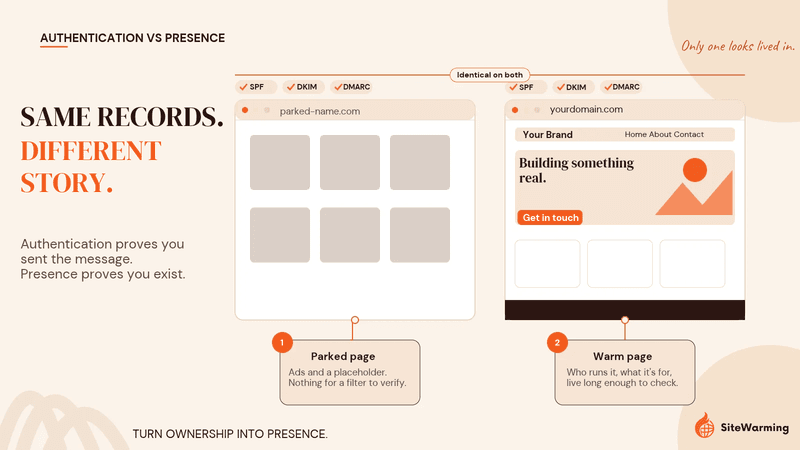
Authentication proves you sent the message. Presence proves you exist.
Here is what the receiving side can see about your domain beyond the authentication result, and who is looking.
| Signal | What gets checked | Who checks it | Source |
|---|---|---|---|
| Domain reputation | The track record of the domain in your From: address, which persists across sending servers | Mailbox providers such as Gmail, which now prioritise domain signals over IP | Allegrow |
| Newly registered domains | Whether the domain was registered in the last 24 hours | Mail systems using Spamhaus's Zero Reputation Domain list | Spamhaus ZRD FAQ |
| Domains inside the message | Sender domains, HELO names and every domain in links or contact addresses in the body, against a domain blocklist | Mail systems using the Spamhaus Domain Blocklist | Spamhaus DBL |
| Web reputation | URL categorisation, age and history of the URL, registrar and network-owner information, blocklist presence | Corporate security gateways using Cisco Talos scores | Cisco WBRS FAQ |
| Recipient response | The share of recipients marking your mail as spam | Gmail, against its 0.10% target and 0.30% ceiling | Google Email sender guidelines |
| Sending pattern | Whether volume ramps gradually to engaged recipients or arrives all at once | Every major receiver during warm-up | Postmark warm-up guide |
Why does domain reputation matter more than IP reputation now?
Allegrow's knowledge base, updated in January 2026, puts it plainly: "Mailbox providers like Gmail now prioritize domain signals over IP, because domains are harder to swap than IPs" (Allegrow). The reasoning is structural. IPs are trivial to rotate, especially on shared sending infrastructure. The domain in your From: address stays constant and is tied to your brand.
For a founder, this is the uncomfortable part. You can switch email providers in an afternoon. You cannot switch the reputation of the domain you've already printed on your pitch deck.
Why do new domains start with low trust?
Because the receiving side can't tell a founder's new domain from an attacker's, and attackers register a great many of them. Spamhaus's latest six-monthly report counted 2.15 million malicious domains detected between October 2025 and March 2026 (Spamhaus Domain Reputation Updates). In the six months before that, 43.5 million new domains of every kind were registered (Spamhaus, April–September 2025), and filters have to judge each one with no history to go on. Spamhaus's Zero Reputation Domain list flags newly registered domains for their first 24 hours, so mail administrators can hold them at arm's length before any reputation exists (Spamhaus ZRD FAQ).
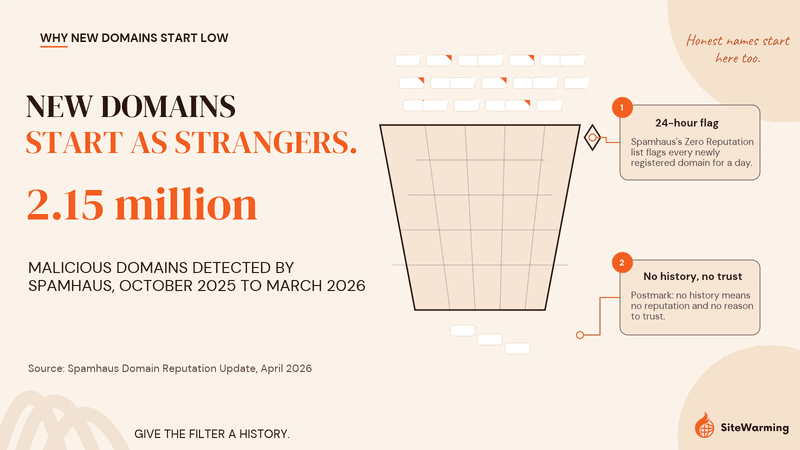
Postmark's guide sums up the starting position: "No history means no reputation and there's no reason to trust your emails" (Postmark). That score doesn't rise because you ask nicely. It rises with consistent legitimate behaviour over time. Search has its own version of this waiting period, which I've written about as the sandbox tax.
Here's the catch for people who sit on domains. A name you registered five years ago and never used is old, but it isn't established. Age with no activity is just a date in WHOIS. So filtering systems are left asking a simple question about every domain that sends an email: does this look like someone's home, or does it look like a rented room?
Does a domain need a website to get emails into the inbox?
No mailbox provider lists a website as a sender requirement. Gmail, Yahoo and Microsoft publish their rules, and none of them says "have a homepage." Anyone who tells you a website is a documented Gmail ranking factor is guessing.
What is documented is that filters look at your domain wherever it appears, including every link in the message. The Spamhaus Domain Blocklist checks domains found in message bodies, "URLs or contact email addresses" (Spamhaus DBL). Corporate gateways score the web reputation of those URLs, and Cisco Talos rates a site it has no evidence about as "Unknown: not previously evaluated, or lacking features to assert a threat level verdict." Even a Trusted rating, Talos says, requires "substantial positive evidence over time" (Talos web reputation levels).
So a website is not a switch that moves you from spam to inbox. It is the thing that lets every other signal attach to something. My position, from first-hand experience rather than a published rule, is this: an empty domain gives the receiving side nothing to evaluate, and nothing to evaluate is not the same as nothing wrong.
There is a human side too. A recipient who doesn't recognise you may type your domain into a browser before replying. A parking page gives them no reason not to press "Report spam," and those reports feed the spam rate Google holds against its 0.30% ceiling.
What is the difference between a registered domain and a legible one?
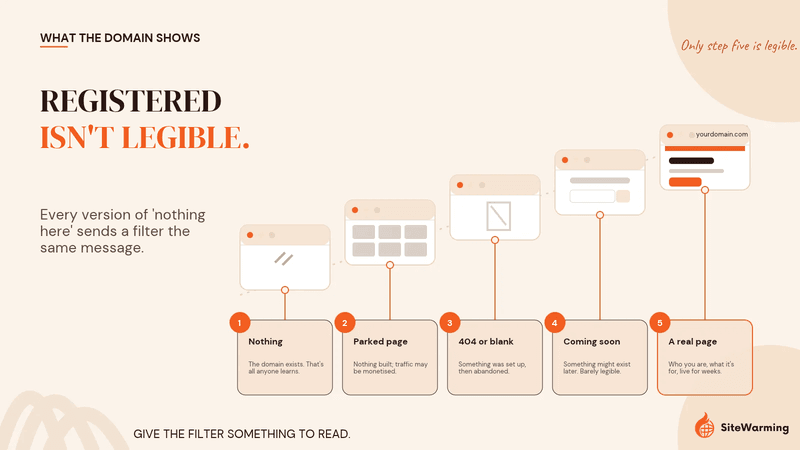
A domain can be technically valid. DNS resolves. MX records are set. Authentication is configured. Every protocol checks out.
And it can still fail the legitimacy evaluation.
A registered domain has records. A legible domain has records plus something a machine or a person can read: who runs it, what it is for, and evidence that it has been there a while. Filtering systems can't distinguish between a domain that exists because a founder registered it and forgot it, and a domain that exists because someone registered it to run a phishing campaign. Both resolve to nothing. Both look the same from the outside.
The difference between a parking page, a 404, and an empty site matters because each one tells the machine something different about whether a real entity exists behind the domain. But every version of "nothing here" carries the same message to an evaluation system.
| What the domain shows | What a filter or recipient can learn | Legible? |
|---|---|---|
| Nothing (no A record, or a connection error) | That the domain exists and nothing else | No |
| Registrar parking page with ads | That the owner has not built anything, and may be monetising traffic | No |
| 404 or blank server page | That something was set up and then abandoned | No |
| "Coming soon" with a signup form | That something might exist later | Barely |
| A real page that says who you are and what the domain is for, live for weeks | A named entity, a purpose, and a history that can be checked | Yes |
The domain is registered. The domain is not legible. Those are different states, and filtering systems treat them differently.
And this is before engagement signals even enter the picture. Open rates, click rates and reply rates matter too, but they come after placement. If the email never lands in the inbox, there's no engagement to measure.
How long does it take to warm up a new email domain?
The email deliverability industry calls the process of building a new domain's sending reputation "domain warming." Postmark's guide, last updated in May 2025, says most senders "can expect their domain to have an established reputation and dependable full-volume deliverability in 3-6 weeks." It suggests starting with 50 to 100 emails to each major provider on the first two days, roughly doubling each day at first, then slowing to 20 to 50% daily growth once volume is substantial, and sending to the most engaged recipients first (Postmark warm-up guide).
That word means two different things on the web, and the difference matters here. Email warming ramps up sending volume. Site warming builds the presence behind the domain. I've laid out the difference between domain warming and email warming separately, and what site warming is and why it isn't email warming if you want the longer version.
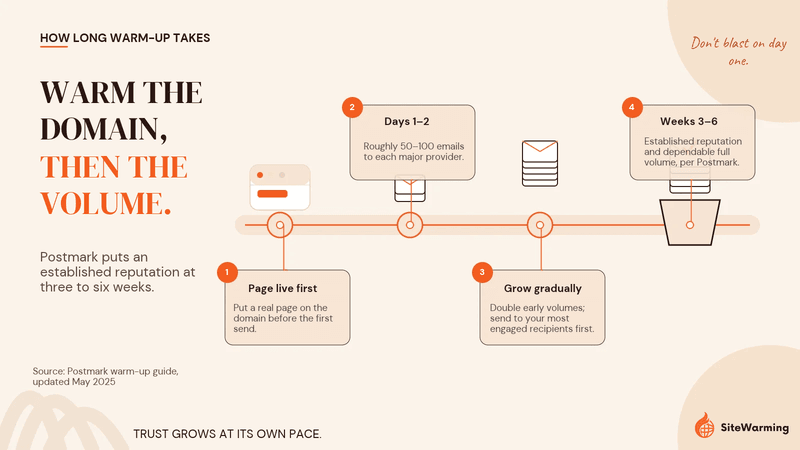
Warming the sending side without warming the domain is building on nothing. You're asking filtering systems to trust a domain that resolves to silence, for weeks, while every link in your emails points back at that silence.
What filtering systems can work with is simpler than most people expect. A domain that resolves to something real. Content that says what this entity is. Activity over time. Evidence that a human built this, not that a registrar generated a placeholder.
That's infrastructure, not marketing. It builds visibility over time, not overnight. You don't need a content strategy. You need evidence that someone exists behind the domain, and you need it in place before the warm-up starts, not after. One real page that says who you are and what the domain is for is enough to begin, and it's the job Launch & Warm was built to do without turning it into a build project.
What should you check before sending email from a new domain?
Before you touch your email content, run this check. The first four items are the documented provider requirements. The last four are the domain-side work that the requirements don't cover.
- Publish SPF and sign with DKIM. Gmail requires both for senders of more than 5,000 messages a day, and Yahoo requires both for bulk senders (Google, Yahoo).
- Publish a DMARC record and align your From: domain. A policy of at least p=none that passes, with the From: domain matching the SPF or DKIM domain.
- Confirm forward and reverse DNS for your sending IPs, and send over TLS. Your email provider usually handles this; check that it does.
- Add one-click unsubscribe to marketing mail and honour it within two days. Yahoo sets the two-day window explicitly.
- Does your sending domain resolve to a real page? Open a browser, type the domain. If you see a parking page, a registrar placeholder, or nothing, that's what the filtering system sees too.
- Does that page describe what the entity actually does? Not a coming soon page. Not a signup form. Something that answers "who is this?"
- Has the domain had consistent web activity for more than 30 days? Filtering systems look for patterns over time, not one-time setups. Thirty days is my working threshold, not a published rule.
- Is the domain on any blocklist? Check before the first send, not after the first bounce. My guide on how to check if your domain has been blacklisted covers the tools and the delisting process.
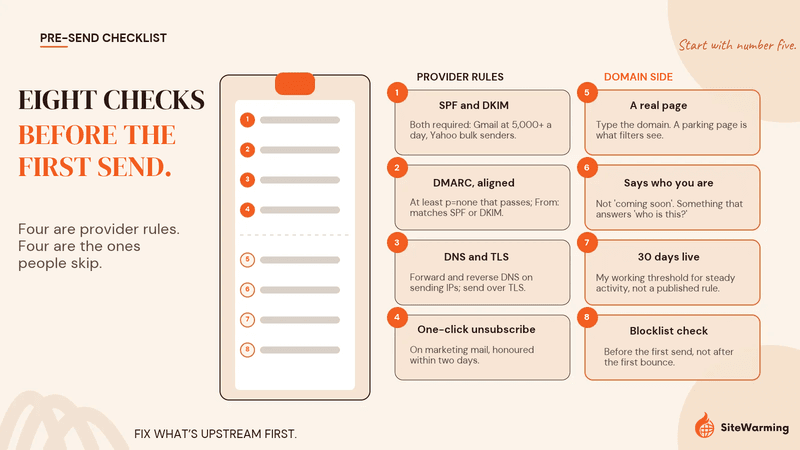
If any answer is no, fix that before optimising subject lines or send schedules. The deliverability bottleneck is upstream of the email.
For a single domain, a browser and a DNS lookup will do. Most founders who buy names faster than they build, and every domainer, hold dozens or hundreds of them across several registrars, and there the first job is knowing which ones resolve to anything at all. A domain health check covers the basics for one name. For the whole set, the SiteWarming domain management tool shows every domain from every registrar in one view, including which are live and which lead nowhere.
What mistakes hurt a new domain's deliverability most?
These are the ones I see most often with founders who finally put a long-held domain to work.
- Treating authentication as the finish line. Passing SPF, DKIM and DMARC means you're allowed through the gate. It doesn't mean you're welcome.
- Sending a launch blast on day one. Full volume from a domain with no sending history is what the warm-up guidance exists to prevent.
- Leaving the domain parked while email goes live. Every link in your message points to a page that says nobody is here.
- Linking to someone else's domain for everything. If your emails link only to a shared landing-page builder or a link shortener, your own domain never builds a web footprint of its own.
- Waiting for a problem to check blocklists. A listing you find before sending costs you a form. A listing you find after costs you a campaign.
Why does a domain's presence matter beyond the inbox?
Every channel checks the same underlying signals. Your email filter checks the domain. Your search engine checks the domain. Your AI model checks the domain. They're all asking variations of the same question.
The same question gets asked when AI systems try to read a parked domain. No presence, no context, no signal. The system has nothing to evaluate. The way AI search engines decide whether to trust a domain runs on the same raw material: who is behind it, what it says, and how long it has been saying it.
This gets bigger when AI agents start acting on behalf of users. The domains they can verify are the ones that show up in the decisions those agents make. That's where domain identity starts to matter beyond the inbox, and that shift is bigger than email. But the inbox is where most domain owners first encounter the principle in a way that costs them something. An email that never arrives is a concrete loss. It makes the abstract real.
Two terms worth defining
I use two phrases for this, and I'll define them so there's no ambiguity.
- Filtering (as legitimacy evaluation): the process by which email, search and AI systems evaluate whether a domain represents a real entity. Not just whether it meets technical standards, but whether it can be verified as legitimate through observable presence.
- Machine legitimacy: the state of being verifiable by automated evaluation systems based on observable domain presence, consistent activity and provable identity, rather than solely on technical authentication records. It's the state where email, search and AI systems can look at a domain and confirm: yes, something real is here. Someone built this. It has context, continuity and coherence.
What does this mean if you own domains you haven't built on?
If you send emails from a domain, that domain's web presence is part of the email equation. No provider will tell you it's a formal requirement. Every filter that looks at your links, your age and your history will still see it, or see its absence.
Authentication is table stakes. Presence is what keeps you in the room.
The pushback is obvious. "I set up SPF, DKIM and DMARC. That should be enough." It was closer to enough before February 2024. It is necessary but not sufficient now.
The shift is not toward complexity. It is toward coherence. Does this domain look like what it claims to be? Does the email match the web presence? Does the web presence match the sending pattern? Does the pattern match the behaviour of a real entity?
Domain reputation is built from everything your domain makes visible, not from any one record. And the signals that build reputation aren't just for email. They're the same signals that determine whether machines can read your content at all.
How do you apply this across every domain you own?
Most people reading this don't own one domain. They own a drawer of them: names bought faster than they could be built, or a portfolio of hundreds spread across three or four registrars. Each one is a possible sending domain. Each one that resolves to nothing starts the trust clock at zero while you keep paying to renew it, and anyone who does look it up finds nobody to talk to.
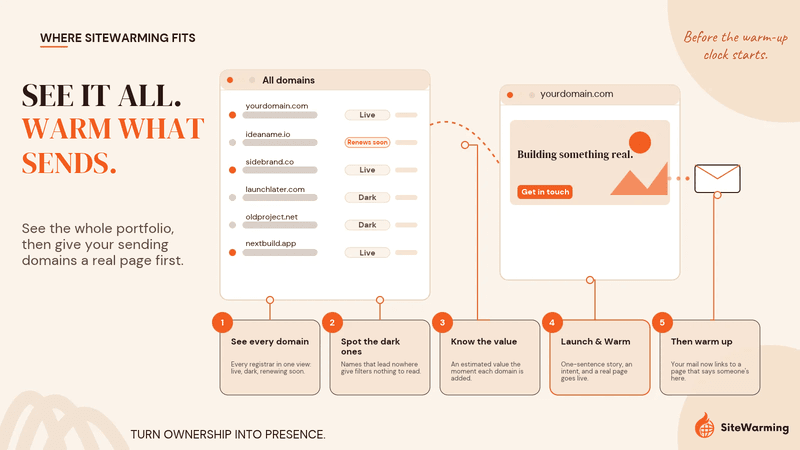
So the work has two parts, and we built one tool for each.
The first is seeing. The SiteWarming domain management tool puts every domain from every registrar in one view. You add names one at a time, import a CSV, connect a registrar or use the MCP server. It shows which domains are live, which lead nowhere, and which are coming up for renewal. It fetches a HumbleWorth valuation for each name automatically and stacks appraisals from 15+ sources beside it. That's how you find the names you'll actually send from, and the dark ones you're renewing without a plan. For a domainer it doubles as the keep, warm, sell or drop list.
The second is acting. For the names worth keeping, Launch & Warm puts a real page on the domain before the warm-up clock starts. You describe the domain in one sentence and choose an intent: Future Build, Open or Actively Selling. A warm site goes live with a domain analysis, AI-readable FAQs, structured story data and a protected, anonymous inquiry path. DNS, HTTPS, hosting and ongoing DNS and SSL checks are handled. By the time you send your first email, the domain already has something to say, and anyone who wants to reach you about it has a way in.
The inbox asks the same question the search engine asks. The same question the AI asks. Is anyone actually here?
Frequently asked questions
Why are my emails going to spam even with SPF, DKIM and DMARC set up? Because authentication only proves the message is authorised to come from your domain. Filters also weigh the domain's reputation, how new it is, the domains in your links, how recipients respond and whether your volume ramped gradually. A domain with no sending history and nothing live on it gives them little reason to trust you, even when every record passes.
Does domain age affect email deliverability? Mainly when the domain is new. Spamhaus flags newly registered domains for their first 24 hours, and a domain with no history has no reputation for filters to rely on. But age alone isn't enough. A domain registered years ago that has never sent mail or hosted a site is old without being established, so it still needs a warm-up.
Do I need a website to send email from my domain? No mailbox provider lists a website as a requirement, so you can send without one. But filters check the domains in your messages against blocklists and web reputation services, and a domain with nothing on it has no reputation to check. A real page that says who you are gives those signals, and wary recipients, something to verify.
How long does it take to warm up a new email domain? Postmark says most senders can expect an established reputation and dependable full-volume deliverability in three to six weeks. Start with 50 to 100 emails to each major provider on the first two days, send to your most engaged recipients first, roughly double at first and then grow 20 to 50% a day. Have the domain's web presence in place before the warm-up begins.
What are Gmail's bulk sender requirements? Senders of more than 5,000 messages a day to personal Gmail accounts need SPF and DKIM, a DMARC record, a From: domain aligned with SPF or DKIM, valid forward and reverse DNS, TLS, and one-click unsubscribe for marketing mail. Google asks you to keep spam below 0.10% and never reach 0.30%. The rules took effect on 1 February 2024, and since November 2025 non-compliant mail can be rejected.
Can I send email from a domain that has been parked for years? Yes, but treat it as a new sender. A domain that has sat parked for years is old without being established: it has no sending history and nothing live for filters or recipients to check. Replace the parking page with a real page that says who you are, set up SPF, DKIM and DMARC, then warm up the volume gradually over several weeks.
Share this article
Ready to Transform Your Domain Portfolio?
Start building real value with your domain investments today.