Domain Warming vs Email Warming: What Is the Difference?
 Bret Siers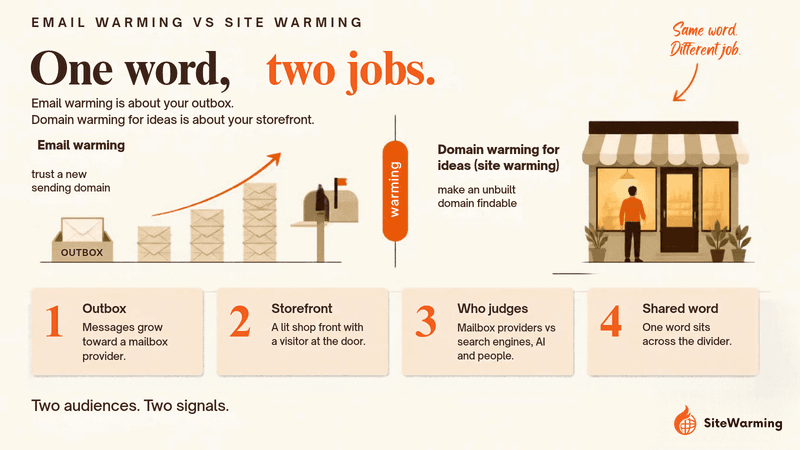
Email warming and domain warming for ideas are different practices that share a word. Email warming slowly raises send volume so Gmail, Yahoo and Outlook trust a new sending domain. Domain warming for ideas, which we call site warming, puts a structured page and contact path on an unbuilt domain so search engines, AI and people can find it.
Search "domain warming" and the results are about email. Specifically, they are about sending: how to ramp up a new email domain so your messages don't land in spam. It's a real practice, it's well documented, and it's routine for anyone who sends email at volume.
That definition isn't wrong. But it's not the only one.
There is a second meaning of "domain warming" that has nothing to do with inboxes. For a long time it didn't have a name. We call it site warming, and this article separates the two: what each one does, where they differ, and which one your domain needs.
How do domain warming and email warming differ?
They differ in what you are trying to prove, who is judging you, and what failure looks like. Email warming proves to mailbox providers that you are a legitimate sender. Domain warming for ideas proves to search engines, AI systems and visitors that a domain is a real project and not an abandoned one.
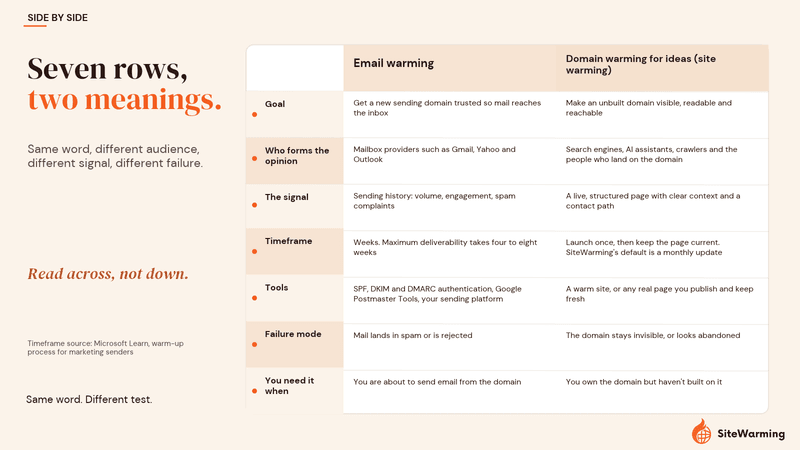
| Email warming | Domain warming for ideas (site warming) | |
|---|---|---|
| Goal | Get a new sending domain trusted so mail reaches the inbox | Make an unbuilt domain visible, readable and reachable |
| Who forms the opinion | Mailbox providers such as Gmail, Yahoo and Outlook | Search engines, AI assistants, crawlers and the people who land on the domain |
| The signal | Sending history: volume, engagement, spam complaints | A live, structured page with clear context and a contact path |
| Timeframe | Weeks. Microsoft's guidance says maximum deliverability takes four to eight weeks | Launch once, then keep the page current. SiteWarming's default is a monthly update |
| Tools | SPF, DKIM and DMARC authentication, Google Postmaster Tools, your sending platform | A warm site, or any real page you publish and keep fresh |
| Failure mode | Mail lands in spam or is rejected | The domain stays invisible, or looks abandoned |
| You need it when | You are about to send email from the domain | You own the domain but haven't built on it |
The rest of this article goes through each side in turn. If you are here because you own a domain you haven't built, the email half is short by design.
What is email warming?
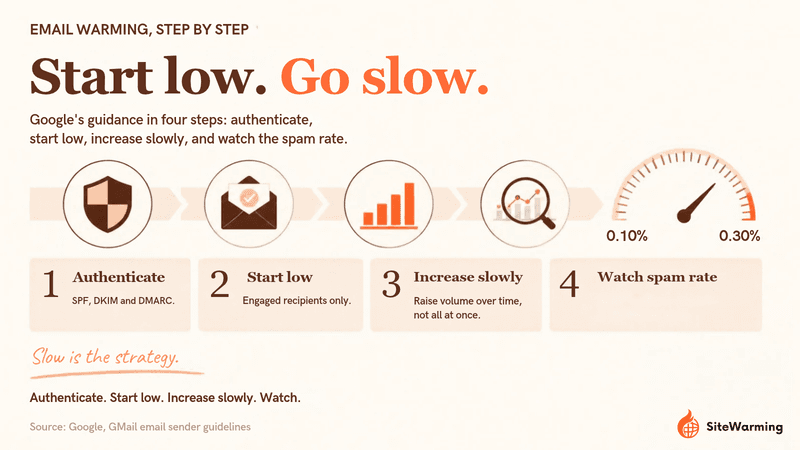
Email warming, also called email domain warm-up, is the process of building a sending reputation for a new domain by sending in small, engaged batches and increasing volume gradually. Microsoft's documentation defines it plainly: "Domain warming is the process of methodically adding email volume to a new domain over several days or weeks."
Honestly, this part is straightforward. When you set up a brand new domain for sending email, inbox providers don't trust you yet. No history, no reputation. If you blast 10,000 emails on day one, you look like exactly the kind of sender providers filter. So you start small and scale up. You send a handful of emails. Then a few dozen. Then a few hundred. Over weeks, providers see consistent volume, low bounce rates and real engagement, and they start letting your messages through.
The providers that set the rules say the same thing in their own words:
- Google: "Start with a low sending volume to engaged users, and slowly increase the volume over time." Google also asks bulk senders, those sending about 5,000 messages or more a day to Gmail, to authenticate with SPF, DKIM and DMARC and to keep the spam rate reported in Postmaster Tools below 0.10%, never reaching 0.30%.
- Yahoo: bulk senders must implement SPF and DKIM, publish a valid DMARC policy of at least p=none, and keep the spam rate below 0.3%.
- Microsoft: its guidance suggests starting with recipients who opened or clicked in the past 30 days during the first two weeks, then widening to 60 days, and avoiding recipients with no engagement in 90 days for the first six weeks.
That is the whole practice. It is proven, it is measurable, and it works. It is also entirely about your outgoing mail reputation. It has nothing to do with search engines, web visibility, or what AI systems see when they read the web.
What is domain warming for ideas (site warming)?
Domain warming for ideas is the practice of giving a registered but unbuilt domain a live, structured presence so it can be found, read and trusted. We use one definition of it across this site, so here it is exactly as it appears in What Is Site Warming? (And Why It's Not Email Warming):
Site warming is the practice of establishing a domain's presence, signals, and visibility before you need them. That word "before" is doing real work in that sentence. Not before you launch a big marketing campaign. Not before you close a funding round. Before any of that. Sometimes before you even have a product.
Here is where the two meanings split. Think about a domain you registered because you had an idea. Maybe it was a product. Maybe it was a project name. Maybe it was just a phrase that felt right at 2 a.m. and you grabbed it before someone else could.
Now think about what happened next. Probably nothing. The domain sat there, parked, dark, or pointing at a page that says "Coming Soon" with no date attached. You renewed it because letting it go felt worse than keeping it, but you didn't build anything on it either.
That domain isn't sending emails. It doesn't need deliverability. What it needs is something else entirely. It needs to be visible, discoverable, and recognizable as something real, not abandoned.
Warming a domain for ideas means adding structured content, context, and signals that tell both humans and machines: there's an idea here, someone is behind this, it's alive. Not a full website. Not a finished product. Just enough presence that the domain stops being invisible.
For the longer version of what site warming is, and what it is not, read What Is Site Warming? For the brand and the service behind the term, see What Is SiteWarming? The Third State Between Parked and Built.
What does a warm domain look like? (The meal-prep example)
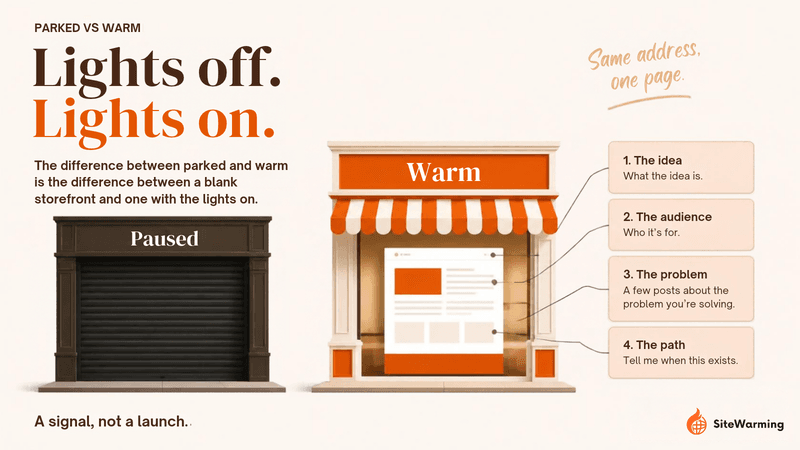
Say you own a domain for a meal prep service you've been thinking about. Right now it's parked. A warm version has a single page: what the idea is, who it's for, a few posts about the problem you're solving, and a way for someone to say "tell me when this exists."
No app. No launch. But the domain is readable and building presence while you figure out the rest.
The difference between parked and warm is the difference between a blank storefront and one with the lights on.
| Parked meal-prep domain | Warm meal-prep domain | |
|---|---|---|
| What a visitor sees | An ad page or a "Coming Soon" placeholder | One page: the idea, who it's for, and how to reach the owner |
| What search engines and AI can read | A template page with nothing to interpret | Structured content that machines can read and humans can understand |
| How the owner hears about interest | They don't | A "tell me when this exists" path |
| What it asks of you | Nothing, which is why it stays that way | One page, not an app and not a launch |
A parked domain tells search engines nothing, AI models nothing, visitors nothing. A warm domain has structured content that machines can read and humans can understand. That's not a launch. It's a signal, and signals compound over time in ways that a parked page never will.
What does a dark domain cost you?
When a domain sits dark, it doesn't just stall. It actively loses ground. AI systems can't read it. Search engines skip it. Anyone who finds it sees nothing. And over time, "nothing" starts to look a lot like "abandoned."
We wrote about why AI can't interpret a parked domain, and the answer is simpler than you'd think: there's nothing there to interpret. If you want to see how a parked page, a 404 and a "coming soon" page each read to a crawler, that comparison is here.
Why do two different practices share one word?
They share a word because "warming" describes something true in both cases: a new domain has no history, and history is what earns trust. The overlap in language is worth naming honestly. If you're launching a cold email campaign, "domain warming" means something specific and technical. If you're sitting on a domain you care about but haven't built yet, it means something completely different.
Both are real. Neither is more valid than the other. They just solve different problems for different people. The email version has years of documentation, tools and best practices behind it. The idea version is newer. It doesn't have a playbook yet, but the need is just as concrete.
The scale of that need is easy to see. Verisign reports 401.6 million domain name registrations across all top-level domains at the end of the second quarter of 2026. No registry publishes how many of those names are built, but any founder who registers ideas faster than they build them knows the pattern from their own account. The ideas behind those names weren't bad. There was no middle step between "registered" and "fully built."
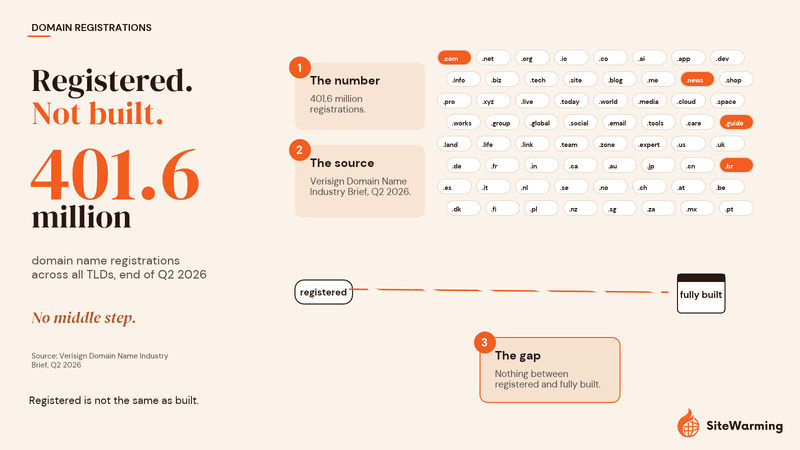
If you're sitting with a domain and wondering whether to keep renewing it, the answer isn't binary. There's a space between "let it go" and "build the whole thing." That's where warming lives. That's the gap.
Which kind of warming does your domain need?
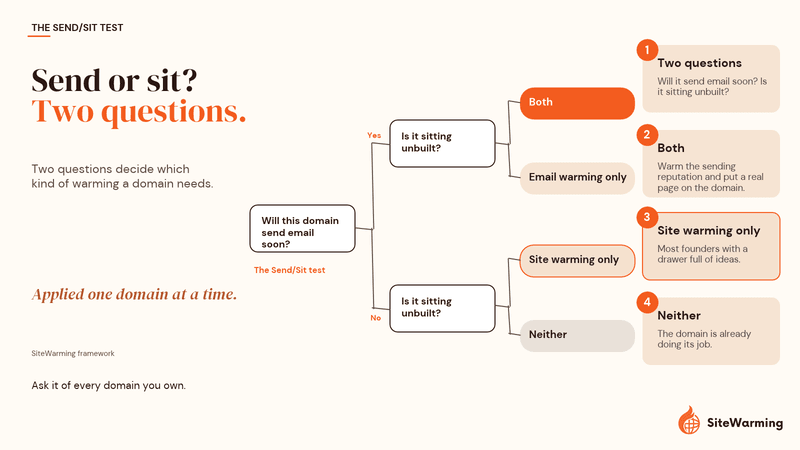
Ask two questions about each domain: will it send email soon, and is it sitting unbuilt? The answers tell you which warming applies. We call this the Send/Sit test. It is our own framework, not a published study, and it is meant to be applied one domain at a time.
| Will it send email soon? | Is it sitting unbuilt (parked, dark or "coming soon")? | What you need |
|---|---|---|
| Yes | Yes | Both. Warm the sending reputation gradually, and put a real page on the domain so anyone who checks it finds something. |
| Yes | No (a real site is live) | Email warming only. |
| No | Yes | Site warming only. This is most founders with a drawer full of ideas. |
| No | No | Neither. The domain is already doing its job. |
The first row is the one people miss. If you plan to email from a domain that shows nothing when someone visits it, the two practices meet on the same name. We make the case for that in Email Deliverability Starts Before You Hit Send. Treat that as our position on how web presence and mail reputation relate, not as a requirement. The sender requirements Google and Yahoo publish cover authentication, spam rates and unsubscribe handling.
How do you know which of your domains need site warming?
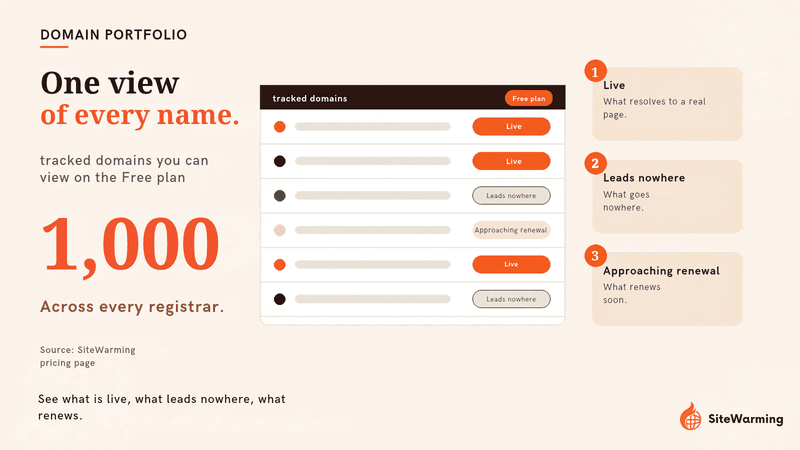
You find out by looking at the whole portfolio at once. Most founders with unbuilt ideas have names spread across two, three or four registrars, and each registrar only shows one account. Nobody sees which names are live, which lead nowhere and which renewals are coming.
The SiteWarming domain portfolio management tool gives you one view of every domain you own across every registrar. You can add domains one at a time, bulk-import a CSV, or connect a registrar, or work through the SiteWarming MCP server from your AI assistant. It shows what is live, what leads nowhere, and what is approaching renewal, and it fetches a HumbleWorth valuation for each name. Viewing up to 1,000 tracked domains is free on the Free plan.
If you're not ready to add anything yet, the free Domain Renewal Analysis takes a list of up to 150 domains and tells you which are worth keeping. For the thinking behind that triage, read what to do with too many domains you never built.
The tool complements your registrar rather than replacing it: renewals, transfers and DNS changes still happen where the domain is registered.
How do you warm a domain you haven't built?
You put one real, structured page on it that says what the idea is and gives people a way to reach you. You can do that by hand with any page you publish and keep current. Launch & Warm does it for the names you choose to keep.
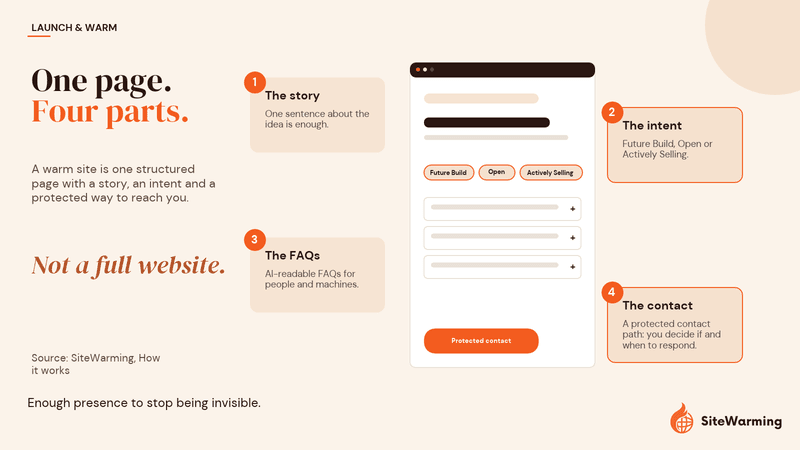
In Launch & Warm, a warm site is a live, structured page that people, search engines and AI can all understand. The steps are:
- Tell your story. One sentence about the idea is enough.
- Choose an intent. Pick Future Build ("Building something here"), Open ("Open, not listed") or Actively Selling ("For sale, if you choose").
- Set the site features. Add the context and FAQs that make the page readable to people and machines.
- Capture interest. Builders and partners reach you through a protected contact path, so you control if and when you respond.
DNS configuration, HTTPS setup, hosting, ongoing DNS and SSL monitoring and a monthly content update are included, and your first two updates are free. The Free plan includes one warmed domain, which is enough to see it work on your best name. For the thinking behind intent choices, Open, Not Listed explains how to stay reachable without becoming a seller, and The Third Option covers why you don't have to choose between building and parking.
Can one domain need both kinds of warming?
Yes. A domain can be unbuilt on the web and still be the address you plan to send email from. In that case run the two practices in order and separately. Authenticate the domain and ramp your sending gradually, following Google's advice to start low with engaged users and increase slowly. Put your warm page live so the name isn't blank. Neither replaces the other.
For a domain you are only holding as an idea, skip the email work entirely. There is no reason to send from a name you haven't built.
What are the key takeaways?
- Email warming and domain warming for ideas solve different problems for different audiences.
- Email warming builds mailbox reputation over several weeks by raising send volume gradually. Google and Microsoft publish warm-up guidance, and Yahoo publishes sender requirements.
- Domain warming for ideas, which we call site warming, gives an unbuilt domain a structured page and a contact path so it can be found and trusted.
- Use the Send/Sit test to decide which one a given domain needs.
- If you own more domains than you have built, the first job is seeing all of them in one place.
Frequently asked questions
Is domain warming the same as email warming?
No. Email warming builds a sending reputation for a new email domain by raising send volume gradually. Domain warming for ideas, which SiteWarming calls site warming, gives an unbuilt domain a structured page and contact path so it can be found by search engines, AI systems and people. They share a word, not a purpose.
What does "domain warming" mean?
Most often it means email domain warm-up. Microsoft defines it as "the process of methodically adding email volume to a new domain over several days or weeks." A second meaning applies to websites: giving an unbuilt domain a live, structured presence before you need it, which we call site warming.
How long does email domain warming take?
Microsoft's guidance says maximum deliverability takes four to eight weeks, depending on target volume and engagement. Google doesn't publish a schedule; it says to start with a low sending volume to engaged users and slowly increase it.
Do I need to warm a domain I'm not sending email from?
Not for email. If a domain never sends mail, email warming does nothing for it. If the domain is unbuilt and you want it findable, the relevant practice is site warming, which is about the web presence of the domain and not its outbox.
Do websites need a warm-up period like email does?
There is no volume schedule to follow, because a website doesn't send anything. The work is publishing a real, structured page and keeping it current. SiteWarming's default is a fresh update every month, so the page keeps showing recent activity.
What is a warm site?
A warm site is a live, structured page that people, search engines and AI can all understand, put on a domain you haven't fully built. It states the idea, gives context, and offers a protected way to get in touch. It is different from a parked page, which is a placeholder with ads or nothing at all.
Can I do both email warming and site warming on the same domain?
Yes, and if you plan to send email from a domain that is otherwise blank, we recommend it. Ramp your sending gradually and authenticate the domain, and put a real page on it. See Email Deliverability Starts Before You Hit Send for our reasoning.
How can I see which of my domains are sitting unbuilt?
Put them in one view. The SiteWarming domain portfolio management tool shows every domain across every registrar, what is live, what leads nowhere and what is approaching renewal. You can add domains one at a time, import a CSV, connect a registrar or use the MCP server, and viewing up to 1,000 tracked domains is free. See how it works and pricing.
How does Launch & Warm help with an unbuilt domain?
Launch & Warm puts a live, structured warm site on a domain you choose, from one sentence about the idea. It includes DNS, HTTPS, hosting, monitoring and monthly updates, and gives builders or buyers a protected way to contact you. Check the Domain Renewal Analysis first to decide which names deserve it.
Share this article
Ready to Transform Your Domain Portfolio?
Start building real value with your domain investments today.