Domain Registrar vs. Web Host: The Difference That Costs You
 Bret Siers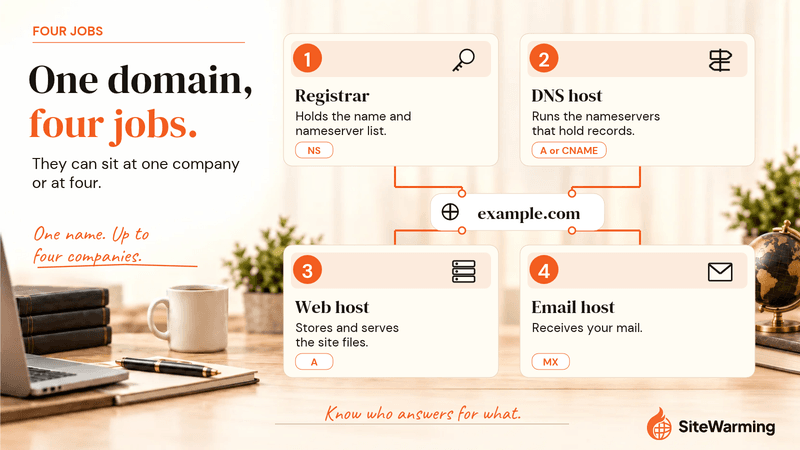
A domain registrar registers your domain name and renews it. A web host stores your website's files and serves them to visitors. They are two jobs and can sit at two companies. When one company does both, renewal is where the bundle costs you: Bluehost renews a .com at $23.99, while near-cost registrars charge about $10 to $11.
The renewal invoice says $40. You expected about $12, because that is what a domain costs. You pay it anyway, because the domain sits inside the hosting account, the site is live, and untangling the two feels like a project for another week.
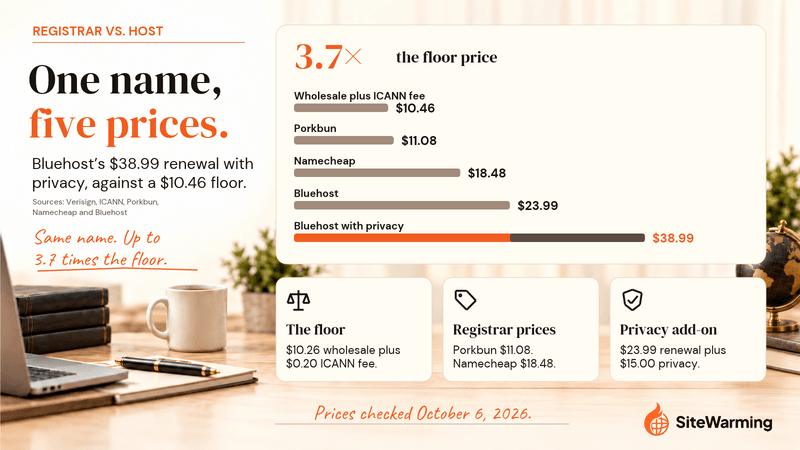
That $40 is not exaggerated. Bluehost's domain price list shows a .com renewing at $23.99, and its add-on renewal list shows Domain Privacy + Protection at $15.00 a year. Together that is $38.99 (checked October 6, 2026). The same name renews at about $11 at a near-cost registrar.
The gap is real money, but it is not the real cost. The real cost is that you don't understand your own infrastructure, so someone else is making decisions about it for you. This post separates the jobs, prices them and shows how to split them without taking your site down.
What does a domain registrar do?
A domain registrar is a company that registers domain names for you and keeps each registration current. For generic top-level domains such as .com, .net and .org, ICANN, the nonprofit that coordinates the domain name system's unique identifiers, requires any company with direct access to the registry to be accredited, and applicants must show they meet technical, operational and financial criteria. The registry is the master database for the extension. For .com, IANA lists VeriSign Global Registry Services as the sponsoring organization. The registrar sits between you and that database.
Your registrar of record appears in your domain's registration data. Since January 28, 2025, ICANN has said that RDAP, not WHOIS, is the definitive source for generic domains, and its Lookup tool is where you read it. What a registration does and does not give you is covered in do you actually own your domain.
A registrar's job list:
- Register and renew your domain name.
- Hold your registration account and contact details.
- Lock and unlock the domain and release your transfer code. ICANN's Transfer Policy says a registrar must provide the code and remove the transfer lock within five calendar days of your request.
- Handle transfers between registrars.
- Often, though not always, run DNS for the domain through its default nameservers. Namecheap's documentation notes that a domain on a registrar's default nameservers loses them after a transfer.
A registrar does not store your website files or run your server. Its job is to maintain your claim on a name. If you want to know what happens when the registrar itself fails, that has its own post.
What does a web host do?
A web host is a company that stores your website's files on a server and serves them to visitors who request them. When someone types your domain into a browser, DNS answers with an IP address, and the host's server at that address delivers the page. Cloudflare describes the A record as the record that matches a domain name to an IPv4 address, which is how a browser finds the server.
ICANN's accreditation requirement covers companies that offer generic-domain registration with direct registry access. Hosting is a different business, and a host that also sells domains is running a second one.
A web host typically does these things:
- Stores your HTML, CSS, images and code.
- Runs the server software that delivers them.
- Handles uptime and performance.
- Gives you a control panel for managing site files.
- Sells add-ons such as email, SSL and, often, the domain itself.
A host without a domain is a server with no address. A domain without a host is an address that leads nowhere. They need each other. They don't need to be the same company.
What is the difference between a registrar, a DNS host, a web host and an email host?
Most articles stop at two jobs. There are four, and the two people forget are DNS and email. Nameservers are authoritative DNS servers that hold the definitive records for a domain, according to Cloudflare's documentation. Whichever company runs the nameservers listed for your domain holds your A record and your MX record, no matter who sells you the domain or hosts the site.
| Job | What it does | Record it controls | Where it often sits | What breaks if you lose it |
|---|---|---|---|---|
| Registrar | Holds the registration and the list of nameservers your domain uses | NS (delegation) | The company you pay for the name | You can't renew, transfer or change nameservers; the site normally keeps running until the registration expires |
| DNS host | Runs the nameservers that answer where the domain points | A, CNAME, MX, TXT | The registrar's default nameservers, your web host, or a third party such as Cloudflare | Nothing resolves: site and email both fail |
| Web host | Stores your site files and serves them | Receives traffic from the A record | Your hosting company | The site goes offline; mail is unaffected if it is hosted elsewhere |
| Email host | Receives and stores your mail | MX | Your web host, Google Workspace or another mail provider | Mail stops or bounces; the site is unaffected |
The table is why a host account problem does not always mean a domain problem, and why it sometimes does. The answer depends on which of the four jobs you gave the host.
How much does a registrar cost compared with a web host?
A registrar charges for the name and a host charges for the server, and only the name has a hard floor. For a .com, the floor is the registry's wholesale fee plus ICANN's. Verisign's annual wholesale fee is $10.26 and, according to its quarterly SEC filing, rises to $10.97 on November 1, 2026. ICANN's registrar-level fee is $0.20 on each annual add, renew or transfer. A registrar that charges at cost therefore pays about $10.46 per .com-year today and $11.17 after November 1 (our arithmetic from those figures).
What does a .com cost to renew at each type of company?
Prices were checked on October 6, 2026. They change, and several carry promotions.
| Company | Type | First-year .com | Renewal .com | Privacy | Source |
|---|---|---|---|---|---|
| Cost floor (Verisign plus ICANN) | Registry and ICANN | Not applicable | $10.46; $11.17 from November 1, 2026 | Not applicable | Verisign filing, ICANN |
| Cloudflare Registrar | Registrar | At cost | At cost, no markup | Free WHOIS redaction by default | Cloudflare |
| Porkbun | Registrar | $11.08 | $11.08, includes ICANN and other fees | Free WHOIS privacy | Porkbun |
| Namecheap | Registrar | $6.79 with a promo code (new customers) | $18.48 | Free for life on eligible domains | Namecheap |
| GoDaddy | Registrar | $2.99 for one year (new customers) | Not shown on the page | Free privacy stated | GoDaddy |
| Hostinger | Web host | $19.99 listed, with a $0.01 first-year offer shown | Not shown on the page | Free for supported extensions | Hostinger |
| Bluehost | Web host | $12.99 | $23.99 | $15.00 a year | Bluehost prices, add-ons |
Bluehost's renewal plus privacy is $23.99 plus $15.00, or $38.99. Porkbun's is $11.08. The gap is $27.91 per domain per year (our arithmetic). Namecheap's $18.48 renewal is well above Porkbun's, so "standalone registrar" does not by itself mean cheap. Read the renewal column, not the first-year one.
Bluehost's shared hosting page adds context. It says one free domain is included for the first year on 12- or 36-month plans, that the domain then renews at the then current rate, and that domain privacy is free for the first year on the Business and eCommerce plans but is not listed for Starter.
Hosting is its own bill. On that same page the Starter plan is $3.99 a month on a 36-month term and renews at $9.99 a month. That money is for the site, and it is the reason to hold the domain somewhere you can leave without moving the site.
What does the bundle cost across a portfolio?
If you hold more than a few names, the per-domain gap compounds. Using Bluehost's $38.99 against Porkbun's $11.08, which is $27.91 a domain, the yearly difference is:
| Domains held at the host | Extra per year |
|---|---|
| 1 | $27.91 |
| 10 | $279.10 |
| 25 | $697.75 |
| 50 | $1,395.50 |
This is our arithmetic and applies only to domains you hold at a host at those list prices. Why renewal prices step up in general is a separate question, covered in why renewals cost more.
How does bundling a domain with hosting cost you?
Why is the renewal so much higher than the first year?
On Bluehost's list a .com registers at $12.99 and renews at $23.99, and the hosting page says domains renew at the then current rate. The first-year price gets you in. The renewal is the real price. Hosts count on friction: most people will not move a domain over a gap of about $13 a year on the name, or about $28 once privacy is added.
Why do you rarely notice the renewal?
When a domain lives at a host, the renewal happens inside the hosting dashboard, not through a standalone registrar interface. Most people don't examine renewal costs closely because they are in a dashboard built for managing websites, not domains. Two separate things living in one interface makes it easy to miss what you are actually paying for.
What does bundling do to your control?
When services are bundled, a dispute with one service can affect all of them. Your host suspends your account over a billing issue and, depending on how you set things up, your site, your DNS and your email go with it. You need to move your site, and you also have to move your domain. You want to change hosts, and you have to make sure you don't break your domain's DNS. These aren't impossible problems. They're unnecessary ones.
What happens to your domain and email if your host suspends your account?
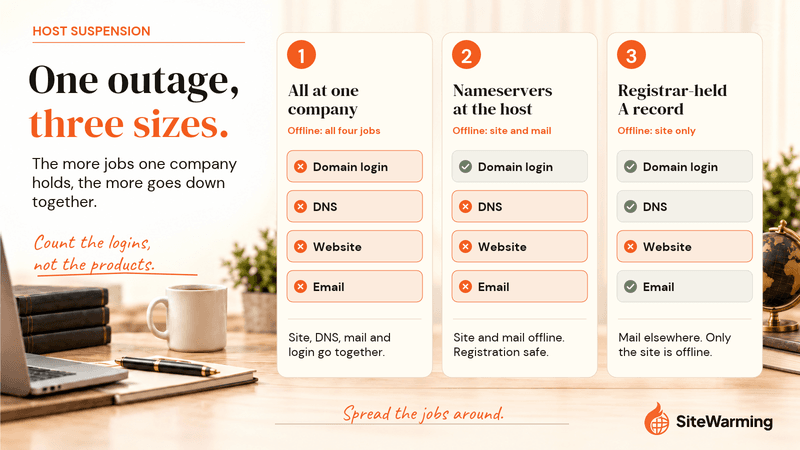
It depends on where three things live: the registration, the DNS and the email. A host controls only what you gave it.
A suspended hosting account takes the site offline. Bluehost's suspension page says visitors see "This account has been suspended," and it does not say what happens to domain registrations, DNS or email. Don't assume either way. Ask the host before you rely on it.
| Setup | What a host suspension does | What you can do |
|---|---|---|
| Domain registered at the host, with DNS and email there too | Site, DNS and mail can all be affected, and your domain-management login may sit behind the same account. Ask the host. | Ask in writing what a suspension does to domain management, then move the domain once it is unlocked |
| Domain at an independent registrar, nameservers pointed at the host, email at the host | Site and mail go offline. The registration is untouched. The DNS zone is at the host, but the nameservers are set at your registrar. | Repoint the nameservers at your registrar's DNS or a new DNS host, and rebuild the records |
| Domain and DNS at the registrar, an A record pointing at the host, email at another provider | Only the site goes offline. DNS and mail are unaffected. | Edit the A record to the new host's IP address |
If your email runs through your hosting provider and your domain's DNS is also there, a hosting suspension means your email goes down with the site. For a business that is more than annoying. It is a trust problem with everyone who is trying to reach you.
How do you tell what you have today?
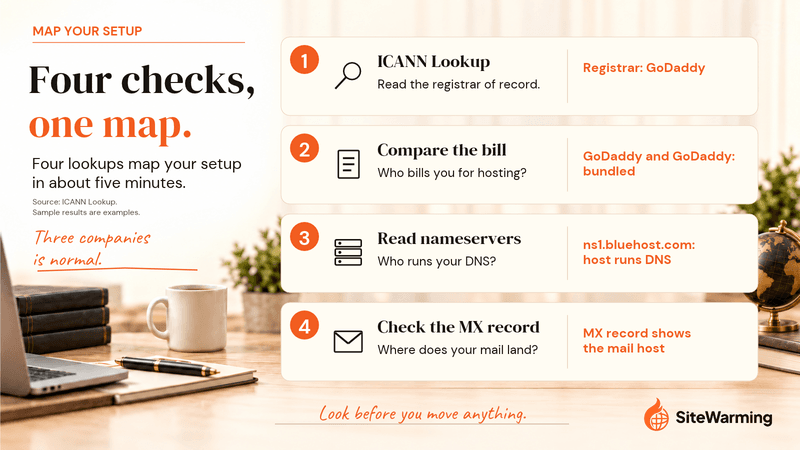
Four lookups map your setup in about five minutes.
- Open ICANN Lookup, enter your domain and read the registrar named in the registration data. That is who registered your domain.
- Look at where you pay for hosting. If GoDaddy shows up as the registrar and you pay GoDaddy for hosting, they're bundled. If Namecheap shows up as the registrar and you pay a different company for hosting, they're already separate.
- Read the nameservers in the same record. Nameservers that point to your host, such as ns1.bluehost.com, mean your host is also running your DNS. The two are tied together even if they are technically separate accounts. Bluehost lists ns1.bluehost.com and ns2.bluehost.com in its external domain guide.
- Find where your mail lands. Check the MX record in your DNS records or the admin console of your email provider. Cloudflare describes an MX record as the record that directs email to a mail server.
If you hold many names, SiteWarming's domain health check is the portfolio version of this review.
How do you separate a registrar from a host without breaking your site?
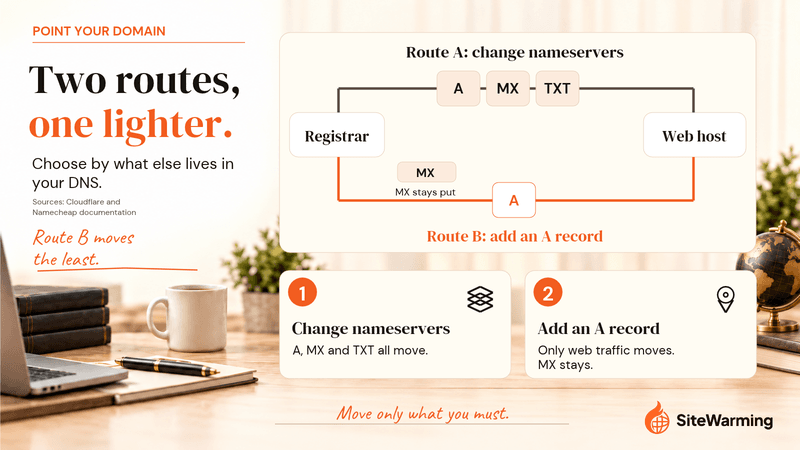
The goal is a domain registered at a registrar you trust and hosting wherever your site lives. Those are two independent decisions. There are two routes for pointing the domain at the host, and the order of your steps matters more than the route.
Should you change nameservers or add an A record?
| Route | What you do | What moves | Use it when | Watch for |
|---|---|---|---|---|
| Change nameservers | At your registrar, replace the nameservers with the host's. Bluehost, for an external domain, lists ns1.bluehost.com and ns2.bluehost.com. | All DNS moves to the host's zone, including MX records | The host runs your DNS and you want site and records in one place | Copy MX, SPF, DKIM and DMARC records first. Cloudflare says to allow up to 24 hours. |
| Add an A record | In your registrar's DNS, add an A record for @ (and www) with the host's IP address | Only website traffic. Nameservers and email records stay where they are. | You want DNS and registration together and your mail is elsewhere | Your registrar's own DNS must be in use. Remove conflicting records. Namecheap says new records normally take about 30 minutes. |
Bluehost's external domain guide describes the nameserver route and does not mention an A record, so ask your host for its IP address and confirm it will not change. Namecheap's guide to A address records says you must be on BasicDNS, PremiumDNS or FreeDNS to set them in its interface. At Cloudflare Registrar the choice is made for you. Its transfer guide says the registrar requires Cloudflare for authoritative DNS, so you add the A record inside Cloudflare DNS instead of changing nameservers.
What are the steps, in order?
- List what lives at the host: the site, the email and every DNS record. Copy the records out before you change anything.
- Pick the registrar you want to own the name long term, using the checks in the next section.
- Request the transfer code (also called an auth or EPP code) at your current registrar. ICANN's Transfer Policy gives a registrar five calendar days to provide it and remove the lock.
- Transfer the domain. A transfer does not change nameservers by itself. Namecheap's documentation says the domain stays pointed at the same nameservers after the transfer, so if they already point at your host, the site stays up. Downtime is a risk only when the domain uses the old registrar's default nameservers, because access to them is revoked after the transfer. Set up DNS elsewhere first.
- Leave your hosting where it is, or move it on its own schedule. Your host can now change at any time without involving the registrar.
- Test. Check ICANN Lookup for the new registrar, load the site from a clean connection and send a test email to and from the domain.
The full transfer mechanics are in how to transfer a domain without breaking everything.
Does the 60-day transfer rule apply to you?
The 60-day rules come from ICANN's Transfer Policy, and not all of them are mandatory.
| Situation | What the Transfer Policy says | May or must |
|---|---|---|
| New registration | A registrar may deny a transfer requested within 60 days of the creation date in the registry record | May |
| After a previous transfer | A registrar may deny a transfer within 60 days after the domain was transferred, or a lesser period | May |
| After a change of registrant | A registrar must impose a 60-day transfer lock unless it lets you opt out before the change request | Must, with an opt-out |
| Transfer code request | A registrar must give you the code and remove the transfer lock within five calendar days of your request | Must |
Source: ICANN Transfer Policy, last updated February 21, 2024. Some registrars apply the strict version. Cloudflare's transfer guide requires that the domain was registered at least 60 days ago, was not transferred in the last 60 days and had no registrant change in the 60 days before. Ask your current and your new registrar which rule each applies before you schedule a move.
How long do DNS changes take, and what happens to your email?
Plan for a window. Cloudflare's setup guide says to wait up to 24 hours while your registrar updates your nameservers. Namecheap puts it at 24 to 48 hours, and up to 72 hours in rare cases. During that window some visitors see the old setup and some see the new one. Most articles skip this. It's not scary, but it's real. It is manageable when you're prepared and messy when you're not. A record's TTL, its time to live, sets how long resolvers may cache it, so a shorter TTL set ahead of a change shortens the mixed window.
Email is where a nameserver change bites. MX records live in whichever DNS zone is authoritative. When you change nameservers, the old zone stops answering, so your mail records must exist in the new one before you switch. Cloudflare's guide tells you to review zone apex, subdomain and email records (MX, SPF, DMARC and DKIM) before you change nameservers. Google's MX guidance says new MX records can take up to 72 hours to be recognized and tells you to remove any other MX records, because old or incorrect ones can break mail. Adding an A record leaves MX records untouched, which is why it is the lower-risk route when your mail lives elsewhere.
What should you look for in a standalone registrar?
Not all registrars are equal. Five checks:
- Renewal price, not registration price. The table above shows a $6.79 first-year promotion that renews at $18.48.
- Privacy included. Cloudflare, Porkbun, Namecheap and GoDaddy each state on their pages that privacy or WHOIS redaction is free. Bluehost lists it at $15.00 a year. What privacy does and does not protect is covered in the WHOIS privacy post.
- Transfer policy. How easy is it to leave? A registrar that makes transfers difficult is telling you something. See what to do when a registrar holds your domain hostage.
- Transfer code delivery. ICANN's policy gives registrars five calendar days. A registrar that generates the code in your account is easy to leave. One that makes you wait or file tickets is a red flag.
- DNS flexibility. Cloudflare Registrar requires Cloudflare DNS. Others let you set your own nameservers or add records. Decide where you want DNS before you pick.
On price alone, Cloudflare and Porkbun are the two near-cost options in the table. Namecheap sits in the middle. Domains are infrastructure. Not a subscription product, not a loyalty program. The right registrar is one that holds your claim cleanly and gets out of the way. The comparison of registrars for long-term ownership goes through them one by one.
Does a domain you haven't built need a web host?
No. An unbuilt domain needs a registrar and, if it should resolve to anything, a DNS host. A web host is needed only when there is something to serve. If you register names faster than you build on them, paying a host for each is the most expensive way to hold a placeholder. Keep the names at one registrar and add hosting for the ones you build.
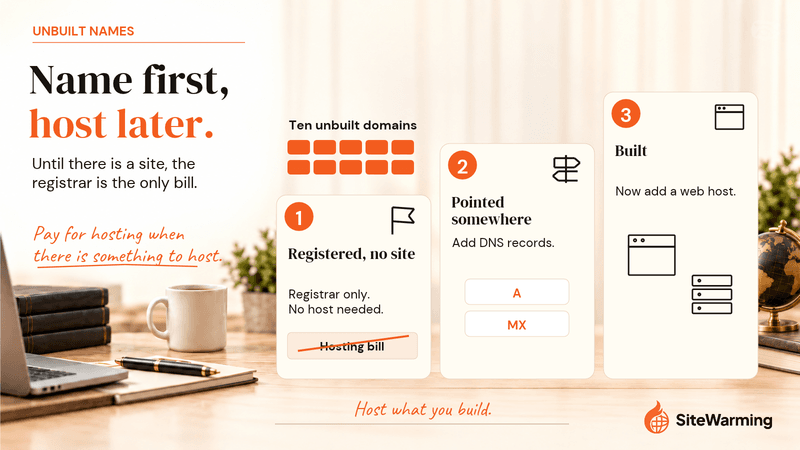
Alt text: Ladder showing that an unbuilt domain needs only a registrar, pointing it somewhere adds DNS records, and hosting is added only once the site is built
Caption: A domain needs a host only when there is something to serve. Until then, the registrar is the only bill that should exist.
The risk in that setup is not cost. It is visibility. Names spread across registrars, some with a host and some without, are how a renewal gets missed or a site quietly stops pointing anywhere. SiteWarming's domain management tool puts every domain across every registrar in one view. Add domains singly, import a CSV, or connect a registrar or an MCP client, and it shows what is live, what leads nowhere and what is approaching renewal. The free plan tracks up to 1,000 domains (pricing). The guide to managing domains across registrars explains how to centralize visibility without moving any domain, and the comparison with a registrar dashboard shows what a single registrar's dashboard can't see.
A name that leads nowhere can still do work. SiteWarming's Launch & Warm publishes content that makes the domain findable and gives it a contact path, so the owner can sell, partner or build when the right person arrives. How it works covers the steps.
Frequently asked questions
What is the difference between a domain registrar and a web host?
A registrar registers your domain name, renews it and handles transfers. A web host stores your site's files on a server and serves them to visitors. DNS, the system that says where the domain points, is a third job. One company can do all of them, but none of them requires the others to share a company.
Is it cheaper to buy a domain from a registrar than from a web host?
Often, at renewal. Bluehost's price list shows a .com renewing at $23.99 and Domain Privacy + Protection at $15.00 a year. Porkbun lists .com at $11.08 with free WHOIS privacy, and Cloudflare charges only what the registry and ICANN charge. These prices were checked on October 6, 2026 and change, so confirm the renewal price before you buy.
Do I have to buy my domain from my web host?
No. A registration lives at the registrar and a website lives at the host, so the domain can stay at one company while the site runs at another. The domain only needs to point at the host, through the host's nameservers or an A record holding the host's IP address. Changing hosts later never touches the registration.
Do I need to change nameservers to point my domain at a host?
No. You have two options. Changing nameservers moves all of your DNS to the host. Adding an A record in your registrar's DNS points only the website at the host and leaves the rest of your DNS, including email records, where it is. Cloudflare Registrar requires Cloudflare DNS, so there you add the A record in Cloudflare.
What happens to my email if I change nameservers?
Mail can stop if you skip one step. MX records, which route your email, live in whichever DNS zone is authoritative. When you change nameservers, the old zone stops answering. Copy your MX, SPF, DKIM and DMARC records into the new zone first. Google says new MX records can take up to 72 hours to be recognized.
Can my web host suspend my domain?
A host can suspend your hosting account, which takes your site offline and any email it hosts with it. A host that is not your registrar cannot change your registration. If the host is also your registrar, ask whether a suspension affects domain management. Bluehost's suspension page describes the message visitors see and says nothing about domains or email.
Does the 60-day transfer lock always apply?
Not always. ICANN's Transfer Policy says a registrar may deny a transfer within 60 days of a domain's creation date or of a previous transfer. A registrar must impose a 60-day lock after a change of registrant unless you opted out beforehand. Ask your registrar which of these it applies before you plan a move.
How do I find out who my registrar is?
Enter your domain in ICANN Lookup at lookup.icann.org and read the registrar named in the registration data. That is the company of record for your registration. Then check who bills you for hosting. If it is the same company, the two are bundled. The nameservers in the same record show who runs your DNS, which may be a third company.
Does a domain I haven't built yet need web hosting?
No. A domain with no site needs a registrar and, if it should resolve to anything, a DNS host. Hosting becomes necessary only when you have something to serve. Paying a host for each unbuilt domain adds a monthly cost for nothing. Keep the names at one registrar and add hosting for the ones you build.
Related reading
- Do You Actually Own Your Domain?: what your registration is, and what ICANN's rules cover.
- How to Transfer a Domain Without Breaking Everything: the transfer steps and the 60-day windows.
- Why domain renewals cost more: the reasons renewal prices step up.
- Best Domain Registrars for Long-Term Ownership in 2026: which registrar to move to.
- Can Your Registrar Hold Your Domain Hostage?: what to do when a registrar blocks your exit.
- What Happens When a Domain Registrar Shuts Down?: the ICANN process and what to document now.
- WHOIS privacy and domain protection: what privacy covers and what it does not.
Share this article
Ready to Transform Your Domain Portfolio?
Start building real value with your domain investments today.