How to Transfer a Domain Without Breaking Everything
 Bret Siers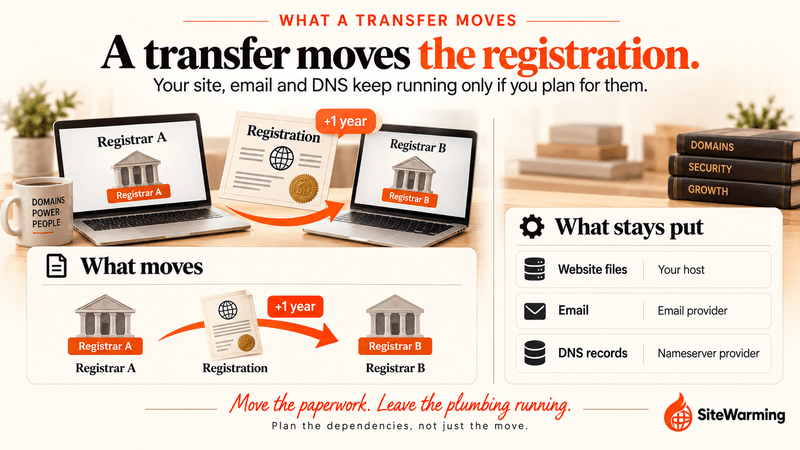
To transfer a domain without downtime, keep your DNS and email working before you move the registration. Copy every DNS record, confirm no 60-day lock applies, make sure you can receive email at the registrant address, unlock the domain, request the authorization code, and start the transfer. It can take up to five calendar days.
You unlock your domain at 9 AM on a Tuesday. You figure it will take maybe twenty minutes. You have a new registrar ready. You have the account set up. The transfer button is right there.
Then you notice a banner at the top of the screen.
"This domain is subject to a 60-day transfer lock. It cannot be transferred until [date two months from now]."
Your first guess is the renewal you paid for in the spring. It's the explanation you'll find in plenty of help articles. It's also not what ICANN's policy says. Renewal does not trigger a transfer lock. The 60-day windows come from three other events: a new registration, a completed transfer, and a change to the registrant's name, organization or email address. You agreed to the registrar's terms of service when you first registered, and those terms are the operating manual for your relationship with your registrar. Most people never read them.
Here's the thing: a domain transfer is not technically complicated. The hard part is the waiting, the dependencies, and the things that break quietly while the process runs. This guide covers all of it. Not what registrars say in their help articles. What actually happens.
What is a domain transfer, and what does it move?
A domain transfer moves the registration of a domain name from one registrar to another. The registrar is the ICANN-accredited company you pay to register and manage the name. The registration is the record that says you hold that name for a set period. Nothing else moves with it unless you move it.
ICANN's Transfer Policy covers generic top-level domains such as .com, .net and .org. Country-code domains such as .uk or .de follow rules set by their own registries, so check the registry's transfer rules before you start.
| Item | Does it move in a transfer? | Where it lives |
|---|---|---|
| The registration (your right to use the name) | Yes | Registrar and registry |
| The registration term | Extended by one year | Set by the transfer itself |
| Website files | No | Your host |
| Email and email history | No | Your email provider |
| DNS records | Only if your registrar hosts them, and then only if you plan for it | Wherever your nameservers point |
| Registrar add-ons (bundled email, site builder, certificates) | No, and they may end | The old registrar |
The one-year extension is part of the policy itself: ICANN's Transfer Policy says a completed, holder-authorized transfer "shall result in a one-year extension of the existing registration." Read the ICANN Transfer Policy once before your first transfer. It's short, and it answers most of the questions registrar help pages leave vague.
What should I do before I transfer a domain?
The biggest transfer mistakes happen in the first five minutes. Someone decides to move their domain, clicks unlock, and starts the process without documenting what they already have. Then they wonder why their email stopped working.
Before you initiate anything, write down these five things.
Your current DNS records. Every A record, CNAME, MX record, and TXT record. The TXT records matter most for email, because SPF, DKIM and DMARC live there. Log into your current registrar, open the DNS management panel, and copy every row into a document. This takes ten minutes. Skipping it costs days.
Your current nameservers. There is a difference between where your domain is registered and where it points. If your domain uses nameservers from a hosting provider (common with Squarespace, Wix, and many shared hosting setups), transferring the registration does not move those nameservers. Your site may keep working. Your email may not, depending on where its records live. Understanding this distinction before you start will save you a significant amount of confusion.
The email address on your registrant record. The transfer confirmation goes to the email address on file with your current registrar. If that address no longer exists, you cannot confirm the transfer. AWS's domain transfer checklist puts it first: confirm that you can receive email at the registrant address. This is a more common problem than it sounds. People change email providers, retire old addresses, or did not realize their registrar still had their 2014 email on file.
Whether DNSSEC is switched on. DNSSEC adds cryptographic signatures to your DNS records. The same AWS checklist says the keys and DS records stored at your current registrar are not transferred automatically, and that you should temporarily disable DNSSEC before a transfer to Route 53. We cover what to do about it in the DNS section below.
Whether a transfer lock applies. A domain registered, transferred or re-registered to a new holder within the last 60 days may be blocked. The next section explains exactly which events trigger a lock.
How long is the domain transfer lock, and what triggers it?
This is the one that catches people off guard most often, mostly because the common explanation is wrong.
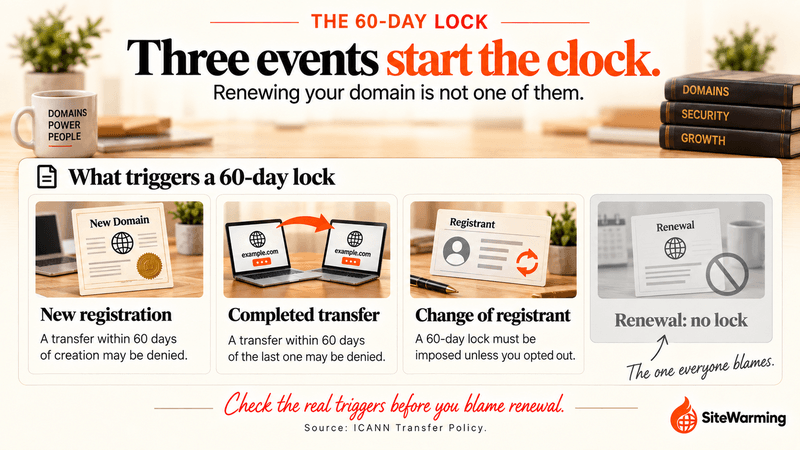
ICANN's Transfer Policy ties a 60-day window to three events.
| Trigger | What the policy says | Can the registrar refuse? |
|---|---|---|
| New registration | A registrar may deny a transfer requested within 60 days of the domain's creation date | May deny |
| Completed transfer | A registrar may deny a transfer within 60 days after a previous transfer | May deny |
| Change of registrant | The registrar must impose a 60-day lock after a change to the registrant's name, organization or email address, unless the holder opted out beforehand | Must deny |
Renewal is not on that list. Your renewal date and your lock window run on separate clocks. If a transfer fails right after you renew, look for one of the three triggers instead. If the banner cites a lock that matches none of them, ask your registrar to name the rule in writing, because registrar terms can add conditions of their own.
Does renewing a domain lock it for 60 days?
No. Under ICANN's Transfer Policy, renewal is not one of the events that locks a domain. The 60-day windows follow a new registration, a completed transfer, or a change of registrant.
Which situations trigger the lock in practice?
A few scenarios where this catches people:
You updated the email address on the registrant record. ICANN's policy counts "any change to the Registered Name Holder's email address" as a material change, and that starts the change-of-registrant lock. Some registrars let you opt out of the lock before you save the change, so ask first. Registrars differ on how they apply this, and some are stricter than others.
You bought a domain and put your own details on it. Changing the registrant's name or organization, other than fixing a typo, is a change of registrant. A domain you just acquired may be unable to move for 60 days.
You moved the domain recently, or registered it recently. If you're consolidating a portfolio in stages, a domain that just arrived at its new registrar can't hop again for 60 days. Plan the order of your moves before you start.
If you are in the lock window and need to transfer urgently, your only real option is to contact your registrar and ask for an exception. For a new registration or a recent transfer, the policy says a registrar may deny the request, so the decision is theirs. It sometimes works for registrar shutdowns or documented abuse situations. It rarely works for "I just want to move." Plan ahead when you can.
Is the 60-day lock going away?
Possibly, but not yet. ICANN's Transfer Policy Review recommended cutting the post-registration and post-transfer locks to 720 hours (30 days) and removing the change-of-registrant lock altogether. The GNSO Council approved all 47 final recommendations on March 13, 2025, and ICANN's May 2026 briefing still listed the report as awaiting an ICANN Board decision. The GNSO Council's recommendations report has the detail. Until the Board acts, plan around the 60-day rules above, and check ICANN's policy page before you start.
What is an EPP code, and how do I get one?
An EPP code goes by several names: authorization code, auth code, transfer key, EPP key. ICANN's policy calls it the "AuthInfo" code. Different registrars use different labels. It is the same thing.
An EPP code is a password that authorizes a domain transfer. It proves to the gaining registrar (the one you are moving to) that the current registrant (you) has approved the move. Without it, the transfer cannot proceed.
Under ICANN's Transfer Policy, a registrar that doesn't let you generate and manage the code yourself must give it to you, and remove the transfer lock, within five calendar days of your request. Registrars that put a "show code" button in your dashboard satisfy the rule instantly. The code must be unique to your domain, and the registrar can't make getting it harder than changing your contact details. The policy doesn't address a fee for the code, so check your registrar's terms before you ask. If a registrar refuses or delays past five calendar days without a documented reason, that is a policy problem you can report to ICANN. The refusal section below shows how.
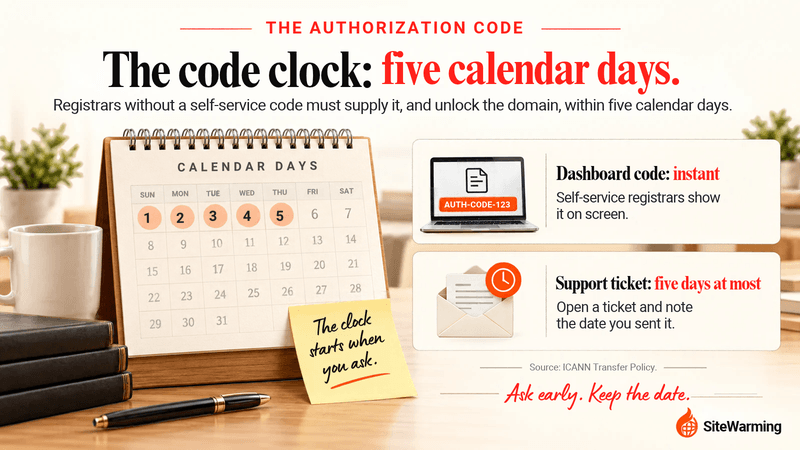
Here is how to request it: log into your current registrar, navigate to domain management, and look for a section labeled "transfer," "transfer out," or "authorization code." Most registrars will email it to you or display it on screen. If yours requires a support ticket, open one and document the date you submitted it.
Treat the code like a password and keep it somewhere safe. ICANN's current policy sets no lifetime for it, and registrars differ on how long it stays valid. If you start a transfer and it fails or times out, you may need a new code. The recommended replacement policy described above would make the code valid for 336 hours (14 days) and usable once.
Which DNS setup do you have, and what happens to it when the domain moves?
Here is a common misunderstanding: transferring your domain registration is not the same as moving your website or email.
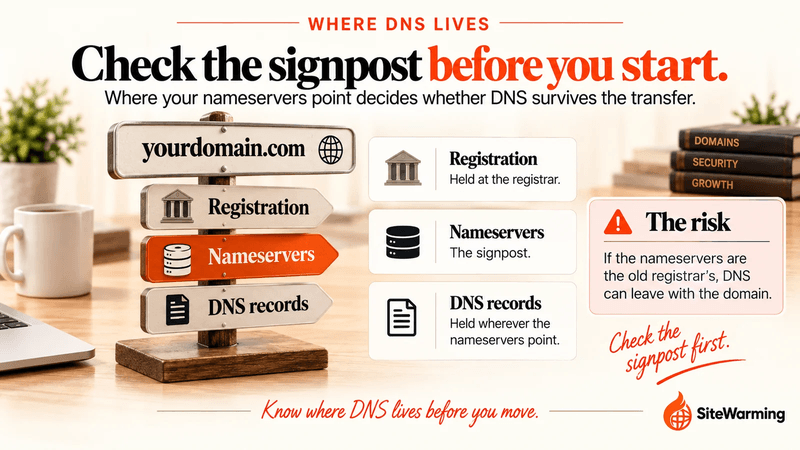
When you transfer registration, you are moving the paperwork. The domain keeps pointing wherever its nameservers say, and a registration transfer does not change them. What changes the outcome is where those nameservers live. To check, search your domain at ICANN Lookup and read the nameserver rows.
| Setup | How to tell | What the transfer does | What to do |
|---|---|---|---|
| A. Nameservers at your host or a DNS provider (Cloudflare, your hosting company) | The nameservers name your host or provider, not your registrar | Nothing. DNS keeps answering from the same place | Leave the nameservers unchanged and transfer |
| B. Nameservers at your current registrar (the default at most registrars) | The nameservers name your registrar | DNS service may stop or change once the domain leaves, depending on the registrar | Copy every record, move DNS to the new registrar or a neutral DNS provider first, verify it, then transfer |
If you are in setup B, the cleanest fix is to separate the two jobs. AWS's checklist recommends transferring DNS service before transferring the registration, because it "reduces the risk of website or email downtime during the transfer." Some registrars stop serving DNS the moment a domain leaves and others do not, so do not assume yours keeps answering. Rebuild the records at the new location, confirm they match your document, switch the nameservers, wait for them to settle, and only then start the transfer.
What is TTL, and should I lower it before a transfer?
TTL (Time to Live) is the value on each DNS record that tells resolvers how long to cache it before checking for updates. Cloudflare's documentation describes it as the field that controls "how long each record is cached and, as a result, how long it takes for record updates to reach your end users." A longer TTL means updates take longer to go into effect.
If your TTL is set to 86400 (24 hours), resolvers can hold the old record for up to 24 hours after you change it. Lower it to 300 (5 minutes) at least one full old-TTL period before you change anything. For a 24-hour TTL, that means a day ahead at minimum, and 48 hours is safer. Then your change reaches users in minutes instead of a day.
How long does DNS propagation take?
It depends on the TTL on the old records. A resolver can keep serving the old value until the TTL it cached runs out, so a 300-second TTL means most people see the change within minutes, and an 86400-second TTL can mean a day. My rule of thumb is to allow 24 to 48 hours for a nameserver change to settle everywhere, even when most people see it sooner.
Should I turn off DNSSEC before a transfer?
If your DNS provider is changing, yes. AWS's checklist says the DNSSEC keys and DS records at your current registrar don't move automatically, and tells you to disable DNSSEC temporarily before transferring to Route 53. Other registrars handle it differently, so read yours. Turn DNSSEC back on once the new DNS is answering correctly. If your DNS provider is not changing, ask them whether the transfer affects your signing setup before you touch it.
How do you keep email working during a domain transfer?
Email is the most commonly broken thing in a domain transfer. And it breaks quietly. Your site usually shows an obvious error if DNS is wrong. Email fails silently. Messages bounce, disappear, or route to the wrong place, and you may not find out for hours.
The specific risk: your email is hosted through a service that finds your domain through MX records, and those records live in DNS. If the DNS configuration that answers for your domain after the move is incomplete or different from the current one, email delivery fails.
Before you transfer, check that your MX records are exactly right wherever your DNS will live. They look something like @ MX 10 mail.yourdomain.com or, for Google Workspace, @ MX 1 aspmx.l.google.com. The exact values depend on your email provider, and most providers publish the exact records to use. Copy the SPF, DKIM and DMARC TXT records too. Without them, mail that does arrive can land in spam.
After the transfer, send test emails both to and from your domain. Do not assume it is working. Test it.
If your email is set up through your current registrar (many registrars sell email as a bundled product), transferring the domain registration may disrupt or end that service. Check the terms. If your email service is tied to your registrar, either migrate email to a standalone provider before transferring or set up a new email service at the new registrar before the move.
What are the steps to transfer a domain?
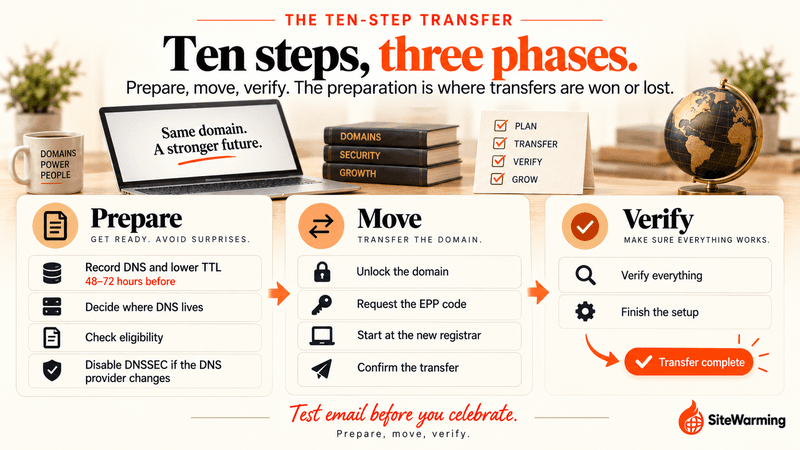
This is the operational sequence for a clean transfer.
- 48 to 72 hours before: record your DNS and lower the TTL. Export every DNS record into a document, then lower the TTL on each to 300 seconds. This minimizes propagation delay when you make changes.
- Decide where DNS will live. If your nameservers belong to a host or DNS provider, leave them alone. If they belong to your current registrar, rebuild the records at the new registrar or a neutral DNS provider, check them against your document, and switch the nameservers before you start the transfer.
- Check eligibility. Confirm the domain wasn't registered, transferred or given new registrant details in the last 60 days, and confirm you can receive email at the registrant address. If a lock applies, find the unlock date and plan around it.
- Turn off DNSSEC if your DNS provider is changing. Remove the DS record at the registrar before the move, and re-enable it afterward.
- Unlock the domain. In your current registrar's settings, disable the transfer lock. It is usually labeled "unlock domain" or "enable transfer."
- Request the EPP code. Generate it in the dashboard or ask your registrar for it. Document the date and time you asked.
- Start the transfer at the new registrar. Enter your domain name and EPP code and pay the transfer fee, which adds a year to your registration. The new registrar sends the request to the current one.
- Confirm the transfer. Watch the email address on file with your current registrar. A confirmation email will arrive. Some registrars require you to approve it. Others run a passive approval window: if the current registrar does not respond within five calendar days, the transfer is approved by default.
- Verify everything. When the transfer completes, check that your site loads, send test emails to and from the domain, and compare your DNS records against your document. A tool like DNS Checker can confirm your nameservers have propagated globally.
- Finish the setup. Re-enable DNSSEC if you turned it off, put the transfer lock back on at the new registrar, check that WHOIS privacy is on, turn on auto-renew, and raise your TTLs back to a normal value.
Older guides tell you to switch off WHOIS privacy before transferring, because the new registrar used to email the contact listed in public WHOIS. ICANN's Board deferred enforcement of that requirement in January 2020, and the ICANN Transfer Policy page still records the deferral, so most transfers no longer need it. If your registrar asks you to disable privacy anyway, follow its instructions and turn it back on afterward.
How do I transfer a whole portfolio of domains?
Move them in planned batches, not all at once. Keep a sheet with each domain's registration date, last transfer date, last contact change and renewal date, because those dates decide which domains are free to move. Remember that every transfer adds a year to the term, so budget for a full year of renewal per domain. SiteWarming's domain renewal tracking shows every domain across every registrar in one view, which makes the sheet easy to keep current.
How long does a domain transfer take?
Up to five calendar days after you start it. Under ICANN's Transfer Policy, the registry completes the transfer unless it receives a rejection within five calendar days, and a current registrar that fails to respond within that window is treated as approving. If you approve the confirmation email, the transfer can finish sooner. Allow the full five days in your plan.
The transfer adds one year to your registration. Any DNS or nameserver change you make afterward follows the timing in the DNS section above.
What if my registrar refuses to release the domain?
If your current registrar refuses the transfer, delays it beyond the ICANN-mandated window, or cites vague policy reasons without documentation, you have options.
First, ask the registrar to state the exact reason in writing. ICANN's Transfer Policy lists what a registrar may and may not refuse.
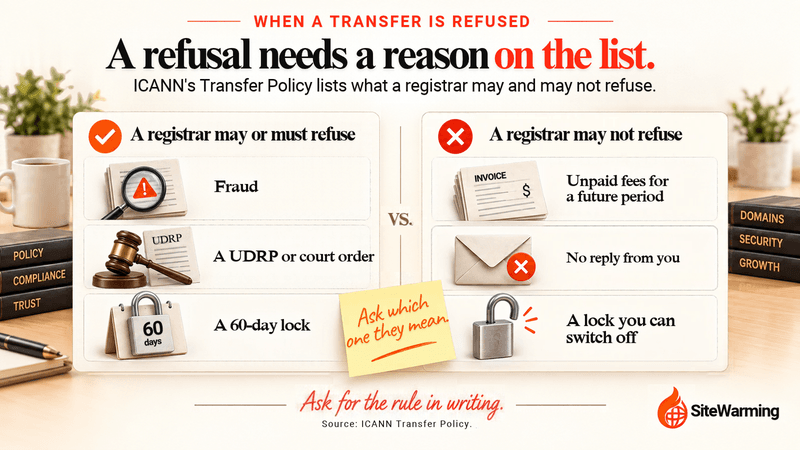
| A registrar may or must refuse when | A registrar may not refuse because |
|---|---|
| There is evidence of fraud, or a reasonable dispute over who the registrant is | You haven't paid for a pending or future registration period |
| A UDRP or URS proceeding is pending, or a court order applies | You didn't respond to the registrar |
| The domain is inside a 60-day window after registration or a prior transfer | The domain is in registrar lock status, unless you were given a way to unlock it |
| The registrant has expressly objected to the transfer | The registrar has a payment dispute with its business partners |
Vague refusals that match none of these are worth challenging. An expired domain is a special case: ICANN's renewals FAQ says registrars cannot deny a transfer because of expiration, but if the domain has already entered the redemption period it must be restored first, which may carry an extra fee. For the timeline, read what happens when a domain expires.
Second, file a complaint with ICANN. ICANN accepts complaints about "the transfer of a domain name to a different registrar and/or registrant" through its complaint form. This does not produce instant results, but it creates a formal record and often prompts registrar action.
For a deeper look at the full range of tactics registrars use to prevent you from leaving, and what your rights are in each scenario, read Can Your Registrar Hold Your Domain Hostage. That article covers the specific patterns in detail.
You have the right to transfer your domain. ICANN's Transfer Policy exists to protect that right. Understanding it before you need it makes the difference between a transfer that takes a week and one that takes three months.
Should I keep my domain, hosting and email at separate providers?
Yes, and a transfer is the clearest reason why. When your registration, hosting and email all sit at the same provider, a transfer becomes a migration of everything at once. Moving the paperwork means moving the systems. Keeping them separate means a registration transfer stays contained: you change the paperwork, and the systems keep running. We compare the cost and risk in the difference between a registrar and a host, and which registrars suit long-term ownership in best domain registrars for long-term ownership.
Sometimes the move isn't your choice. When a registrar shuts down or sells its business, the transfer happens on someone else's schedule. Google Domains is the example most people remember. It's the best reason to document your DNS and keep email separate before you need to.
A transfer leaves the things that make a domain recognizable alone: its name, its content, its URLs. The registration changes hands between registrars. The domain doesn't. Which is worth thinking about before you transfer. Not whether to move. But what you are carrying with you when you do: the registration, its renewal date, and one extra year. For the bigger picture, read about trust as a system and what you actually own in Do You Actually Own Your Domain? What ICANN Says.
Related reading
- Do You Actually Own Your Domain?: what you signed when you registered, and the limits of domain ownership.
- Your Domain Expires One Day at a Time: the expiry risks that often prompt a transfer decision.
- Best Domain Registrars for Long-Term Ownership in 2026: which registrar to trust with your domain going forward.
Frequently asked questions
How long does a domain transfer take?
Up to five calendar days. ICANN's Transfer Policy lets the registry complete the transfer unless it receives a rejection within five calendar days, and a current registrar that doesn't respond in that window is treated as approving. Approving the confirmation email can speed it up. Plan for the full five days.
Does renewing my domain lock it for 60 days?
No. Under ICANN's Transfer Policy, renewal is not a trigger. The 60-day windows follow a new registration, a completed transfer, or a change to the registrant's name, organization or email address. If a transfer fails right after you renew, check for one of those three events, or ask your registrar to name the rule in writing.
Can I transfer a domain within 60 days of registering it?
Usually not. ICANN's Transfer Policy lets a registrar deny a transfer requested within 60 days of the domain's creation date. The decision is the registrar's, so you can ask for an exception, but it rarely works for "I just want to move." Plan to wait the full 60 days.
What is an EPP code, and how long does my registrar have to give it to me?
An EPP code, also called an authorization code or auth code, is the password that authorizes a domain transfer. ICANN calls it the AuthInfo code. If your registrar doesn't let you generate it yourself, it must provide the code and remove the transfer lock within five calendar days of your request.
Will my website go down when I transfer my domain?
Not if your DNS stays put. A transfer moves the registration, not your website files or your nameservers. The risk comes when your old registrar hosts your DNS. Check where your nameservers point, rebuild the records elsewhere if needed, switch nameservers before you transfer, and verify the site afterward.
Will my email stop working during a transfer?
It can, quietly, if the MX records that route your mail disappear or don't match. Copy every MX, SPF, DKIM and DMARC record first, make sure they exist wherever your DNS will live, and send test emails to and from the domain afterward. Email bundled with your registrar may end when the domain leaves.
Do I need to turn off WHOIS privacy to transfer a domain?
Usually not. Older guides said to, because the new registrar emailed the contact in public WHOIS. ICANN's Board deferred enforcement of that requirement in January 2020. If your registrar still asks you to disable privacy, follow its instructions, then turn it back on after the transfer completes and check that it's active.
How much does a domain transfer cost?
The new registrar charges a transfer fee that varies by registrar and top-level domain, and ICANN's Transfer Policy says a completed transfer adds one year to the registration. Check the new registrar's price before you start, and multiply it across your portfolio if you're moving more than one domain.
What can I do if my registrar won't release my domain?
Ask for the exact reason in writing and compare it with ICANN's list of valid refusals, such as fraud, a UDRP or court order, or a 60-day window. Unpaid fees for a future period and no reply from you are not valid reasons. If the reason doesn't hold up, file a transfer complaint with ICANN.
Share this article
Ready to Transform Your Domain Portfolio?
Start building real value with your domain investments today.