Schema Markup for Small Websites: Do You Actually Need It?
 Bret Siers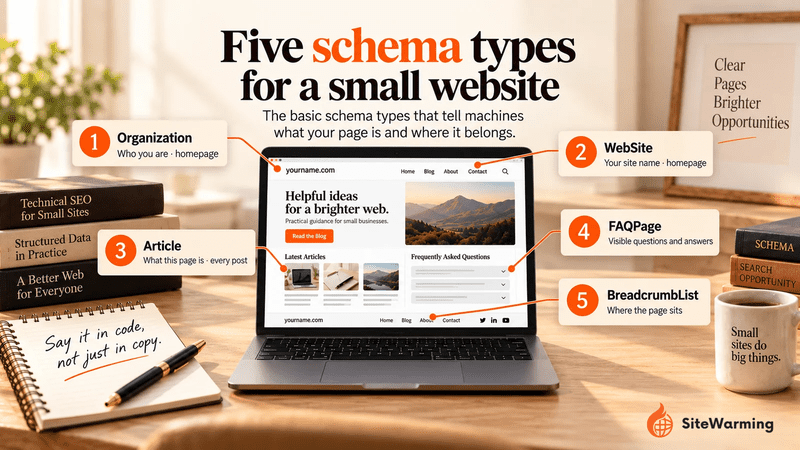
Small websites don't need every schema type, but five are worth adding: Organization, WebSite, Article, FAQPage and BreadcrumbList. Schema markup is structured data, written in JSON-LD, that tells search engines and AI systems what a page is. It doesn't guarantee a rich result or an AI citation, so treat it as clarity, not a shortcut.
By Bret Siers, founder of SiteWarming. Figures, dates and Google features in this guide were checked on October 8, 2026.
A founder we know ran Google's Rich Results Test on his 12-page website and got nothing back: no detected structured data and no eligible features. A competitor with five pages had JSON-LD on each of them, and the same test listed the types it found. By his account, the competitor's content wasn't better. What the test could show was the difference in markup, and he wanted to know how much that mattered.
This guide answers the question he asked. It names the five types worth adding, gives you the code, and says plainly what each one does in Google today, because several features that older guides promise have been retired. For the minimum a domain needs before it launches, see what structured data a domain needs before launch.
What is schema markup, and what does it do?
Schema markup is structured data you add to a page to describe what the page contains in a form that machines read directly. It is written as JSON-LD, a block of code inside a script tag that visitors never see, using the shared vocabulary at Schema.org. Google, Microsoft, Yahoo and Yandex are Schema.org's founding companies, and representatives of search engines sit on its steering group, so one vocabulary works across them.
| Term | What it means |
|---|---|
| Schema.org | The shared vocabulary of types (such as Organization and Article) and properties (such as name and datePublished) |
| JSON-LD | The code format Google recommends for structured data, placed in a script tag in the page's head or body |
| Rich result | An enhanced search listing built from structured data, such as breadcrumbs shown above a title |
| Entity | A distinct thing a machine can identify, such as your organization, a page or an author |
Google's introduction to structured data says the markup gives Google explicit clues about what a page means and can make the page eligible for rich results. It makes no claim that markup improves rankings. The benefits it points to come from the enhanced listing, such as more interaction when a rich result appears.
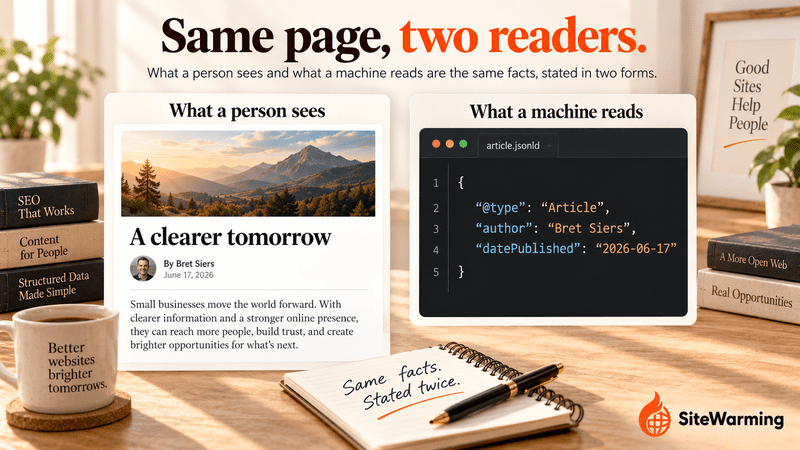
For AI answers the documentation is thinner. Google says there is no special schema.org structured data you need to add for its AI features. Microsoft's Fabrice Canel said at SMX Munich in March 2025 that Microsoft uses schema markup to help its large language models understand web content, as Search Engine Land reported. The OpenAI and Perplexity crawler documentation we read lists crawler access, not structured data, as the requirement, which is covered in how to get your site into ChatGPT and Perplexity answers. Our view: schema is a clear, low-cost statement of facts about your site, not a switch that turns citations on. Where it sits among the other habits is in what GEO is.
Can wrong schema markup get your site penalized?
Not in the way many guides imply, but there are rules. Per Google's structured data guidelines, markup that is missing required properties is not eligible for rich results. Markup that breaks Google's content or spam policies, such as misleading data or fake reviews, can stop a rich result from showing and can lead to a manual action. Google describes a manual action as the page losing eligibility for rich results, and says it does not affect the page's ranking in web search. You can check for one in the Manual Actions report in Search Console.
Three rules keep a small site safe:
- Mark up only what visitors can see on the page. Markup must describe content that is on the page.
- Make every value true. Don't invent reviews, ratings, prices or credentials.
- Replace every placeholder before you publish. A sample that still says "Your Company Name" describes nothing.
Why do small websites need schema markup more than large ones?
Our view: a large site has years of links, mentions and indexed history, so a machine has many signals to work out who it is and what it covers. A small site has fewer, and a machine isn't biased against it; it simply has less to go on. Markup is a direct statement that fills part of that gap. Organization states who you are, Article states what a page is and who wrote it, and FAQPage gives a machine ready-made question-and-answer pairs.
Here is the limit of that argument. We haven't found a vendor that documents a bonus for small sites, and schema can't stand in for content or links. What it can do is remove guesswork. For the other signals a machine weighs, see how AI search engines decide which domains to trust and why AI search engines ignore most websites.
Which schema types still do something in Google in 2026?
Some of the types older guides recommend no longer produce anything in Google. Here is where each stands, based on Google's documentation.
| Type | What it states | What Google does with it today |
|---|---|---|
| Organization | Who you are | Supported. No required properties; Google recommends name, URL, logo and sameAs profile links, on your homepage or one page describing the organization |
| WebSite | Your site's name | Supported for site names. Name and URL are required, alternateName is optional, and it belongs on the home page only |
| Article | What a page is, who wrote it, when | Supported. No required properties; Google recommends author, datePublished, dateModified, headline and image |
| BreadcrumbList | Where a page sits in your site | Supported. Needs at least two list items, each with a position |
| FAQPage | Visible questions and answers | No Google rich result. Google's FAQ notice says the feature stopped appearing on May 7, 2026 |
| WebSite with SearchAction | A sitelinks search box | Retired. Stopped showing on November 21, 2024 |
| HowTo | Steps in a process | Not in Google's Search gallery; rich results were limited to desktop in August 2023 |
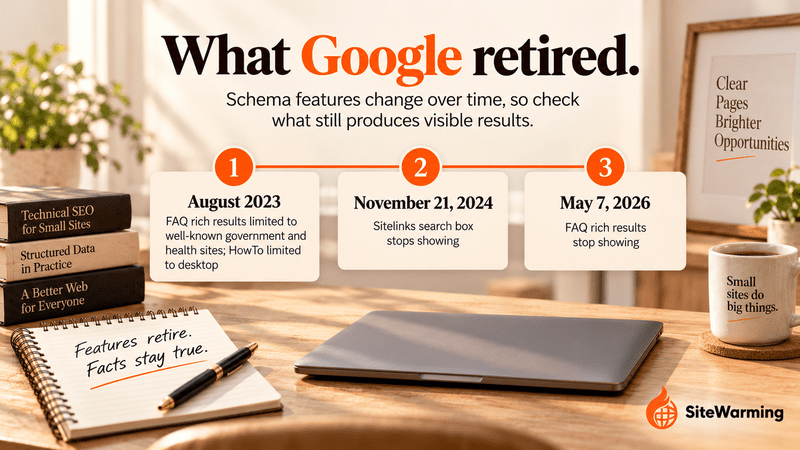
The dates behind that table: in August 2023 Google announced changes to HowTo and FAQ rich results, which Search Engine Journal reported as FAQ results shown only for well-known government and health sites and HowTo limited to desktop. Google announced the end of the sitelinks search box on October 21, 2024, and Search Engine Land reported that it stopped showing on November 21, 2024. Google says it needs no action, but its site names feature uses WebSite markup that remains supported, so don't remove that.
What this means for you: don't add markup to chase a feature, because features come and go. Add the types that state true facts about your site, and treat any rich result as a bonus.
Which five schema types should a small website add?
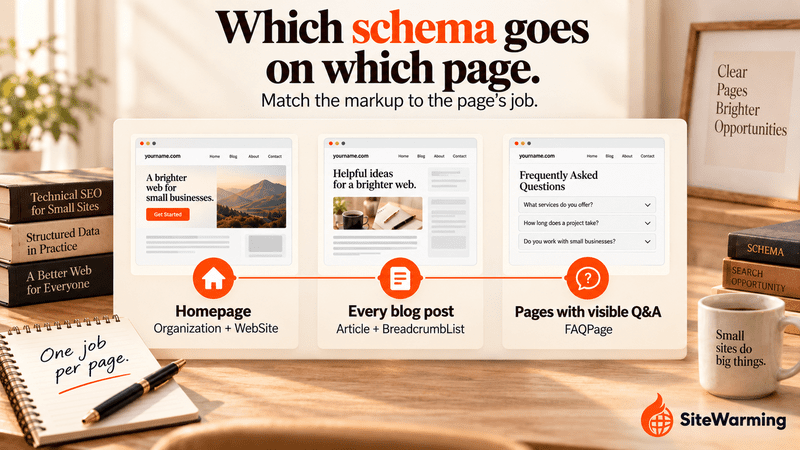
These five cover who you are, what each page is and where it sits. Each goes on specific pages, so you add a few blocks, not hundreds.
| Type | Where it goes | What it states |
|---|---|---|
| Organization | Homepage | Your organization's name, URL, logo and official profiles |
| WebSite | Homepage | Your preferred site name |
| Article | Every post | The content type, author, publication date and modified date |
| FAQPage | Pages with visible questions and answers | Question-and-answer pairs |
| BreadcrumbList | Interior pages | Where the page sits in your site |
Every sample below uses reserved example.com addresses. Replace every placeholder, including the dates, with your own real values before you publish.
What is Organization schema, and where does it go?
Organization schema identifies your organization to machines. Google's Organization documentation says to put it on your homepage or on one page that describes your organization, such as an About page, and that you don't need it on every page. There are no required properties. Google recommends a name, URL, logo and sameAs links to your profiles elsewhere. The logo should be at least 112 by 112 pixels, crawlable, and look right on a white background. List only profiles you actually own.
{
  "@context": "https://schema.org",
  "@type": "Organization",
  "name": "Your Company Name",
  "url": "https://www.example.com/",
  "logo": "https://www.example.com/images/logo.png",
  "description": "One sentence describing what your organization does.",
  "sameAs": [
    "https://www.linkedin.com/company/your-company",
    "https://x.com/your-handle"
  ]
}
What is WebSite schema for now that the sitelinks search box is gone?
It tells Google the name you prefer for your site. Per Google's site names documentation, WebSite markup on the home page carries the most weight for choosing the name shown in results. The name and URL are required, alternateName is optional, and the markup belongs only on the home page. This is the type that used to power the sitelinks search box, so older guides add a SearchAction. We have left it out because Google retired that feature in 2024, and markup for a search page you may not have describes something that isn't there. If your homepage already has WebSite markup, add these properties to the existing block instead of creating a second one.
{
  "@context": "https://schema.org",
  "@type": "WebSite",
  "name": "Your Site Name",
  "alternateName": "Your Short Name",
  "url": "https://www.example.com/"
}
What does Article schema state?
Article schema states what a page is, who wrote it and when. Google's Article documentation lists no required properties and recommends author, datePublished, dateModified, headline and image. Put only the author's name in the author name field and add a URL that points to a bio page. Write dates in ISO 8601 with a timezone offset, because without one Google assumes the timezone Googlebot uses. Use BlogPosting if you prefer, since it is a more specific form of Article. Change dateModified only when you really change the content, so the date stays an honest signal.
{
  "@context": "https://schema.org",
  "@type": "Article",
  "headline": "Your Article Title",
  "description": "A brief summary of what this article covers.",
  "image": "https://www.example.com/images/blog/your-article-hero.webp",
  "author": {
    "@type": "Person",
    "name": "Author Name",
    "url": "https://www.example.com/about"
  },
  "publisher": {
    "@type": "Organization",
    "name": "Your Company Name",
    "logo": {
      "@type": "ImageObject",
      "url": "https://www.example.com/images/logo.png"
    }
  },
  "datePublished": "2026-06-17T09:00:00+00:00",
  "dateModified": "2026-10-08T09:00:00+00:00",
  "mainEntityOfPage": "https://www.example.com/blog/your-article"
}
Should you still add FAQPage schema?
Add it only where the questions and answers are visible on the page, because Google's rule is that markup must describe content users can see. Since May 7, 2026 Google no longer shows FAQ rich results, so the reason to add it has changed. It labels question-and-answer pairs plainly for any machine that parses them. We haven't found documentation that it increases citations in AI answers, so add it for clarity, and keep to the two or three real questions your readers ask.
{
  "@context": "https://schema.org",
  "@type": "FAQPage",
  "mainEntity": [
    {
      "@type": "Question",
      "name": "Do small websites need schema markup?",
      "acceptedAnswer": {
        "@type": "Answer",
        "text": "Not every type, but Organization, Article and BreadcrumbList give search engines and AI systems clear facts about who you are and what each page is. Schema doesn't guarantee a rich result."
      }
    },
    {
      "@type": "Question",
      "name": "Which schema type should a small website add first?",
      "acceptedAnswer": {
        "@type": "Answer",
        "text": "Organization, on the homepage, because it states who you are and links your official profiles."
      }
    }
  ]
}
What does BreadcrumbList schema do?
BreadcrumbList shows a page's position in your site hierarchy. Google's breadcrumb documentation requires at least two list items, and each needs a position and a name. The item URL can be left off the last entry. Google may show a different trail depending on the query, and says breadcrumbs should reflect a typical user path rather than mirror the URL structure. It describes the feature as available on desktop.
{
  "@context": "https://schema.org",
  "@type": "BreadcrumbList",
  "itemListElement": [
    {
      "@type": "ListItem",
      "position": 1,
      "name": "Home",
      "item": "https://www.example.com/"
    },
    {
      "@type": "ListItem",
      "position": 2,
      "name": "Blog",
      "item": "https://www.example.com/blog"
    },
    {
      "@type": "ListItem",
      "position": 3,
      "name": "Your Article Title",
      "item": "https://www.example.com/blog/your-article"
    }
  ]
}
The machine-readable layer these types belong to is covered in the machine-readable website guide, which includes a 30-minute audit.
How do you add schema markup to a small website?
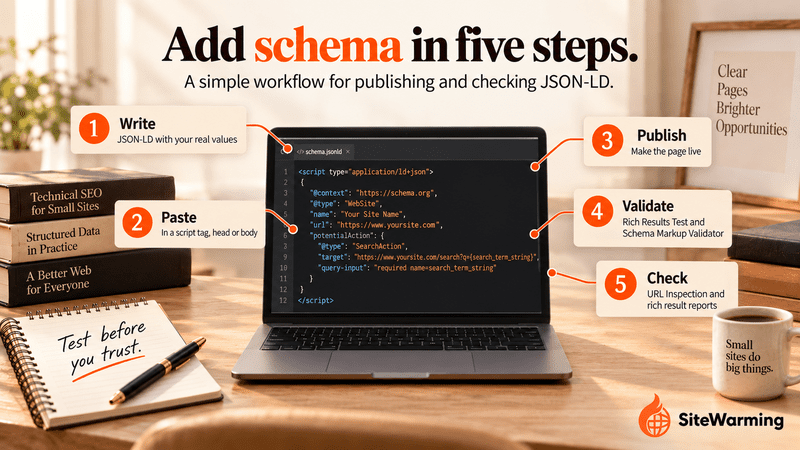
Five steps take a page from nothing to checked.
- Write the JSON-LD for the page type, using the samples above and your own real values.
- Paste it into a script tag with the type application/ld+json. Google says the tag can sit in the head or the body of the page.
- Publish the page.
- Validate it. Run the page through Google's Rich Results Test, and use the Schema Markup Validator for types the Rich Results Test doesn't cover, such as site names. Fix every error before you move on.
- Check it in Search Console. Use the URL Inspection tool to confirm Google found the markup, and watch the rich result status reports. Google says to allow several days after publishing for the page to be crawled and indexed.
<script type="application/ld+json">
  { ...your JSON-LD goes here... }
</script>
Where the script goes depends on your platform.
| Platform | Where the code goes |
|---|---|
| WordPress | An SEO plugin that outputs schema, such as Yoast SEO or Rank Math, or JSON-LD added to your theme's head |
| Webflow | Site settings, Custom code for every page, or a page's "Inside head tag" setting for one page. Requires a Core, Growth, Agency or Freelancer Workspace, or a site with an active Site plan |
| Squarespace | Code Injection: the Header field for every page, or Page Header Code Injection in a page's Advanced settings. Available on the Core, Plus and Advanced plans, and Squarespace support doesn't troubleshoot custom code |
| Any HTML site | Add the script tag directly to the page |
What should you add as your site grows?
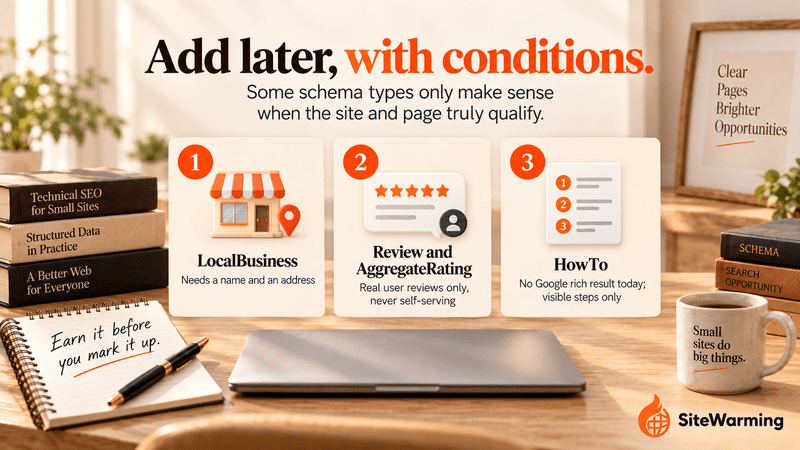
Three more types are worth knowing about. Add each only when it is true of your site and the content is visible on the page.
| Type | Add it when | The rule that matters |
|---|---|---|
| LocalBusiness | You serve a physical location or service area | Google requires a name and an address, recommends phone and hours, and says to use the most specific subtype. It can contribute to knowledge panels and business carousels |
| Review and AggregateRating | You show genuine reviews from users on the page | Per Google's review snippet documentation, pages that use LocalBusiness or Organization markup aren't eligible for star ratings when the business controls its own reviews |
| HowTo | You publish step-by-step guides | Google no longer lists a HowTo rich result, so mark up steps that are visible on the page and expect no special listing |
So, do small websites actually need schema markup?
Not every type, and not to unlock a feature. But a short list is worth a few hours: Organization on the homepage, Article on every post, BreadcrumbList on interior pages and WebSite for your site name, plus FAQPage wherever your questions are visible. Schema is free to add and free to validate. The founder in our opening example added all five types over a weekend, and he told us it took about four hours. The Rich Results Test then listed the types it found. That shows the markup works. It doesn't show that the markup changed his rankings, and we haven't measured that.
What schema can't do is stand in for the content and signals a machine needs. For the full audit that markup belongs to, use the machine-readable website guide. For the minimum before a domain launches, see what structured data a domain needs before launch. And for the larger argument that every domain now has human and machine readers, see the two audiences of every domain.
The SiteWarming perspective. Schema is how a domain states that it is a real entity with a real idea. A warm site from SiteWarming launches with DNS configuration, an HTTPS certificate, hosting, structured story data, AI-readable FAQs and a protected contact path, so a domain you haven't built yet still gives machines something clear to read. That is groundwork, not a guarantee of citation or rankings. See how SiteWarming works, what SiteWarming is, whether a domain with no content can show up in AI search, how to make a domain discoverable without a website, or start free.
Frequently asked questions
Do small websites need schema markup?
Not every type, and not to unlock a feature. But a short list is worth adding: Organization on the homepage, Article on every post and BreadcrumbList on interior pages, plus WebSite for your site name. They state true facts about your site in a form machines read directly. Google says markup doesn't guarantee a rich result.
Which schema types should a small business website use?
Start with Organization and WebSite on the homepage and Article and BreadcrumbList on posts. Add FAQPage only where questions and answers are visible on the page. If you serve a physical location or service area, add LocalBusiness, which Google requires to have a name and an address.
Does schema markup help SEO?
Google's introduction to structured data says markup helps it understand a page and can make the page eligible for rich results, and it makes no claim that markup improves rankings. Treat schema as clarity and rich-result eligibility, not a ranking lever.
Does schema markup help with ChatGPT and AI answers?
Nothing guarantees it. Google says no special schema is needed for its AI features, and the OpenAI and Perplexity crawler documentation we read lists crawler access as the requirement. Microsoft's Fabrice Canel said in March 2025 that Microsoft uses schema markup to help its large language models understand content.
Can wrong schema markup hurt my site?
Invalid markup makes a page ineligible for rich results. Misleading or spammy markup can lead to a manual action, which Google says removes rich-result eligibility without affecting the page's ranking in web search. Mark up only visible, true content and replace every placeholder before you publish.
Is FAQ schema still worth adding?
Google stopped showing FAQ rich results on May 7, 2026, so it no longer earns that listing. It still labels visible question-and-answer pairs plainly for machines. Add it only where the questions and answers appear on the page, and don't expect a ranking or citation boost.
How do I check my schema markup works?
Run the page through Google's Rich Results Test, and use the Schema Markup Validator for types it doesn't support, such as site names. Then use the URL Inspection tool in Search Console to confirm Google found the markup, and check the rich result status reports after it's live.
Related reading
Share this article
Ready to Transform Your Domain Portfolio?
Start building real value with your domain investments today.