How to Make Your Website Machine-Readable: A Beginner's Guide
 Bret Siers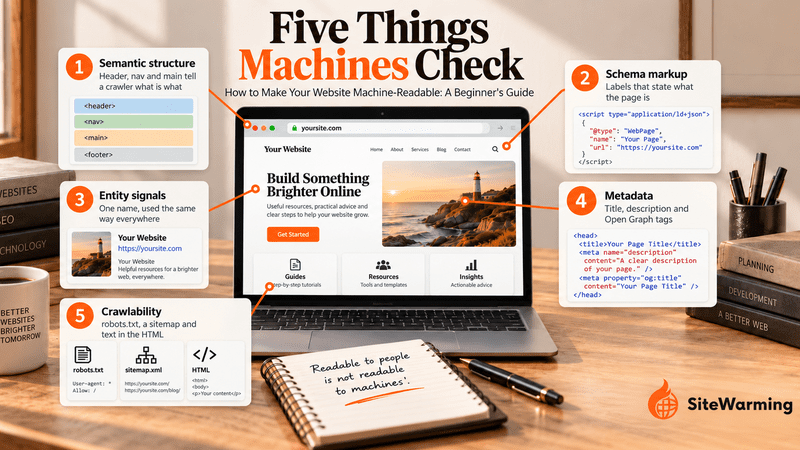
A machine-readable website lets crawlers and AI systems extract what each page is, who published it and what it claims. You build it in three layers: semantic HTML for structure, schema markup for explicit labels, and consistent entity signals for identity. A 30-minute audit checks all three, plus robots.txt, your sitemap and your meta tags.
By Bret Siers, founder of SiteWarming. Crawler rules and sources in this guide were checked on October 8, 2026.
A site owner launches a new website and runs Google's Rich Results Test on it. The result comes back blank: zero structured data detected, zero rich-result eligibility. The site has forty pages of content and three years of work behind it. To a visitor it looks finished. To a machine it is a pile of unlabeled text.
That gap matters more each year. Search crawlers and AI systems increasingly sit between your site and the people looking for it, and they can only use what they can parse. We cover the reasons sites get skipped in why AI search engines ignore most websites. This guide is the practical side: what machine readability is, the three layers that create it, and a 30-minute audit you can run today.
What does it mean for a website to be machine-readable?
A website is machine-readable when software can work out its structure and meaning without guessing. Human readability is about layout, wording and feel. Machine readability is about whether a crawler, an automated program that fetches pages so a search or AI system can read them, can tell what each part of a page is and who stands behind it.
Crawlers can't ask what you meant. They read the code you served and decide from that. Five things shape the result.
| What machines look for | What it tells a machine | Where you check it |
|---|---|---|
| Semantic structure | Which part of the page is the heading, the navigation, the main content and the footer | View source |
| Schema markup | What the page is: an organization, an article, a FAQ, a breadcrumb trail | Rich Results Test, Schema Markup Validator |
| Entity signals | Which organization or person is behind the site, named the same way everywhere | About page, schema, social profiles |
| Metadata | The page's title, summary and preview details | The head of the page |
| Crawlability | Whether a crawler may fetch the page and can see the text in the raw HTML | robots.txt, sitemap, view source |
A site can fail several of these without any visible symptom, because every page still looks fine to a person. That is why the problem usually goes unnoticed until a test like the one above exposes it.
What are the three layers of a machine-readable website?
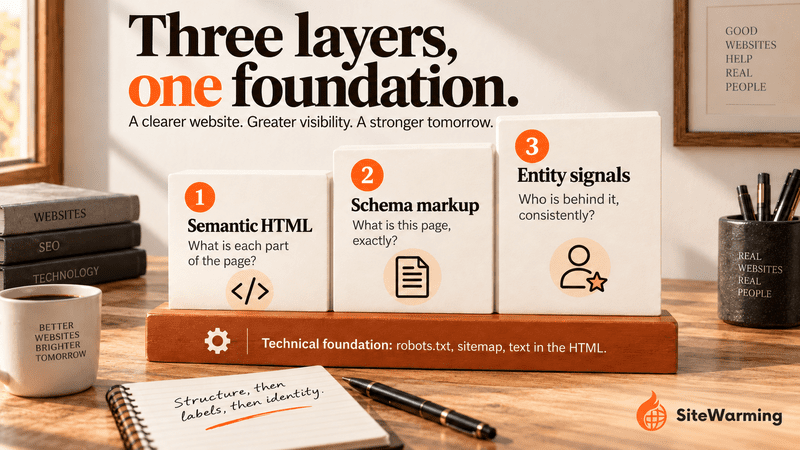
Machine readability works as a stack of three layers with a technical foundation underneath. Each layer answers a different question, and each one depends on the one below it.
| Layer | The question it answers | Format | Typical failure |
|---|---|---|---|
| 1. Semantic HTML | What is each part of this page? | HTML elements such as header, nav, main, article, footer | Everything is a generic div |
| 2. Schema markup | What is this page, exactly? | JSON-LD using the Schema.org vocabulary | No structured data at all |
| 3. Entity signals | Who is behind it, consistently? | The same name, author and facts across the site and the web | Three spellings of one company |
| Foundation | Can a crawler reach and read it? | robots.txt, sitemap, text present in the HTML | A leftover "block everything" rule |
Layer 1: What is semantic HTML, and how do you check yours?
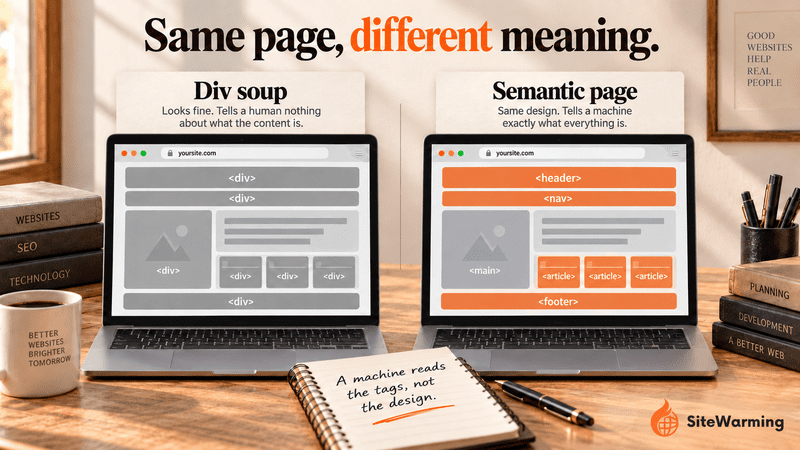
Semantic HTML means using elements that describe their content instead of generic containers. A heading is an h1 or h2, not a styled div. Navigation sits inside nav, and the dominant content sits inside main. MDN describes main as the dominant content of the page body and says a document shouldn't have more than one visible main element. Use one h1 per page, headings in logical order with no skipped levels, and header, nav, article and footer where they apply.
Drag-and-drop builders often produce what developers call div soup, a page where every block is an anonymous div. It looks identical to a person and tells a machine almost nothing.
<!-- Div soup: the machine sees anonymous boxes -->
<div class="top"><div class="menu">...</div></div>
<div class="big-text">How to Make a Website Machine-Readable</div>
<div class="content">...</div>

<!-- Semantic: the machine sees what each part is -->
<header><nav>...</nav></header>
<main>
  <article>
    <h1>How to Make a Website Machine-Readable</h1>
    ...
  </article>
</main>
<footer>...</footer>
To check your own page, open it, view the page source, and search for h1, nav, main and footer. If you find one h1 and the other elements are present, layer 1 is in place. The fix is usually a theme or template setting, not a rebuild.
Layer 2: What is schema markup, and which types matter first?
Schema markup is structured data that states what a page is, written in a shared vocabulary called Schema.org. The most common way to write it is JSON-LD, a block of data placed in a script tag. Google recommends JSON-LD where your setup allows it and says it can sit in either the head or the body of the page. Schema.org was started by Google, Microsoft, Yahoo and Yandex and is now developed through a W3C community group under a small steering group.
Five types cover most small sites.
| Type | What it states | Put it on |
|---|---|---|
| Organization | Who you are: name, website, logo, social profiles, contact route | Homepage |
| WebSite | The site's name and address | Homepage |
| Article (or BlogPosting) | Headline, author, publish and modified dates | Every article |
| FAQPage | Visible questions and their answers | Pages that contain real Q&A |
| BreadcrumbList | Where the page sits in the site | Interior pages |
The Organization type is the one to get right first. Google says Organization markup helps it understand your organization and tell it apart from others, and that no properties are strictly required, though name, url, logo and sameAs are among those it recommends. A minimal version looks like this, with example values you must replace:
{
  "@context": "https://schema.org",
  "@type": "Organization",
  "name": "Acme Co.",
  "url": "https://www.example.com/",
  "logo": "https://www.example.com/images/logo.png",
  "sameAs": [
    "https://www.linkedin.com/company/example"
  ]
}
The other four types, with copy-and-paste code for each, are in schema markup for small websites. If your domain has no site yet, what structured data a domain needs before launch covers the minimum. Whatever you add, test it, and keep it matched to what is visible on the page.
Layer 3: What are entity signals?
An entity is a named thing, such as a company, a person or a product, that a system can recognize as one distinct item. Entity signals are the consistent facts across your site and the web that let a machine decide it has found that one thing. Schema says what a page is. Entity signals say who the organization behind it is, and whether every mention agrees.
When they don't agree, you get entity fragmentation: "Acme," "Acme Co." and "ACME Technologies" read as three organizations instead of one, and the credibility you earn is split three ways.
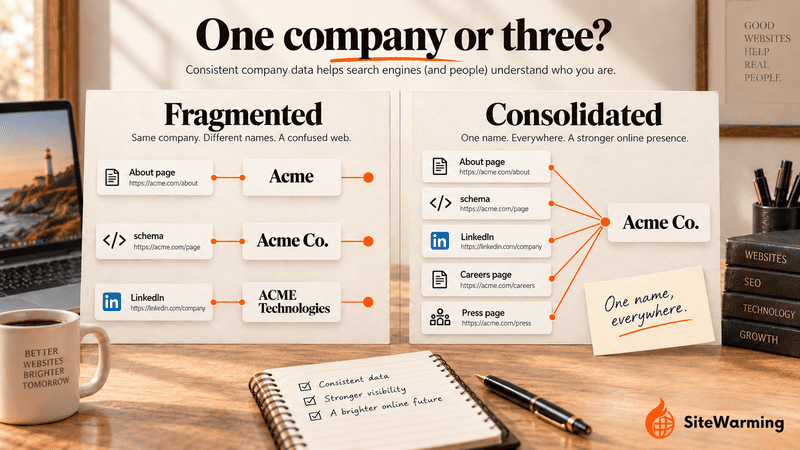
Consistency here means four things: the same organization name on the site, in your schema, on social profiles and in directories; author bylines that match the author named in your Person markup; the same address format everywhere; and the same language for what you are expert in. Our shorthand for the principle is: consistency is confidence, and confidence is citation. That is a working rule, not a published ranking factor, but it matches how AI search engines decide which domains to trust.
Which AI crawlers should you allow?
A robots.txt file is a plain-text file at the root of your site that tells crawlers which paths they may fetch. Google describes it as a way to manage crawler traffic, and is explicit that it is not a mechanism for keeping a page out of Google. The classic mistake is a leftover from a staging site: a User-agent: * line followed by Disallow: /, which blocks every compliant crawler from everything.
The newer mistake is treating all AI bots as one group. Each AI company runs separate crawlers for training, for search and for requests a user triggers, and blocking one does not block the others.
| Crawler | Operator | What it does | What blocking it affects |
|---|---|---|---|
| OAI-SearchBot | OpenAI | Surfaces sites in ChatGPT search features | The site is not shown in ChatGPT search answers, though it can still appear as a navigational link |
| GPTBot | OpenAI | Crawls content that may be used to train OpenAI's foundation models | Signals that your content should not be used for training; it does not affect search visibility |
| ChatGPT-User | OpenAI | Visits a page when a user asks ChatGPT or a custom GPT | User-initiated, so robots.txt rules may not apply; it does not decide Search appearance |
| Claude-SearchBot | Anthropic | Browses to improve the quality of search results | Stops Anthropic from indexing your content for search, which may reduce your visibility there |
| ClaudeBot | Anthropic | Gathers web content that may be used for model training | Leaves your future content out of training datasets |
| Claude-User | Anthropic | Accesses a site when someone asks Claude a question that needs it | Stops Claude from retrieving your content for user queries |
| PerplexityBot | Perplexity | Surfaces and links sites in Perplexity search results; not used for foundation model training | Reduces your appearance in Perplexity search results |
| Perplexity-User | Perplexity | Visits a page when a user's question calls for it | It generally ignores robots.txt, because a user requested the fetch |
| Googlebot | Crawls pages for Google Search and respects robots.txt | A page must be indexed and eligible for a snippet to be a supporting link in AI Overviews and AI Mode, according to Google |
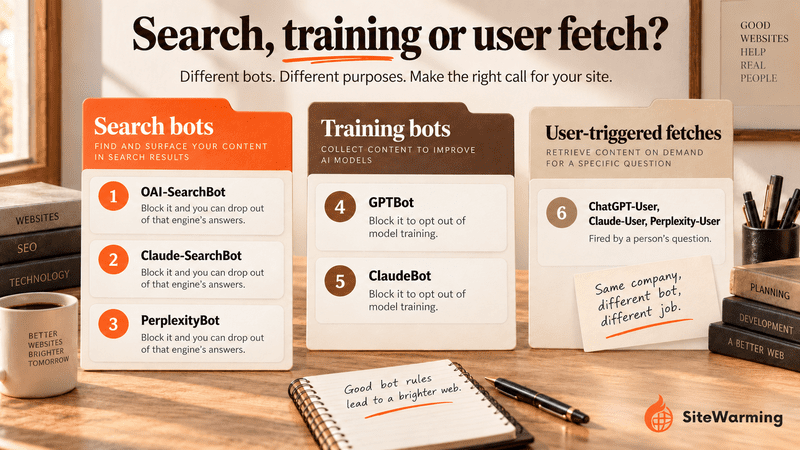
A workable rule: allow the search bots if you want to be cited in those engines, and treat the training bots as a separate content-licensing decision. Here is a robots.txt that allows ChatGPT search and opts out of OpenAI training, as an example of how separate the controls are:
User-agent: OAI-SearchBot
Allow: /

User-agent: GPTBot
Disallow: /
Two caveats. Changes to these rules can take up to about 24 hours to apply, according to the OpenAI and Perplexity documentation. And robots.txt is not the only gate: OpenAI's ChatGPT search help page says sites become eligible by allowing OAI-SearchBot and by letting its published IP addresses reach your host or CDN, so a security plugin or CDN rule can block a bot that robots.txt allows. For crawler behavior in depth, read how AI crawlers decide what to index, and for the citation side, how to get your site into ChatGPT and Perplexity answers.
Can AI crawlers read JavaScript?
Mostly no. A study published by Vercel on December 17, 2024 found that none of the major AI crawlers it measured, including GPTBot, OAI-SearchBot, ChatGPT-User, ClaudeBot and PerplexityBot, render JavaScript. They download JavaScript files but don't run them, so text that only appears after a script runs is invisible to them. The same study found that Google's Gemini, which uses Googlebot's infrastructure, and AppleBot do render JavaScript. Vercel's advice is to server-render critical content: the main text, meta information and navigation. This is a December 2024 snapshot and vendors can change behavior, so retest rather than assume.
The quick test: view your page source, copy a distinctive sentence from the visible page, and search for it. If it isn't in the source, your content depends on JavaScript.
How do you audit a website for machine readability in 30 minutes?
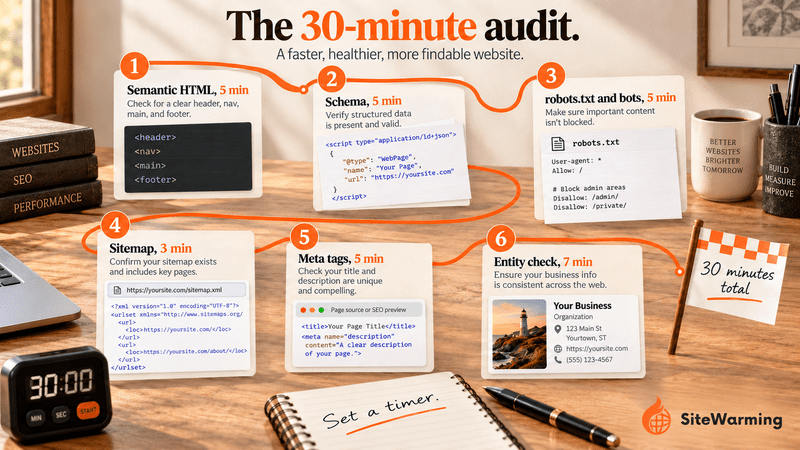
The audit tests each layer and the foundation in order. The steps below add up to 30 minutes, and the timings assume a site of up to a few dozen pages. Because a theme usually sets layer 1, expect most of the gaps to show up in layers 2 and 3.
| Step | Time | Layer | What you are checking |
|---|---|---|---|
| 1. Semantic HTML | 5 min | Layer 1 | One h1, nav, main, header and footer; text visible in the source |
| 2. Schema markup | 5 min | Layer 2 | Types detected and no errors |
| 3. robots.txt and bots | 5 min | Foundation | No blanket block; the right bots allowed |
| 4. Sitemap | 3 min | Foundation | A sitemap exists and is submitted |
| 5. Meta tags | 5 min | Metadata | Unique title, description and Open Graph tags |
| 6. Entity consistency | 7 min | Layer 3 | One name, everywhere |
Step 1: Check your semantic HTML (5 minutes)
Open your homepage and a blog post and view the page source. Confirm there is one h1, a nav element, a main element or an article element, and header and footer elements. Check that heading levels descend in order without skipping. Then run the JavaScript test from the previous section on a sentence from each page. If something is missing, look first for a theme or template setting or a custom HTML block, since page builders vary in what they output.
Step 2: Test your schema markup (5 minutes)
Run Google's Rich Results Test on your homepage, one article or product page, and your contact page. It shows what Google can detect and whether those pages are eligible for rich results. Then paste the same URLs into the Schema Markup Validator, which checks structured data of any type, including types that don't produce rich results. You want detected types and no errors. A result of "No items detected" means the page has no structured data the tool recognizes, which is the outcome in the opening story.
Step 3: Check robots.txt and crawler access (5 minutes)
Open yoursite.com/robots.txt. Look for a Disallow: / rule under User-agent: *, and for any lines naming the bots in the table above. Compare them with what you decided: search bots allowed if you want citations, training bots according to your licensing choice. If a bot you allowed still can't reach you, check your security plugin or CDN settings. The crawler decision guide explains what each choice costs.
Step 4: Verify your sitemap (3 minutes)
Open yoursite.com/sitemap.xml. A 404 means your site doesn't publish a sitemap at that address, or doesn't have one. Google says a site of about 500 pages or fewer that links all its pages internally may not need one, but a sitemap still helps discovery on larger or newer sites, and many content management systems generate one. Submit it in Google Search Console, and in Bing Webmaster Tools if you use it. A sitemap doesn't guarantee that pages are crawled or indexed.
Step 5: Check your meta tags (5 minutes)
Every page needs a unique title tag and a unique meta description. Google says there is no limit on meta description length, but results are shortened to fit the device, and Google sometimes uses text from the page instead when it describes the page better, so write a plain summary and lead with the point. Also check for Open Graph tags (og:title, og:description and og:image), which control how a link previews when shared, and a canonical tag on each page. Missing or duplicated tags make a page harder to identify and summarize.
Step 6: Run the entity consistency check (7 minutes)
Write down the exact name of your organization. Then check it in five places: the About page, the footer, your Organization schema, the contact page and your linked social profiles. Note every variation, such as "Acme Co." against "Acme Company" against "ACME." Pick one form, then update every place, including the name property in your schema and your author bylines. Do the same for your address and for how you describe what you do. This is entity fragmentation, and it is the one problem a theme setting won't fix.
What should a machine-readability checklist include?
Run through this after the audit. Each item maps to a step above.
Layer 1: semantic HTML
- One h1 on every page
- Navigation wrapped in nav
- Main content in main or article
- A logical heading hierarchy with no skipped levels
- No duplicate page titles
Layer 2: schema markup
- Organization and WebSite schema on the homepage
- Article or BlogPosting schema on every article
- FAQPage schema only where visible Q&A appears
- BreadcrumbList on interior pages
- Zero errors in the Rich Results Test and the Schema Markup Validator
Layer 3: entity signals
- An identical organization name on the site, in schema, on social profiles and in directories
- Author names that match your Person markup
- An identical address format everywhere
- Consistent language for your topics
Technical foundation
- A robots.txt file that doesn't block all crawlers and treats search and training bots as separate decisions
- A sitemap submitted in Google Search Console
- Critical text present in the HTML, not only added by JavaScript
- A canonical tag on every page
Do you need special files or markup for AI search?
No, and it helps to know where the line sits. Google's guidance on AI features says a page needs to be indexed and eligible to be shown in Search with a snippet to appear as a supporting link in AI Overviews and AI Mode, and that there are no additional requirements. It also says you don't need special Schema.org markup, new machine-readable files or AI text files, and that any structured data you do have should match the visible text.
So treat the three layers as clarity, not a trick. They make your site easier to parse and verify, which helps every system that reads it. They don't guarantee a citation, and Google's structured data introduction describes the benefit as richer search appearance rather than a ranking boost.
What should you add after the basics?
Once the audit is clean, add schema for what your site actually contains. Describe only what is visible on the page.
| If your site has | Add | What it states |
|---|---|---|
| A physical location or service area | LocalBusiness | Name, address, phone number and opening hours |
| Customer reviews | Review | Who reviewed what, and the rating |
| Products for sale | Product | Product details, with price and availability described through an offer |
| Events | Event | Dates, location and description |
Add the JSON-LD, validate it, and watch Search Console for errors.
Why do machines read your site differently from people?
People compensate for a confusing layout. They scroll, squint and guess. Machines don't compensate, and a page that parses badly is unlikely to get a second look. That is the core of the two-audience problem: one audience reads for meaning and the other reads for signal, and a site has to serve both. The strategy side is in how to optimize for both Google and AI search, and the background on the second audience is in structured content for machines.
So when someone asks ChatGPT or Perplexity about your field, will your name come up, or will a competitor that did this work earlier? Nothing guarantees either outcome. But a site a machine can't read has no chance of being understood in the first place, and the checklist above is how you remove that one avoidable reason. For the wider picture, see what GEO is. If you want a presence before you have a full site, see how to make a domain discoverable without a website and how to show a domain idea without a full website. If your domain has no site yet, read whether a domain with no content can show up in AI search and why AI can't read a parked domain.
The SiteWarming perspective. Machine readability is the foundation of being found, and it applies to domains you haven't built yet. A warm site from SiteWarming launches with DNS configuration, an HTTPS certificate, hosting, structured story data, AI-readable FAQs and a protected contact path, so a domain you're not ready to build is still visible, current and reachable. The difference between an active domain and a dark one is whether the machines reading the internet can tell your idea is real. See how SiteWarming works, what SiteWarming is, or start free.
Frequently asked questions about machine-readable websites
What does machine-readable mean for a website?
A machine-readable website is one that software can parse without guessing. Crawlers can identify its headings, navigation and main content, read structured labels such as schema markup, and recognize one consistent organization behind it. It is the difference between a page that only looks finished to a person and one a machine can actually use.
Should I block GPTBot?
It depends on what you want. GPTBot is OpenAI's training crawler, and blocking it opts your content out of model training without affecting ChatGPT search visibility. OAI-SearchBot is the separate crawler for ChatGPT search, so allow it if you want citations. Decide the two independently, and allow up to 24 hours for changes to apply. See the crawler table for the full list.
Do AI crawlers read JavaScript?
Mostly not. Vercel's December 2024 study found that GPTBot, OAI-SearchBot, ChatGPT-User, ClaudeBot and PerplexityBot fetch JavaScript files but don't execute them, while Gemini and AppleBot do render JavaScript. Put critical text in the server-rendered HTML, and test by searching your page source for a distinctive sentence. Retest from time to time, because vendors can change this.
Is semantic HTML the same as schema markup?
No. Semantic HTML uses elements such as header, nav, main and footer to show what each part of a page is. Schema markup is a separate block of structured data, usually JSON-LD, that states what the page itself is, such as an article or an organization. You want both: one describes structure, the other labels meaning. The schema guide has the code.
Do I need special schema to appear in AI Overviews?
No. Google says a page needs to be indexed and eligible to appear in Search with a snippet, and that there is no special Schema.org structured data you need to add. Any structured data you do use should match the visible text. Schema still helps machines understand a page, but it isn't a requirement for AI Overviews.
Do FAQ rich results still appear in Google?
No. Google stopped showing FAQ rich results in Search on May 7, 2026. You can still publish FAQPage markup for other parsers, but it no longer earns the expandable result in Google. Add it only where the questions and answers are visible on the page, and don't expect a visual change in results.
How long does a machine-readability audit take?
We estimate about 30 minutes for a small site: 5 minutes each for semantic HTML, schema, robots.txt and meta tags, 3 for the sitemap and 7 for the entity check. Larger sites take longer because you must test templates, not just single pages. Repeat the audit after a redesign, a theme change or a new plugin.
Related reading
- What Is GEO? A Guide to Generative Engine Optimization in 2026: the definition and the case for optimizing for AI answers.
- Why AI Search Engines Ignore Most Websites (And What to Do About It): six data failures and how to fix each.
- How to Get Your Site Into ChatGPT and Perplexity Answers: crawler access and citation in practice.
- Schema Markup for Small Websites: Do You Actually Need It?: the five types with code.
- How AI Crawlers Decide What to Index (And What They Skip): what each choice costs you.
- Can a Domain With No Content Show Up in AI Search?: the minimum presence a new domain needs.
- How to Optimize Domains for Both Google and AI Search: the strategy behind the two audiences.
Share this article
Ready to Transform Your Domain Portfolio?
Start building real value with your domain investments today.