How to Monetize a Domain Without Ads or Parking Pages
 Bret Siers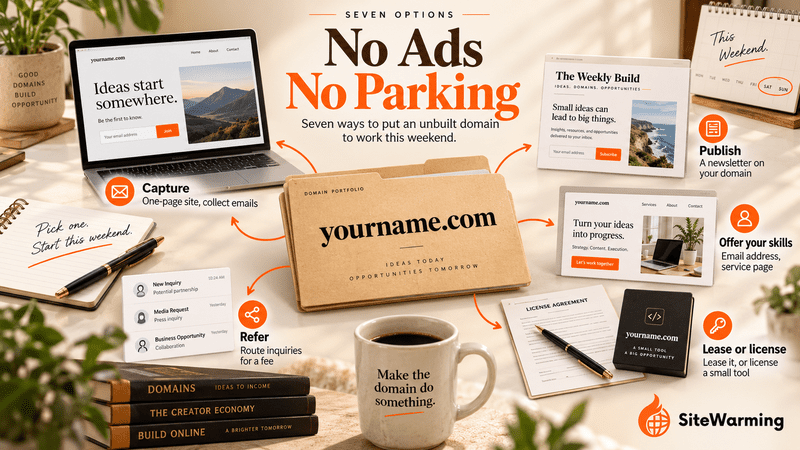
You can monetize a domain without ads or parking by making it do real work before the full site exists. Capture emails on a one-page site, start a newsletter, signal consulting availability, offer a service, lease it, license a small tool or arrange a referral. Pick one and start this weekend.
You registered the domain. The idea felt real. It still does.
But that was eight months ago, and the site you were going to build is still sitting at "when I have time." The renewal invoice just arrived. You've been paying to hold a name that's doing nothing except costing you a renewal fee (Namecheap lists a .com renewal at $18.48 a year) and a small steady guilt.
Here's what most domain owners do at this point: park it. Enable ads. Let the registrar fill the page with links that have nothing to do with the original idea, and call it managed.
I want to show you a different set of options. Specifically, I want to show you what's possible this weekend. Not "build the whole site." Not "launch the full product." Just: make the domain start doing something useful while you figure out the rest.
This article is for pre-website, pre-audience domain owners. If you already have a site with content and visitors, this isn't your entry point. But if your domain is parked or dark and you're wondering whether there's a middle path between "build everything" and "do nothing," keep reading.
Two nearby questions have their own answers. If you want a ranked verdict on every route for a domain that's already parked, read What to Do With a Parked Domain in 2026. If you have a site with content and readers and want to earn from it, read How to Monetize a Niche Website Without Ads. This post covers the stage before both: a domain with no site and no audience that you want to start earning from.
Are parking and ads still a neutral choice for an unbuilt domain?
No, and the practical reasons are stronger than the moral ones. First, the honest case against parking. Not "parking is lazy." That's a moral argument and it's not useful.
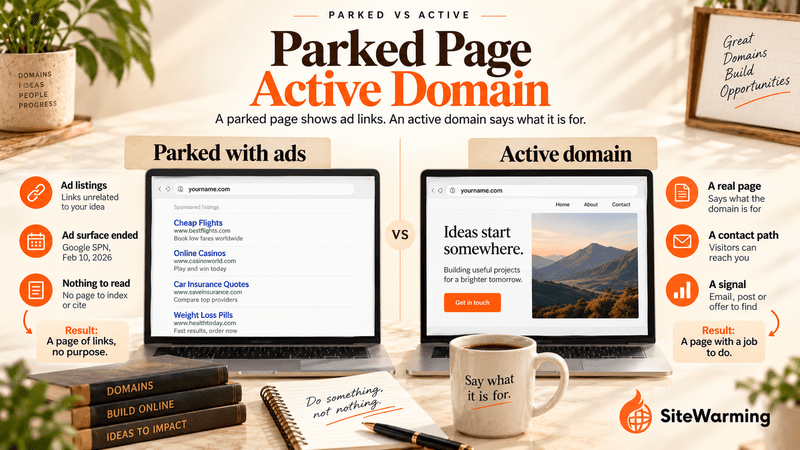
Parking used to be a real line of business. Domain Name Wire describes parking arbitrage as a major income source for the domain industry before Google unwound AdSense for Domains. The unwinding was fast. Domain Name Wire reports that Google announced in February 2025 that it would opt all existing advertisers out of showing ads on parked domains, that the final phase in September 2025 cut parking revenue to a fraction of what it had been, and that Sedo's revenue fell 66% in the third quarter. Google Ads Help now says that parked domains "will cease to be an ad surface within the Search Partner Network effective February 10, 2026." Its parked domain policy also bars ads that link to pages that "display only advertising listings and links, and that don't provide the user with unique and valuable content."
What parking does to your search standing is less settled than the usual advice suggests. Google doesn't document a reputation score for parked domains, and its spam policies don't name parked domains. What Google does document is that pages with little or no added value break its rules: its manual action description lists thin affiliate pages, content from other sources and doorways as examples of "thin content with little or no added value." A parked page of unrelated ad links sits close to that description, but we can't point you to a Google statement that says parked pages are penalized.
What you can observe is simpler. A parked page gives search engines and AI systems nothing to index, cite or attribute to you, and it gives a visitor nothing to remember or contact. Visitors find noise, not an idea. Our posts on why domain parking is not neutral and the real cost of parking a domain go through what crawlers see and what the wait costs.
I've talked to domain owners who were genuinely surprised by this. They assumed parking was neutral, just sitting there, doing nothing. "I'm not hurting anything," they'd say. In our view the cost isn't a penalty. It's the months in which nothing accumulates, while a domain with even minimal content and a way to reach you is building a record. Time you can't get back.
The good news is that "something" doesn't have to be complicated.
What are the seven ways to monetize a domain without ads or parking?
The seven options below run from "you could do this today" to "this takes a few weeks." The table compares them. The time and effort entries are our estimates, not measured data, and the costs come from the vendor pages linked in each option.
| Option | Effort | Time to first dollar (our estimate) | Cost to start | Needs an audience? | Main risk | Best for |
|---|---|---|---|---|---|---|
| 1. Lead capture page | A few hours | No direct revenue; it builds a list | $0 to $19 a year | No | People sign up and you never write | Any domain with an idea behind it |
| 2. Newsletter on the domain | A weekend to set up, then a steady cadence | Months, if at all | $0 to a one-time $50 | You build one | The cadence stalls | A domain with a clear topic |
| 3. Consulting signal | About an hour | Weeks, if you have the expertise | $0 | No | You have no expertise to sell | A domain in your professional field |
| 4. Lease or lease-to-own | Low effort, slow wait | Depends on finding a tenant or buyer | Marketplace commission | No | No tenant appears | A name that matches a business category |
| 5. License a small tool or content | Days to weeks | Weeks to months | $0 to start | Helps | Few sales without readers | A domain built around one problem |
| 6. Service landing page | About a day | Weeks | Low | No | A vague offer | A descriptive name plus a service you provide |
| 7. Referral partnership | One conversation and one page | Depends on the partner | Low | No | Rules in regulated categories | A name in a category with established players |
Option 1: How do you capture leads with a one-page site on your domain?
This is the fastest thing you can do. Today, if you want.
You build a single landing page with a simple page tool and connect your domain to it. It doesn't have to be a full website. Carrd builds up to three sites on its free plan. Kit, the company formerly called ConvertKit, includes unlimited landing pages and forms on its Free plan, for up to 10,000 subscribers. In our experience, a page like this takes an afternoon and needs no code.
What goes on the page? Your name. What the domain is eventually going to be about. One sentence that says: "This is coming. Leave your email if you want to know when it's ready."
That's it. You now have a domain that, when someone types it into a browser, shows them something human instead of ad noise. They see an idea with a name behind it. Some percentage of them will leave their email.
Those emails are your early audience. They're people who found the idea before the thing existed and decided it was worth knowing about. That's valuable, and collecting them costs you nothing beyond the page.
Should you forward the domain or point it at the page?
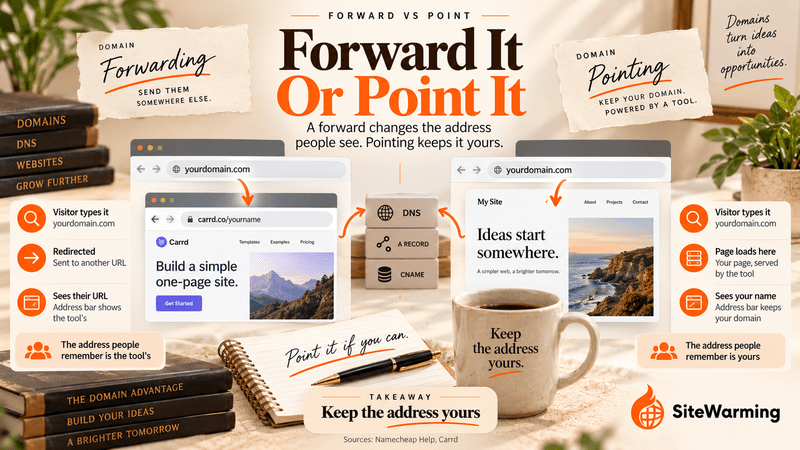
Two different things get called "forwarding," and the difference decides whose address people see.
Forwarding is a redirect. The visitor types your domain and is sent to another URL, so the address bar shows the destination. Namecheap's documentation says that with 301 and 302 redirects, visitors see the destination URL.
Pointing the domain at the page, usually by adding the DNS records your tool gives you, means the page loads at your domain and the address stays yours.
Point it whenever the tool supports a custom domain, because the address people see, share and remember should be yours. Carrd publishes to your own domain on its Pro plan, which costs $19 a year. Kit says that using a custom domain for landing pages means changing the domain's DNS records and that verification can take 24 to 48 hours. Its help article doesn't say which plan includes it, so confirm that before you count on it.
Linktree is the exception. Its help center says it doesn't offer a custom domain to replace the linktr.ee URL and suggests a redirect link instead. A forward to a Linktree works, but the address people remember is Linktree's, not yours.
The domain has gone from dark to active in the afternoon. No website, no product, no code. Just a name that now points to something human.
That might be enough for some domains. For others, you'll want to go further. You won't just want to capture interest. You'll want to build a relationship with it.
Option 2: Can a newsletter tied to the domain work before you have a site?
Yes, and it's the best long-term play in this list. A newsletter-first strategy means you're building the audience before you build the site. The domain becomes the brand. The newsletter is the product, for now.
Substack and beehiiv both support custom domains, at a price. Substack charges a one-time $50 fee to use a custom domain. beehiiv's pricing page lists a Free plan and paid plans from $49 a month on yearly billing, and its help center says custom domains are available on paid plans. Connect your domain to a newsletter so that when someone visits, they see your publication. Publish whenever you have something worth saying, even once a month. You're building a subscriber list. You're accumulating a reputation for this topic.
Here's what this does that parking never can: it starts the trust-building process immediately. Every issue is a signal. Every subscriber who opens it is engagement. Every reply is relationship. In our view those three things compound, and parking generates none of them.
You don't need an audience to start. You need a perspective and the willingness to share it at a pace you can sustain. The argument for why small focused audiences are more valuable than traffic matters here. You're not trying to reach everyone. You're trying to find the 200 people who care specifically about this topic. In our view, 200 people who chose you are worth more than 20,000 passive visitors who found you by accident and left.
Be honest about the timeline. A newsletter is the slowest of the seven to pay. The revenue arrives later, from a paid tier, a sponsor or the product you eventually build.
By the time you're ready to build the full site, you won't be launching into silence. You'll be launching to a list. That list is the beginning of what long-tail audiences that become real revenue infrastructure look like.
Option 3: How do you use a custom email address to signal consulting availability?
This one requires the least infrastructure of anything on this list. And it works immediately if you have expertise in the domain's topic area.
You don't need a built website. You need two things: a professional email address at the domain, and one public piece of content that connects you to it.
The email address. Cloudflare Email Routing is free on Free and Paid plans, and it routes incoming mail from yourname@yourdomain.com to the inbox you already use. It requires Cloudflare DNS, and Cloudflare says DNS changes usually finish within 5 to 15 minutes for domains on its DNS and can take up to 24 hours. Its limits are 200 routing rules per domain, 200 destination addresses per account and 25 MiB per inbound message, which is plenty for one person.
One limit matters more: Email Routing handles incoming mail only. To reply from the address, you need a sending setup. Gmail's "Send mail as" can send from an address you own once you add and verify it with an SMTP server, and Cloudflare offers a separate Email Sending service that it lists as a beta on its Workers Paid plan. Set up your domain's email authentication properly before you rely on it, or your replies may land in spam. Our guide on email deliverability explains why.
The public piece. Pair the address with a LinkedIn article or post that mentions the domain, describes what you're building, and invites inquiries. It gives search engines and AI systems one more public place that connects your name to the domain. Neither is guaranteed to pick it up, but the right people reading it can write to you.
You haven't built a website. You've created a consulting signal. The right people find it, they reach out, and the domain starts generating value through the opportunities it creates. I've seen domain owners land their first consulting client within weeks of doing nothing more than this. The domain did the selling. They just had to show up.
The first three options all require you to do something with the domain. The next one works even if you're not going to touch the domain yourself, because it depends on someone else wanting the name.
Option 4: Can you lease a domain without selling it?
Leasing means allowing a business or operator to use your domain in exchange for a monthly fee, while you retain ownership. That's renting, and it has precedent. In 2017, Radix and the marketplace Undeveloped tested a "Domain Rental Market" that let customers rent premium domains by the month. Treat a rental as a negotiated deal: we didn't find a standard marketplace program for plain rentals, so you'd be finding the tenant and writing the agreement yourself.
Lease-to-own is a different arrangement. It's a sale paid in installments, and the major marketplaces run it.
- Afternic. Afternic's page says buyers can pay over a term of up to 60 months. They can start using the domain right away, but it stays locked until the last payment, and sellers are paid on a monthly schedule. Domain Name Wire reported the launch terms in July 2023: domain prices from $495 to $100,000 and a minimum monthly payment of $100. Check current terms before you list.
- Dan.com. When it launched the feature in 2020, Domain Investing reported that if a buyer didn't pay in full, the seller got the domain back and kept every payment made to that point.
In our view, a name that matches a real business category is the kind most likely to attract a tenant or a buyer who'd rather pay over time than build on a weaker name.
This is a longer-range play. Finding the right tenant takes time, and a buyer can only lease a name they can find, which is why the signals someone wants your domain matter before you list anything. But for domains with clear business relevance, it's real revenue that doesn't require you to build anything. You keep ownership throughout a rental, and until the final payment on a lease-to-own. Someone else does the work. The domain stays active.
Option 5: Can you license content or a small tool from the domain?
If the domain's concept lends itself to a specific piece of content or a simple tool, you can build and license that without building a full website.
A single-page calculator. A reference guide in PDF form. A template set. A small data tool. These are things that can live on a minimal site and be offered for a small fee. Kit's Free plan, for example, lets you sell digital products.
The threshold for "minimal viable tool" is lower than most people assume. A genuinely useful template that solves one specific problem is enough to start. The domain is the container. The tool is the value.
We can't give you a reliable revenue figure for this option, so we won't print one. What we can say is that with no audience, sales depend on who finds the page, so this option sells faster when it follows Option 1 or Option 2 and the people on your list already know the problem you solve.
Option 6: How does a service landing page with a specific offer work?
This is the practical extension of Option 3. You're not just signaling availability. You're describing a specific service with a specific scope and a specific price.
A single-page service landing page on a domain can generate client inquiries without a full site. The page includes: what you do, who it's for, what it costs, and how to get started. That's the whole page. No blog, no portfolio section, no about page (yet).
The visibility before validation argument applies here. The most common mistake is waiting until the whole site is built before anyone can find you. A single service page is visible. It signals that the domain is live, the offer is real, and you're ready to work.
This is particularly effective when the domain name is descriptive. Take a hypothetical domain like chicagoroofingquotes.com with a service page: it's immediately clear to anyone who finds it. The domain does part of the selling before the page even loads.
Option 7: How does a referral partnership through a domain work?
The last option, and the one most overlooked, is building a single referral relationship through the domain.
If your domain represents a topic that has established players, those players may pay referral fees for warm introductions. A domain about a specific professional services category, pointed at a simple landing page that captures contact information, can route qualified inquiries to a service provider in exchange for a commission or a flat fee.
This requires one conversation with one business in the relevant space. You explain that your domain receives inquiries in their category and that you'd like to route them to the business in exchange for a referral fee. Some businesses already pay referral partners and may be open to it. Others won't be. Get the terms in writing.
The domain goes from dormant to a quiet source of referred business. No content required. No product. No audience. Just a well-named domain pointed at a capture page, with an agreement in place for where the inquiries go.
What should you check before you take a referral fee?
Two checks come before the first introduction.
- Disclose the arrangement. The FTC's guidance says a material connection includes a financial relationship, such as a brand paying you, and that disclosures must be hard to miss. That guidance is written for influencers. If you're paid when a visitor becomes a customer, assume the same principle applies and say so on the page.
- Check the category. Some fields restrict referral fees. For settlement services tied to federally related mortgage loans, the federal rule says that no person shall give or accept any fee, kickback or other thing of value for referring that business, with limited exceptions. The American Bar Association's Model Rule 7.2(b) says a lawyer shall not give anything of value to a person for recommending the lawyer's services, with listed exceptions, and state rules differ. Insurance, health care and financial services have rules of their own that we haven't covered here. Ask a lawyer before you sign.
What does each option cost to start?
Less than most people expect. Plans and prices below were checked on October 7, 2026, and vendors change them, so confirm on the vendor page before you buy.
| Tool | Used for | Plan and price | Custom domain on your own address? |
|---|---|---|---|
| Carrd | Options 1 and 6 | Free for up to three sites; Pro is $19 a year | Pro only |
| Kit | Options 1, 2 and 5 | Free plan: up to 10,000 subscribers, unlimited landing pages and forms, digital product sales; Creator from $33 a month | Set up with DNS records; confirm which plan includes it |
| Linktree | Option 1, as a forward only | Not priced here | No. Linktree doesn't offer one |
| Substack | Option 2 | One-time $50 fee for a custom domain | Yes, after the fee |
| beehiiv | Option 2 | Free plan; paid plans from $49 a month on yearly billing | Paid plans only |
| Cloudflare Email Routing | Option 3 | $0 on Free and Paid plans; receives mail only | Not applicable; it's an email address on your domain |
| Afternic lease to own | Option 4 | A commission on the sale, with discounts on longer terms | Not applicable |
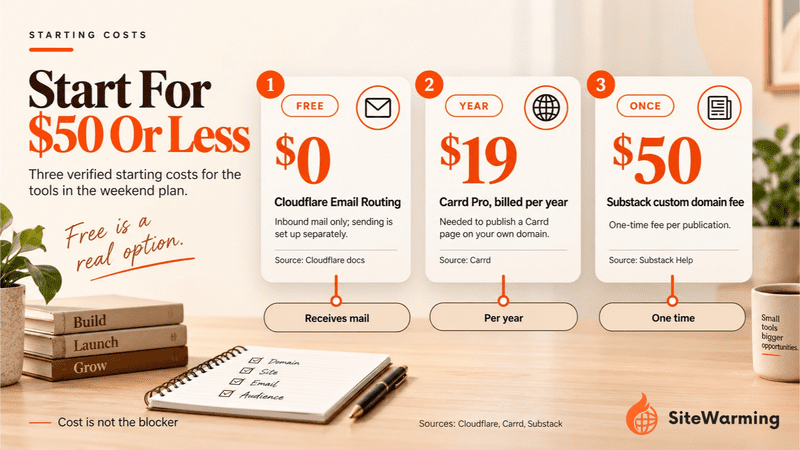
The weekend plan below costs between $0 and $19 a year in tools, depending on which page tool you choose. The renewal fee on the domain is separate.
How do you choose the right option for your domain?
Seven options is a lot. Here's how to narrow it down. The right path depends on two things: how close the domain is to the original idea you registered it for, and how much time you actually have right now.
If you have a few hours this weekend: Options 1 and 3. A one-page site on your domain and a custom email address. That's a weekend afternoon's work, and you've turned a dormant domain into an active signal. Not a finished product. A signal. That's enough to start.
If you have time to build a small audience before you build the site: Option 2 is the most valuable long-term play. A newsletter-first strategy means you arrive at launch day with subscribers already waiting. That changes everything about how the launch feels.
If the domain is clearly relevant to a business category and you're not going to develop it anytime soon: Option 4 (leasing) or Option 7 (referral) convert the domain's inherent value into actual revenue without requiring you to build anything.
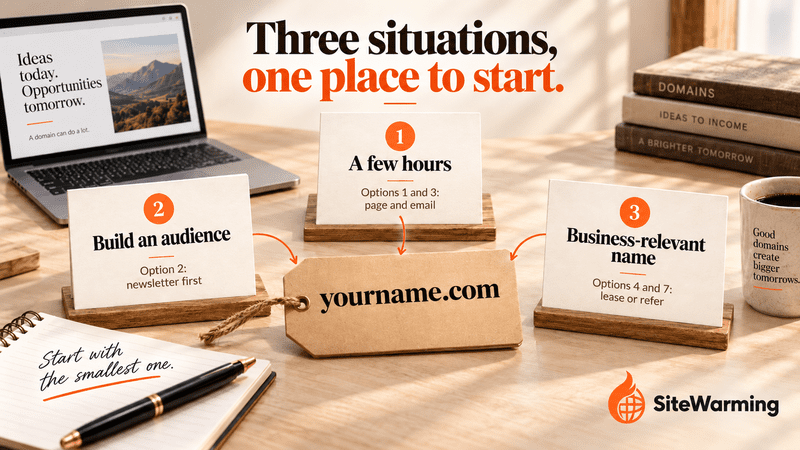
Options 5 and 6 follow naturally from the first three. A tool or template sells best to a list you built in Option 2, and a service page is Option 3 with a price on it.
The one option that's not on this list: parking it and hoping the ad revenue covers renewal. As of February 10, 2026, Google Ads Help says parked domains are no longer an ad surface in its Search Partner Network, so that bet has lost a major source. You already know it doesn't work.
What does a weekend plan look like?
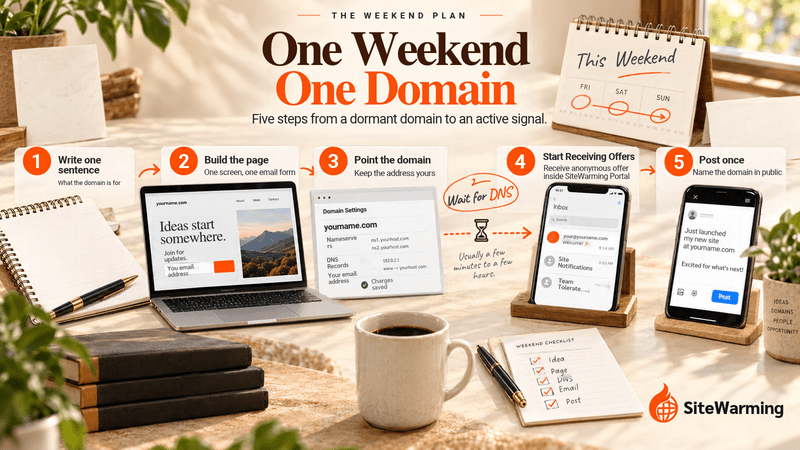
This is the plan for Options 1 and 3, in order. Most of it is waiting for DNS to settle.
- Write one sentence. What is this domain going to be about, and who is it for? That sentence is the page.
- Build the page. One screen: the sentence, your name, and an email form. Carrd or Kit will do.
- Point the domain at it. Use the tool's custom domain setting rather than a forward, so the address stays yours. Add the DNS records it gives you and allow time for them to verify.
- Add an email address. Turn on Cloudflare Email Routing so mail to you@yourdomain.com reaches your inbox, and set up sending if you want to reply from it.
- Post once. Write a LinkedIn post that names the domain, says what you're building and invites inquiries.
- Set a date. Put a check-in on your calendar 30 days out. The next section says what to look for.
What mistakes should you avoid?
- Forwarding when you could point. A forward leaves the visitor on someone else's address. Point the domain where the tool allows it.
- Collecting emails and never writing. A list you ignore is a parked page with a signup box. Decide the first email before you publish the form.
- Starting all seven at once. Pick one for the next 30 days.
- Charging before there's anything to trust. Our view on the timing is in why monetizing too early poisons domains.
- Listing a name for lease or sale with no way to be found. A buyer can't lease what they can't reach. See the signals someone wants your domain.
- Taking a referral fee without a disclosure or a category check. The two checks under Option 7 come first.
- Counting visitors instead of conversations. One reply from the right person beats a hundred anonymous visits.
How do you know it's working?
Watch conversations, not traffic. The check-in windows below are our suggestions, not benchmarks.
| Option | What to watch | Suggested check-in |
|---|---|---|
| 1. Lead capture page | Sign-ups, and replies to your first email | 30 days |
| 2. Newsletter | Opens and replies per issue, subscriber count | After three issues |
| 3. Consulting signal | Messages to your address, replies to your post | 30 days |
| 4. Lease or lease-to-own | Inquiries and offers through your listing | 90 days |
| 5. License a tool or content | Downloads and sales | 60 days |
| 6. Service landing page | Inquiries that mention the page | 30 days |
| 7. Referral partnership | Qualified inquiries routed, fees paid | 60 days |
If nothing happens in the window, change the offer before you change the plan. If nothing happens after two honest tries, the domain may not be one to keep. The free Domain Renewal Analysis looks at up to 1000 domains so you can see which ones deserve the effort before the next invoice.
Where does Launch & Warm fit?
SiteWarming exists for the gap between "I registered this domain" and "I built this thing." That gap doesn't have to be empty. The options above are what a warming strategy looks like in practice. Not building everything. Just making the domain start doing something real while you figure out the rest.
Launch & Warm is how we do that for you. You tell your story in one sentence, it picks a template that fits your intent, keeps the site current, and gives anyone interested a protected way to reach you while you control every response. It does the job of Option 1 without the setup. The Free plan covers one warmed domain. Start free.
Our post on what SiteWarming is explains the approach behind it. If you want a plan for all your domains, not just one, how to build a domain roadmap is the right next step.
The domain you're sitting on isn't a burden. It's an idea that hasn't found its first foothold yet. Every option above is a foothold. Pick one. Start this weekend. The idea has waited long enough.
Frequently asked questions about monetizing a domain without ads or parking
How can you monetize a domain without ads or parking?
Put the domain to work before the site exists. Point it at a one-page lead capture site, start a newsletter on it, set up a custom email address, offer a specific service, lease it, license a small tool or arrange a referral. Pick one option and run it for thirty days.
Can you make money from a domain with no website?
Yes, but not directly. A domain with no site earns through what it enables: a lead list, a newsletter, a consulting inquiry, a lease, a licensed template or a referral fee. In our view the first dollar usually comes from a conversation the domain started, not from the domain itself.
What is the difference between forwarding a domain and pointing it at a page?
A forward redirects the visitor to another URL, so the address bar shows the destination, as Namecheap documents. Pointing the domain at a page, usually with DNS records, keeps your address in the browser. Point it when your tool supports a custom domain. Forward only when it does not.
Is domain leasing the same as lease-to-own?
No. Renting means a business pays monthly to use your domain while you keep ownership. Lease-to-own is a sale paid in installments: on Afternic, buyers can pay over up to 60 months, use the domain while it stays locked, and receive it after the final payment.
Do you need an audience to monetize a domain?
Not for every option. Leasing, referral partnerships and a service page need a buyer or partner, not subscribers. A newsletter needs readers, and a template or tool sells best to people who already know you. Our view: start with the option that needs the smallest audience.
Can you take referral fees for sending inquiries through a domain?
Sometimes. You can route inquiries to a business for a fee, but disclose the arrangement and check the category first. Federal rules bar referral fees for mortgage settlement services, and ABA Model Rule 7.2(b) restricts lawyers from paying for recommendations. Confirm the rules for your category before you sign.
What is the cheapest way to put a domain to work this weekend?
Point a one-page site at the domain and add a free email route. Carrd's free plan builds up to three sites, and Pro, at $19 a year, adds custom domains. Cloudflare Email Routing is free but receives mail only. Kit's Free plan includes unlimited landing pages and forms.
Do parked domains still earn ad revenue in 2026?
Not through Google's network. Google Ads Help says parked domains stopped being an ad surface in its Search Partner Network on February 10, 2026, and Domain Name Wire reported that parking revenue fell sharply through 2025. A parked page also gives visitors nothing to remember or contact.
Related reading
- What to Do With a Parked Domain in 2026 (7 Options Ranked)
- The Third Option: Why You Don't Have to Choose Between Building and Parking
- How to Monetize a Niche Website Without Ads
- The Real Cost of Parking a Domain
- Does Domain Parking Hurt SEO? What Google Actually Sees in 2026
- How to build a domain roadmap
Share this article
Ready to Transform Your Domain Portfolio?
Start building real value with your domain investments today.